

For Maryland remote online notarization in 2026, prepare a current government-issued photo ID, such as a driver’s license, state identification card, or passport. The specific credential must work with the remote platform’s verification process, and the notary must establish your identity under Maryland notarial requirements. Having an acceptable ID does not, by itself, guarantee that your document or appointment qualifies for remote notarization.
- For ID accepted for remote online notarization in Maryland, start with a current government-issued photo ID.
- Proof identity verification and Maryland notarial requirements both matter; an ID alone does not guarantee completion.
- Craigvetnotary offers Maryland remote online notarization through Proof for eligible documents; confirm eligibility before scheduling.
- An expired ID needs advance review, not an assumption that the platform will accept it.
What ID is accepted for remote online notarization in Maryland?
Maryland’s identification rules recognize passports, driver’s licenses, and government-issued nondriver identification cards. Remote notarization adds an identity-verification process; the notary does not simply inspect an ID over an ordinary video call and proceed.
For eligible documents, Craigvetnotary offers Maryland remote online notarization through Proof. Ask about your specific credential before arranging the session, particularly if it is expired, damaged, foreign-issued, or different from the name on your document.
| Identification option | Best for | Practical advantage | Limitation to resolve |
|---|---|---|---|
| Current driver’s license | Signers with a readable government-issued photo credential | Provides identifying information and a photograph | The credential still needs to pass the applicable verification process |
| Current state identification card | Signers who do not drive | Provides a government-issued identification alternative | A state ID is not an exemption from remote identity checks |
| Current passport | Signers using a passport as their identification credential | Maryland law recognizes passports as an identification category | Confirm support for the specific issuing country and credential |
| Expired government-issued ID | Signers seeking advance review of an existing credential | Maryland law permits certain recently expired credentials | Legal eligibility does not establish platform acceptance |
Use a current, readable government-issued photo ID whenever possible. Keep the actual credential accessible during the appointment rather than relying only on a saved photograph.
What does Maryland law say about expired identification?
Maryland Code, State Government §18-206, permits specified identification documents that are current or expired not more than 3 years before the notarial act. That statutory rule concerns satisfactory evidence of identity; it is not a promise that a remote platform will accept every credential within that period.
For your 2026 appointment, distinguish the state-law rule from the remote verification workflow. Tell the notary the credential type, issuing jurisdiction, and expiration date before proceeding. Do not interpret the 3-year provision as automatic permission to use an expired ID through Proof.
Why this matters
Remote notarization has separate questions to resolve: whether your identity can be established, whether the document is eligible, and whether the receiving organization accepts the resulting notarization. Passing one check does not settle the others.
A business preparing recurring notarizations should resolve these questions before directing employees or clients into an appointment. Otherwise, a readable ID and a prepared document can still leave the transaction unfinished.
For a 2026 business workflow, ask the receiving organization about its requirements first. Then confirm the notarial process and prepare each signer individually rather than treating a company’s prior appointment as approval for everyone else.
How do you prepare your ID for a Proof appointment?
Prepare the document and identity information before the live session. Do not sign ahead unless the notary’s instructions permit it for the particular notarial act. An acknowledgment and an oath-based notarization do not have identical signing requirements.
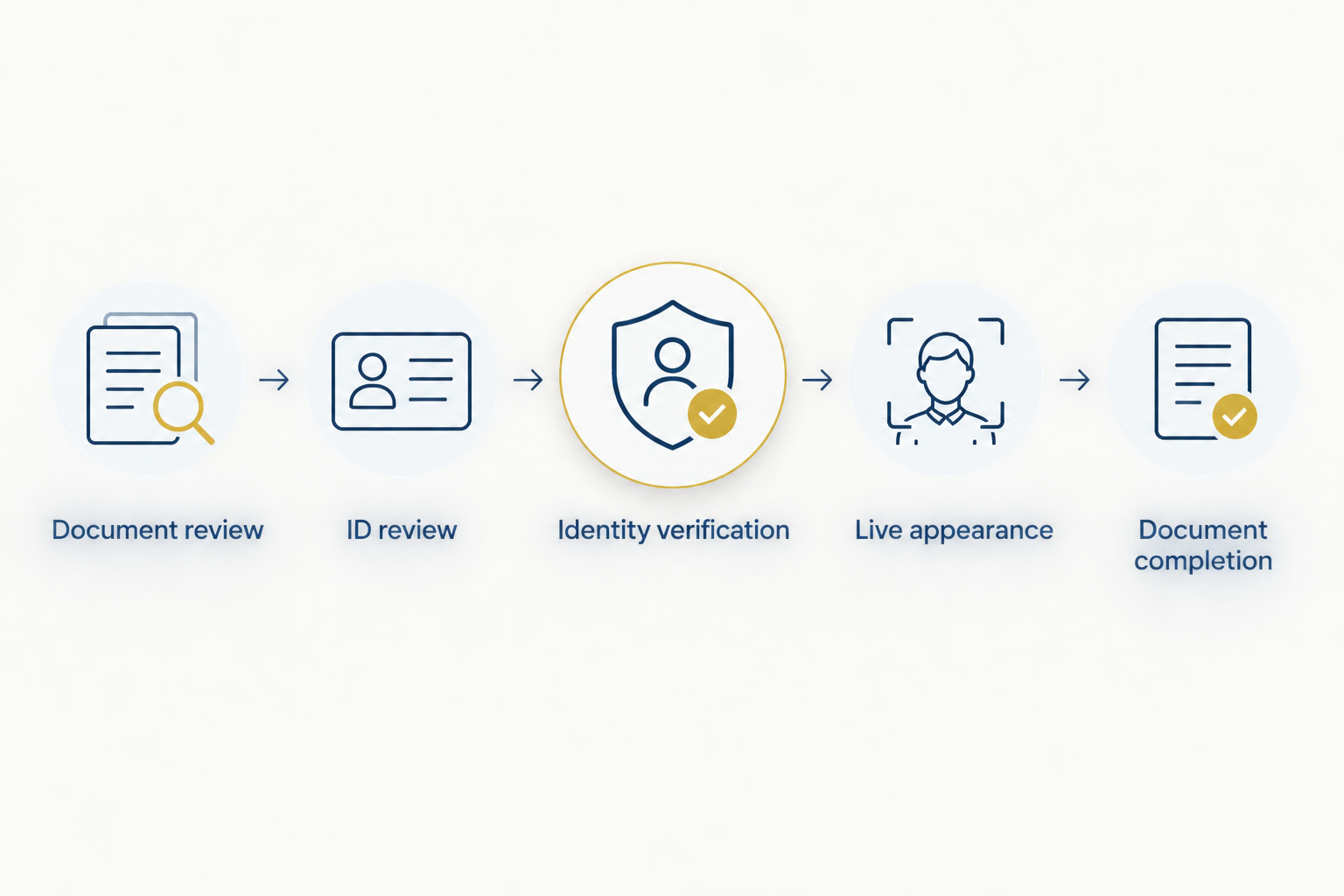
- Document review. Identify the document, its intended recipient, and the requested notarial act. Ask the document’s issuer or an attorney if you do not know which act is required; the notary cannot choose legal requirements for you.
- ID review. Check the credential’s expiration date and condition. Flag name differences, an unfamiliar identification type, or a foreign-issued credential before the session.
- Identity verification. Follow the current instructions provided through Proof. Complete the applicable checks yourself; another person should not answer identity questions or impersonate you.
- Live appearance. Join with working audio and video, keep your ID accessible, and follow the notary’s directions. Tell the notary if you cannot hear, see, or understand an instruction.
- Document completion. Sign or acknowledge your signature as directed. Follow the instructions for obtaining and delivering the completed electronic document.
These steps separate preparation from the actual notarial act. Uploading a document, submitting an inquiry, or completing an identity check does not mean that notarization is complete.
For document preparation, use the guide to connecting documents to Proof for Maryland notarization. Keep questions about document transfer separate from questions about whether your ID and document are eligible.
Make your credential readable
Use clear lighting and follow the platform’s capture instructions. Glare, cropped edges, blur, or a damaged credential can prevent the identification information from being reviewed properly.
Do not edit an ID image to change its contents or conceal information required for verification. If you are uncomfortable with a requested submission, pause and ask for clarification through the established appointment channel rather than sending identification to an unfamiliar address.
Prepare your device and surroundings
Check your camera, microphone, internet connection, and access to the appointment instructions. Choose a setting where you can speak directly with the notary without interruptions or someone answering for you.
If you need assistance using the device, explain that before the session. Technical help does not replace your personal participation, identity verification, or ability to communicate with the notary.
Why ID acceptance varies
ID acceptance depends on the credential and the complete verification process, not simply whether the card displays your photograph. These are the main issues to resolve before a Maryland remote appointment:
- Credential type. A driver’s license, passport, and other identification document are not interchangeable in every verification workflow. Describe the exact type rather than saying only that you have government ID.
- Expiration date. Maryland’s statutory treatment of certain expired credentials does not override the platform’s verification requirements. Ask before relying on an expired document.
- Issuing jurisdiction. Identify the state or country that issued the credential. Recognition under Maryland law and technical support for a particular credential are separate questions.
- Image condition. Damaged cards, unreadable text, and poor captures interfere with review. Have the original credential ready and follow capture instructions.
- Identity consistency. Differences between the credential, document, and information entered during verification need attention. Explain the difference instead of changing a legal document on your own.
- Verification outcome. Possessing an ID does not establish that every required remote check has succeeded. An unresolved verification issue must be addressed before the notarization continues.
Maryland Code, State Government §18-214, addresses identification for remotely located individuals. Its identity-proofing route calls for at least 2 different types of identity proofing; the law also describes other permitted identification routes. That does not mean every route is offered in every appointment or supported by every platform.
Can I use an out-of-state or foreign-issued ID?
A Maryland-issued credential is not the only identification category recognized by Maryland law. An out-of-state driver’s license is different from an unsupported credential, and a passport is different from every other foreign-issued identification document.
Tell the notary exactly what you have. Include the credential type, issuing jurisdiction, expiration status, and any name difference, but do not send a full identification image through an unrequested channel.
If you will be physically outside the United States during the appointment, disclose that separately. Your location creates an additional eligibility question; possession of an acceptable passport does not resolve all requirements for a signer abroad.
What if my ID name does not match the document?
Tell the notary about the difference before signing. A shortened first name, an additional surname, or a recent legal name change requires review rather than an assumption that the names are interchangeable.
Bring the issue to the document’s issuer if the document itself needs correction. The notary verifies identity and performs the requested notarial act; the notary does not decide your legal name or rewrite the document’s legal terms.
For business documents, also distinguish identity from signing capacity. Your personal ID identifies you, while the document and transaction instructions address whether you are signing individually or on behalf of an organization.
What happens if remote identity verification fails?
An unsuccessful verification attempt means the remote appointment cannot proceed on the assumption that identity has been established. It does not, by itself, prove that your ID is fraudulent or that no lawful notarization method exists.
Explain the issue without repeatedly changing identity details to obtain a different result. The next step depends on whether the problem concerns the credential, image capture, entered information, or another required check.
Do not treat a regular video call as a substitute for the required remote notarization process. A familiar face, company email address, or colleague’s reassurance does not automatically satisfy the applicable identification requirements.
Is a mobile appointment an alternative?
An in-person mobile appointment is an option to discuss when remote notarization is unsuitable. It still requires satisfactory identification and an eligible notarial act; changing the meeting format does not remove those obligations.
Craigvetnotary offers mobile notary appointments as a secondary service. Confirm Baltimore County availability before booking, and wait for direct contact before treating the appointment as confirmed.
The practical trade-off is straightforward: remote appointments avoid an in-person meeting but require the applicable technology and remote identity checks. Mobile appointments provide an in-person meeting but require location and scheduling arrangements.
How should a business prepare repeat notarizations?
Craigvetnotary is best for Maryland individuals and businesses seeking remote online notarization through Proof for eligible documents. Repeat business users should build a preparation process around each signer, not assume that an earlier successful transaction approves future documents or identification.
For your 2026 procedure, give staff a short preparation checklist covering the document recipient, signer’s name, credential status, and appointment instructions. Keep unnecessary identity-document copies out of ordinary email chains and shared scheduling notes.
Before requesting the next appointment, confirm:
- The receiving organization accepts the planned electronic notarization.
- Each signer has an identification credential ready for review.
- Name differences and expired credentials have been disclosed.
- Any witness requirements have been identified separately.
- Each signer can participate personally in the live session.
- The appointment remains a request until the service confirms it.
A repeatable checklist improves preparation without promising completion. Every notarial act still requires its own eligibility and identity assessment.
Request an eligibility review
Ask about your document and identification before arranging a Maryland remote appointment.
FAQ
What ID should I have ready for online notarization in Maryland?
Have a current government-issued photo ID ready, such as a driver’s license, state identification card, or passport. Confirm that the particular credential works with the remote verification process before your appointment.
Can I use an expired ID for remote notarization in Maryland?
An expired ID requires advance review rather than automatic acceptance. Maryland law permits specified credentials expired not more than 3 years before the notarial act, but that does not guarantee acceptance through Proof.
Do I need a Maryland driver’s license for a Maryland online notary?
A Maryland driver’s license is not the only identification category recognized by Maryland law. Confirm the credential you intend to use, and disclose your physical location separately.
Is showing my ID on a video call enough?
Showing an ID on an ordinary video call is not enough to establish that Maryland remote notarization requirements have been met. The notary must use a compliant process and establish your identity through an applicable permitted route.
Can my employer verify my identity instead of me completing the checks?
Your employer cannot simply replace the identity verification required for your remote appointment. You must participate personally, and any alternative identification route must meet the applicable legal and service requirements.
What should I do if my ID has my previous last name?
Disclose the name difference before the appointment. Ask the notary what information is needed for identification review, and ask the document’s issuer or your attorney about any necessary document correction.
Does submitting an appointment request confirm my session?
Submitting a request does not confirm your appointment. Wait for Craigvetnotary to contact you, and confirm document eligibility, identification preparation, and scheduling details before relying on the session.
One last thing
Successful identity verification does not determine whether the receiving organization will accept your document. For a 2026 appointment, ask the recipient about electronic notarization before completing the session, especially when the document has specific delivery or original-format instructions.
Craig is not an attorney and cannot provide legal advice. Questions about legal effect, document wording, the correct notarial act, or whether a document protects your interests belong with an attorney or the document’s issuing organization.


