Yes. A Maryland notary can notarize for a blind or visually impaired signer, including through remote online notarization on Proof when the document is eligible and the required process is accessible to the signer. The notary must still verify identity and establish the signer’s willingness and awareness; blindness does not, by itself, establish incapacity. Remote completion is not guaranteed, so discuss document eligibility and access needs before arranging an appointment.
- Blindness alone does not prevent notarization; identity, willingness, and awareness still matter.
- CraigVet Notary Services offers Maryland remote online notarization through Proof for eligible documents.
- Confirm an accessible document-review and identity-verification process before the appointment.
- Mobile notarization is a secondary option; confirm Baltimore County availability before booking.
Can a notary notarize for a blind or visually impaired signer?
Yes—the decision turns on the notarial requirements, not on whether the signer can see the page. A blind signer who understands the transaction and acts voluntarily is not the same as a person who cannot understand or authorize it.
For a 2026 appointment, start with the document and the signer’s preferred way of reviewing it. Then determine whether remote online notarization is suitable. The guide to how remote online notarization works in Maryland explains the broader process.
Three separate checks guide the appointment:
- Identity: Can the notary establish who the signer is using an acceptable method?
- Willingness and awareness: Can the signer communicate that the act is voluntary and demonstrate an understanding of the transaction?
- Document and procedure: Can the required notarial act be completed using the proposed format?
An accessible reading method helps the signer review the document. It does not replace identity verification, any required oath or acknowledgment, or the signer’s own decisions.
Why this matters
A family member or business coordinator can make an appointment easier to arrange without taking control of the signing. The distinction matters: assistance should give the signer access to the process, not substitute another person’s answers or judgment.
For Maryland businesses arranging repeat notarizations in 2026, build accessibility into intake rather than treating it as an exception at the appointment. Ask what the signer needs, identify the document’s requirements, and resolve questions before scheduling. Do not assume that every blind signer uses the same reading tools or needs the same assistance.
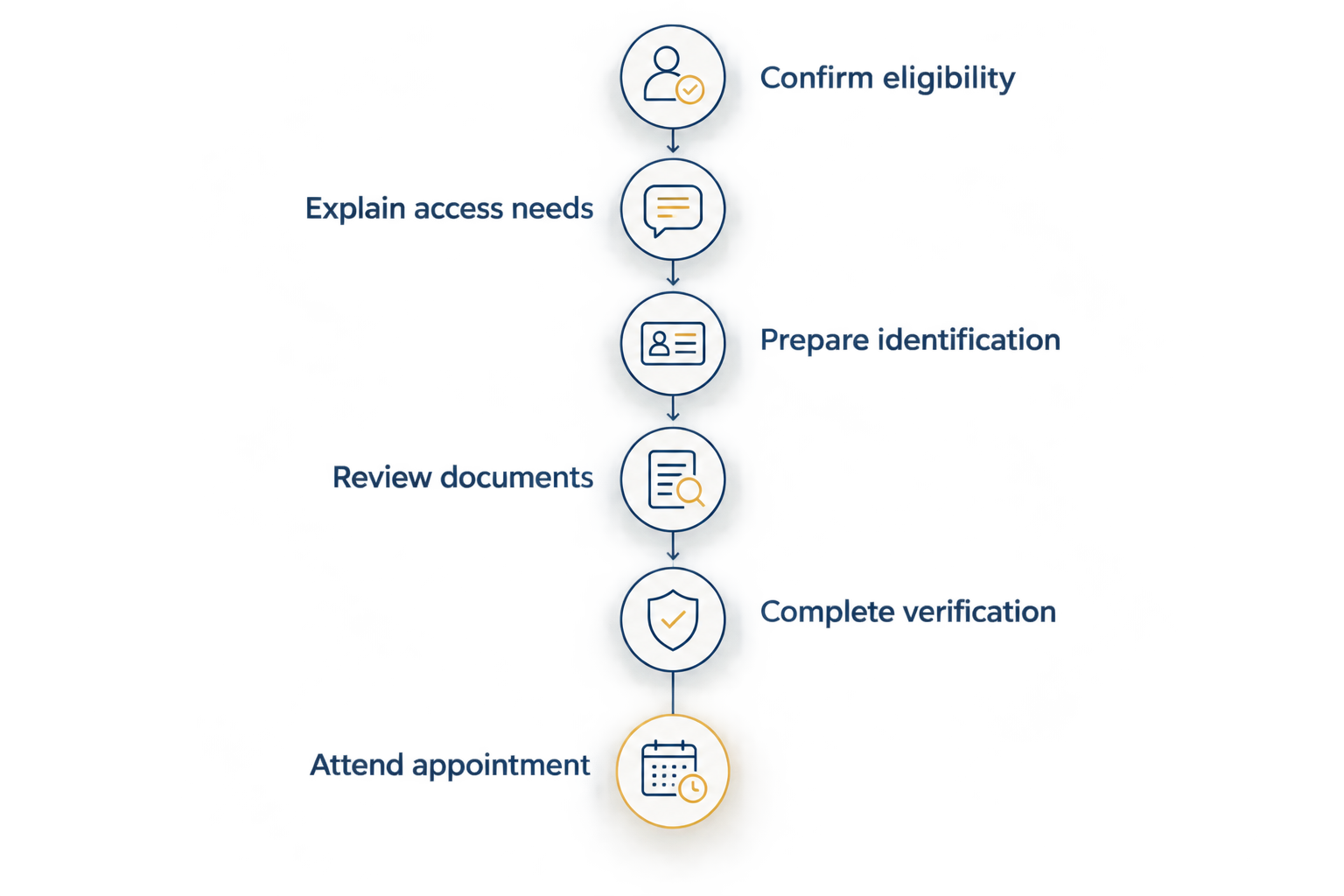
Prepare for remote notarization in 6 steps
1. Confirm eligibility
Identify the document, its intended recipient, and the requested notarial act. Explain whether the recipient expects an electronic document or a paper original, and ask the recipient about acceptance requirements before proceeding.
Not every document or transaction is suitable for remote completion. If you need legal guidance about the document or which notarial act it requires, obtain that guidance from an attorney or the appropriate document recipient—not from the notary.
2. Explain access needs
Describe how you prefer to read and interact with documents: for example, enlarged text, a screen reader, or having text read aloud. Tell the notary whether another person will help with equipment or document access.
Do not assume that a platform will support every assistive-technology setup. Discuss the actual steps you must complete through Proof before relying on a remote appointment. A usable video connection alone does not establish that document review and signing will also be accessible.
3. Prepare identification
Ask which identification and verification steps apply to your remote session. Keep the requested identification ready, and discuss any difficulty photographing, positioning, or reviewing it before the appointment.
A helper’s familiarity with you does not automatically satisfy the applicable identification requirements. Never ask someone else to answer identity-verification questions as though they were you.
4. Review documents
Obtain the complete document in a format you can review. Check that attachments and referenced pages are included, and resolve questions about the document’s meaning with its preparer or your attorney before the notarial session.
If someone reads the document aloud, ask for the complete relevant text rather than a summary. The reader should not decide which provisions matter to you. Tell the notary how you reviewed the document and whether any part remains inaccessible.
5. Complete verification
Follow the identity-verification instructions provided for your session. Report an inaccessible step instead of allowing another person to complete it in your name.
If the required verification cannot be completed, stop and discuss an appropriate alternative. Moving to a different appointment format still requires compliance with the identification rules that apply to that format.
6. Attend appointment
Use a setting where you can hear, communicate, and respond without pressure. Identify anyone assisting you and explain their role at the start of the session.
Follow the notary’s instructions about when to sign, acknowledge a signature, or take an oath. An appointment request is not a confirmed appointment; wait for direct contact and confirmation before relying on a time.
Remote or mobile: which appointment fits the signer?
Compare 2 appointment formats by the signer’s access needs and the document’s requirements—not by an assumption that blindness makes either format unsuitable. Remote notarization avoids travel, while mobile notarization brings an in-person appointment to an agreed location.
| Appointment format | Best for | Practical benefit | Limit to resolve |
|---|---|---|---|
| Remote online notarization through Proof | Signers with eligible documents who can complete the required remote process | No travel to an in-person appointment | Document access, identity verification, and electronic completion must work for the signer |
| In-person mobile notarization | Signers who need an in-person process or whose document is unsuitable for remote completion | The notary attends an agreed location | Baltimore County availability and appointment details require confirmation |
Neither format removes document-specific witness requirements or guarantees acceptance by the receiving organization. Confirm those matters before choosing the appointment format.
Remote online notarization: best for eligible, accessible sessions
CraigVet Notary Services is best for Maryland signers seeking remote online notarization through Proof for eligible documents. The key preparation question is whether the signer can complete the required process with an appropriate, agreed approach to access.
For your 2026 remote appointment, explain any difficulty with reading electronic files, locating signature fields, or handling identity-verification prompts. Ask how each issue will be addressed before the session begins. Do not treat a general statement about accessibility as confirmation that your particular setup will work.
The benefit is avoiding travel. The limitation is that an inaccessible or incomplete remote process cannot be solved simply by having a family member operate everything for the signer.
Mobile notarization: best for an in-person process
An in-person mobile appointment is a secondary option when the signer needs a physical meeting or remote completion does not fit the document. Confirm Baltimore County availability before booking; submitting a request does not reserve an appointment.
Prepare a quiet place where the signer and notary can communicate directly. Tell the notary about reading assistance, positioning needs, or other access arrangements beforehand. An in-person meeting still requires identity verification and the signer’s voluntary participation.
The benefit is direct, in-person interaction. The limitation is that travel arrangements and location availability require confirmation, and a physical visit does not resolve missing witnesses or legal questions about the document.
Why the notarization process varies
The appropriate process depends on the transaction and the signer’s needs. These 5 factors deserve attention before a 2026 appointment:
- Document eligibility: Remote online notarization is offered for eligible documents, not every document presented.
- Identity verification: The signer must complete an acceptable identification process for the appointment format.
- Access to the process: Reading the document, communicating with the notary, and completing the signing steps are separate tasks to discuss.
- Appointment format: Remote and mobile appointments involve different practical arrangements, even though both require a valid notarial act.
- Confirmed arrangements: Remote session details and Baltimore County mobile availability must be settled before you rely on an appointment.
Describe the task that creates difficulty rather than providing unnecessary medical details. For example, explaining that you cannot locate an electronic signature field gives the notary a concrete issue to address.
Does a blind signer need someone else to sign?
Blindness alone does not mean another person must sign. A person who cannot read standard print can still be able to sign and authorize a document independently.
If the signer also has a physical difficulty making a signature, raise that as a separate issue before the appointment. Do not assume that a relative can sign the person’s name or that a power of attorney applies. The lawful signing method and any required formalities need to be established for the specific circumstances.
Does someone reading aloud count as a witness?
Reading assistance does not automatically make a person a document witness. A reader helps the signer access the text; a witness performs a separate role when the document or applicable law requires one.
Tell the notary who will attend and what each person will do. Confirm witness requirements with the document preparer or an attorney rather than assuming that the notary, reader, or accompanying relative can fill every role.
Practical guidance for businesses arranging repeat appointments
For a 2026 business workflow, use the same core intake questions each time while allowing the signer to describe their own access needs. Ask about the document, its recipient, the requested notarial act, the preferred appointment format, and any assistance needed to complete the process.
Keep the signer involved in scheduling and preparation. An office manager, adviser, or caregiver can coordinate logistics, but the signer should receive the information needed to understand and participate in the appointment. Avoid directing all communication to the accompanying person.
Request an appointment through CraigVet Notary Services and explain the access needs at the outset. Wait for direct contact before treating the appointment as confirmed. For mobile requests, include the proposed Baltimore County location so availability can be checked.
The service is veteran-owned, with remote online and mobile notarization options. Craig is not an attorney and cannot provide legal advice, select legal documents for you, or resolve questions about the legal effect of what you intend to sign.
FAQ
Can a blind person get a document notarized online in Maryland?
Yes, a blind person can use Maryland remote online notarization when the document is eligible and the required process can be completed. Discuss document access, identity verification, and signing steps before arranging the session.
Does being visually impaired mean I lack capacity to sign?
No, visual impairment does not by itself establish a lack of capacity. The notary must consider the signer’s willingness and awareness separately from the signer’s ability to see.
Can my caregiver answer the notary’s questions for me?
A caregiver cannot replace your own participation in the notarial act. Explain any communication or access assistance you need, but the notary must establish your identity and voluntary participation.
Will Proof work with my screen reader?
Confirm your particular screen-reader setup and the required session steps before relying on a remote appointment. Do not assume that document review, identity verification, and electronic signing will all work simply because you can join a video session.
Do I need a witness because I am blind?
Blindness alone does not establish that your document needs a witness. Witness requirements depend on the document and applicable law, and reading assistance is a separate role.
Can I arrange a mobile notary instead of an online appointment?
Yes, you can request an in-person mobile appointment, subject to confirmation. Baltimore County availability must be confirmed before booking, and the document’s identification and signing requirements still apply.
Can Craig explain whether I should sign the document?
No, Craig is not an attorney and cannot provide legal advice about whether you should sign. Ask your attorney or the document’s preparer to resolve questions about its meaning and legal effect before the appointment.
One last thing
Check the final document version, not just the accessible draft. If someone revises the document after you review it, obtain access to the revised text before signing. A familiar title or filename does not establish that the contents are unchanged.
CraigVet Notary Services can address appointment procedures and eligibility questions, but legal questions belong with an attorney. Keeping those roles separate protects your opportunity to understand the document and make your own decision.