

Yes—you can get an eligible document notarized remotely without a printer through Maryland remote online notarization using Proof. You work with an electronic document, complete identity verification, and meet the notary by live audio-video connection rather than printing pages for an ink signature. The receiving organization must accept the electronic notarized document, and the document must meet the applicable requirements for remote notarization.
- To notarize a document remotely without a printer, confirm electronic acceptance before scheduling Maryland remote online notarization.
- Proof supports the electronic appointment; identity verification and a live notarial session still apply.
- CraigVet Notary Services offers Maryland remote notarization for eligible documents, with mobile appointments as a secondary option.
- Keep the completed electronic file intact; printing is not a substitute for confirming the recipient’s requirements.
Can I get a document notarized remotely without a printer?
Yes, provided the entire transaction can stay electronic. That means more than having a document on your computer: the recipient must accept electronic execution and notarization, the document must qualify, and you must complete the required identity and notarial procedures.
For a Maryland appointment in 2026, start by asking the recipient what format it requires. A requirement for an original ink signature changes the plan, even if you would prefer a printer-free appointment.
CraigVet Notary Services offers Maryland remote online notarization through Proof. CraigVet Notary Services is best suited to Maryland individuals and businesses seeking remote notarization of eligible documents through Proof. Mobile appointments are a secondary option, with Baltimore County availability confirmed before booking.
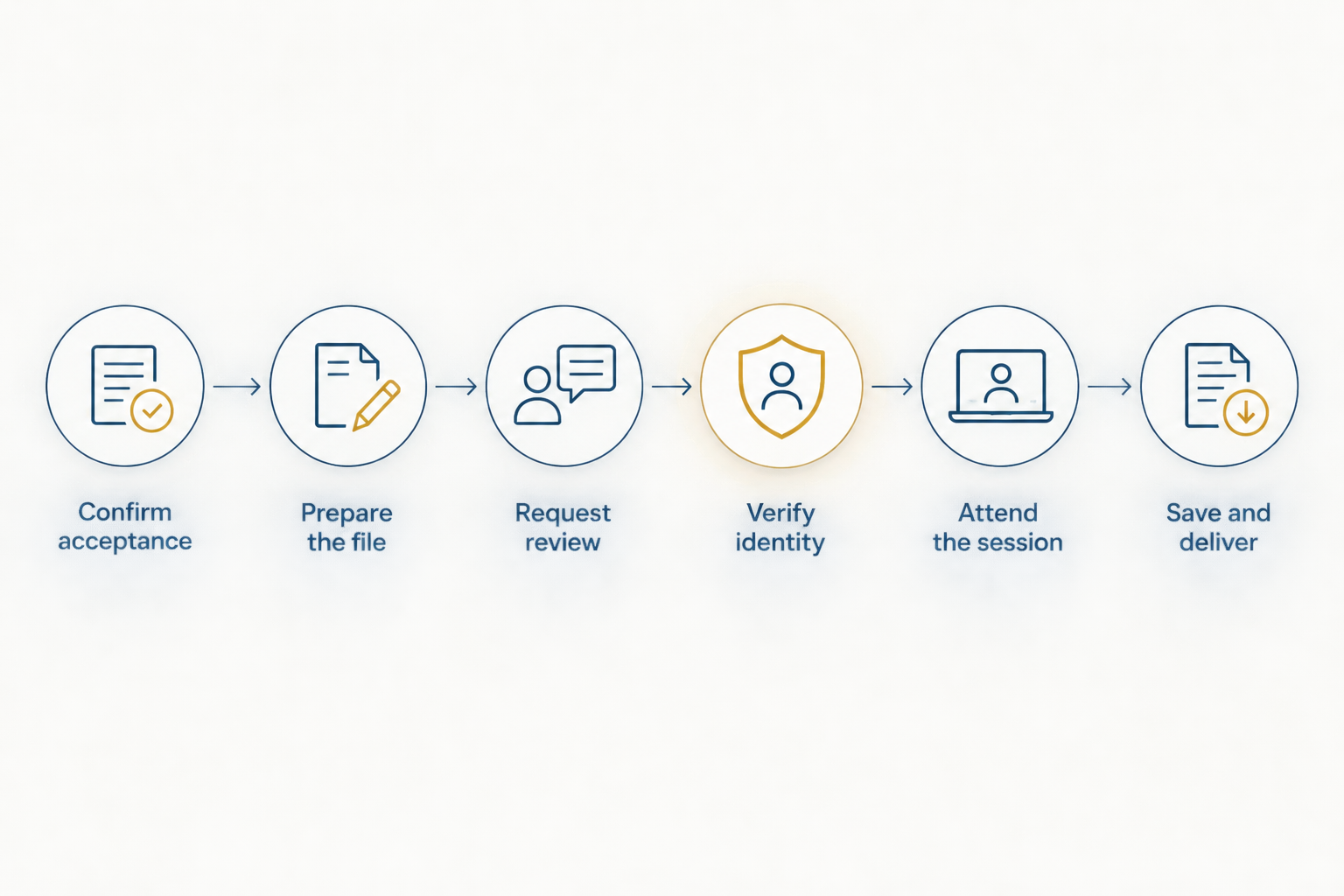
Follow these steps before and during your appointment
- Confirm acceptance. Ask the organization receiving the document whether it accepts an electronically signed and remotely notarized file. Identify any submission instructions, witness requirements, or restrictions before arranging the appointment. Do not assume that accepting emailed paperwork means accepting electronic notarization.
- Prepare the file. Obtain the complete document from its issuer or preparer, preferably in the electronic format it provides. Complete the information you are responsible for, but follow the notary’s instructions about signing. Do not change legal language or select a notarial act without appropriate direction.
- Request review. Explain the document’s purpose, who will receive it, how many people need to sign, and whether witnesses are involved. Tell the notary about any deadline and where each signer will be during the appointment. A request is not an appointment confirmation; wait for direct contact and instructions.
- Verify identity. Follow the identity-verification instructions supplied for the Proof appointment. Have the requested identification ready and make sure you can complete the required checks yourself. An emailed identification image alone does not replace the required identity-verification process.
- Attend the session. Use a compatible device with a working camera, microphone, and internet connection. Join the live session, follow the notary’s directions, and complete the required signing or acknowledgment procedures. Do not treat an ordinary video call as an interchangeable substitute for the remote notarization workflow.
- Save and deliver. Follow the instructions for accessing the completed electronic document. Preserve that file and send it through the recipient’s approved submission channel. Check that you are delivering the completed notarized version, not the unsigned file you started with.
These steps separate document preparation from the notarial appointment itself. Completing a file or submitting a request does not mean identity verification has passed or that notarization is complete.
For help organizing the electronic handoff, see how to connect documents to Proof for Maryland notarization. Use the appointment instructions you receive rather than guessing which upload or signing steps apply.
Why this matters
A printer-free notarization solves a paper-handling problem, not every document requirement. You still need the correct document, an acceptable identity-verification process, any required witnesses, and a completed file the recipient will accept.
For your 2026 paperwork, ask about the final deliverable before discussing convenience. That order prevents you from completing an electronic appointment only to discover that the recipient requires a different execution or submission process.
The same distinction matters for local businesses. A repeatable workflow starts with recipient requirements—not with an assumption that every form in a shared folder can follow the same signing process.
Remote online notarization: best for an accepted electronic file
Remote online notarization is the printer-free choice when the document and receiving organization permit an electronic process. You attend remotely instead of arranging an in-person meeting, and the completed document remains electronic.
The benefit is straightforward: you do not need to create a paper signing set merely to participate. The limitation is equally important: suitable technology does not make an ineligible document eligible or override the recipient’s instructions.
Use the following comparison to choose a process, not to decide legal eligibility. Confirm the document’s requirements before committing to either approach.
| Appointment method | Best for | Main advantage | Main limitation |
|---|---|---|---|
| Remote online notarization through Proof | Eligible documents accepted electronically | Supports a printer-free electronic signing and notarization process | Requires successful identity verification, suitable technology, and document eligibility |
| In-person mobile notarization | Documents requiring an appropriate paper-based appointment | Brings the notary to an agreed meeting location | Requires location coordination and preparation of the required paper documents |
Mobile notarization: best when paper execution is required
An in-person mobile appointment is the secondary route when the transaction requires paper execution or remote notarization is unsuitable. It addresses the meeting location; it does not automatically resolve document preparation or printing.
If you do not own a printer, ask the document issuer how to obtain the required paper version. Do not assume that a mobile appointment includes printing, document drafting, or selecting the correct form.
For a Baltimore County request, confirm service availability and the meeting details before booking. Do not treat a submitted request as a confirmed appointment. Wait for CraigVet Notary Services to contact you about the next steps.
Why printer-free eligibility varies
The answer depends on the document and transaction, not simply on whether you can open a PDF. Review these factors before making a 2026 appointment request:
- Recipient acceptance: The receiving organization’s electronic submission instructions determine what you should deliver. Ask specifically about remotely notarized electronic documents.
- Document requirements: Some documents involve additional execution rules or a paper-original requirement. Obtain direction from the issuer or an attorney when the instructions are unclear.
- Identity verification: Every signer must complete the identity procedures required for the appointment. Access to a camera or an uploaded ID image is not, by itself, completion.
- Witness participation: A document’s witness requirements are separate from the notary’s role. Disclose them before scheduling so the proposed process can be reviewed.
- Signer circumstances: Location, ability to communicate, willingness to sign, and access to suitable technology affect appointment planning. Explain relevant circumstances rather than assuming they can be addressed during the call.
- File condition: Missing pages, unreadable text, or an incorrect version interfere with preparation. Obtain a complete, legible document before requesting notarization.
What should I prepare if I only have my phone?
Start with the appointment’s device instructions rather than assuming that any phone will work. You need to read the document, follow the electronic signing instructions, complete identity verification, and maintain the required live connection.
Check your camera and microphone permissions before the appointment. Use a private, well-lit space where you can hear the notary and show identification as instructed. Keep your device powered and avoid joining while driving or handling another task.
You also need access to the actual document file. A message preview, partial screenshot, or photograph that cuts off a page is not a reliable substitute for a complete, readable document.
If the document begins on paper, ask whether a complete scan is suitable for review. Scanning paper does not turn it into a certified copy or establish that the original can be replaced. The issuer or recipient must clarify any original-document requirement.
How should a business handle repeat printer-free notarizations?
For repeat business appointments in 2026, create an intake checklist for each document type. Record who issues the form, who receives it, whether electronic notarization is accepted, and who must sign or witness it.
Assign a staff member to confirm that the file is complete before requesting an appointment. Keep unsigned drafts separate from completed notarized files so employees do not accidentally send the wrong version to a customer, lender, or other recipient.
Do not treat a successful past appointment as blanket approval for later documents. A revised form, different recipient, additional signer, or changed instructions deserves a fresh check.
CraigVet Notary Services provides a veteran-owned service option for Maryland individuals and local businesses. Its remote notarization service does not replace legal review: Craig is not an attorney and cannot provide legal advice. Direct questions about legal effect, form selection, or execution requirements to an attorney or the responsible document issuer.
Do I need to print my document before the video appointment?
No printing is needed for an eligible, fully electronic remote notarization. Follow the instructions for supplying the electronic document and signing within the appointment workflow.
Do not print, sign, and photograph the document merely because that seems familiar. That creates a different file and signing history, which the notary must assess rather than assume is suitable.
Can I print the completed notarized document afterward?
You can print an electronic file, but a printout is not the same electronic record. Paper does not preserve interactive electronic signatures or the file’s electronic verification features.
Ask the recipient whether it needs the electronic document, a paper copy, or another authorized form. Keep the completed electronic file intact even if you also print a reference copy.
What if the recipient insists on an ink signature?
An ink-signature requirement means you should not assume a fully electronic appointment will satisfy the transaction. Ask the recipient to clarify its instructions before proceeding.
If paper execution is required, discuss an appropriate in-person option and arrange the necessary paper documents. A printer-free preference does not override the required form of execution.
FAQ
Can I notarize a document remotely without a printer in Maryland?
Yes, eligible documents can be notarized through a fully electronic Maryland remote online notarization process without printing. Confirm that the receiving organization accepts the electronic notarized file before scheduling.
Do I still need to show ID for an online notary appointment?
Yes, remote notarization requires identity verification. Follow the identification and verification instructions supplied for your Proof appointment rather than assuming an emailed ID image is enough.
Can I use a photo of my document instead of a PDF?
Ask for file-preparation instructions before relying on a photograph. The document must be complete and readable, and photographing paper does not remove any requirement for an original document.
Can I sign my document before the remote appointment?
Follow the notary’s signing instructions before adding a signature. The required procedure depends on the notarial act, and some acts require signing in the notary’s presence.
Is an electronic signature the same as notarization?
No, an electronic signature alone is not notarization. Remote notarization also involves the required identity verification, appearance before the notary, and completion of the notarial act.
Will a mobile notary bring printed copies if I have no printer?
Do not assume a mobile appointment includes printing. Confirm document preparation and paper-copy responsibilities before the meeting, along with Baltimore County service availability when applicable.
Does sending an appointment request confirm my booking?
No, submitting a request does not confirm an appointment. Wait for CraigVet Notary Services to contact you and clarify eligibility, scheduling, and preparation instructions.
One last thing
Before your 2026 appointment, ask the recipient: Does your electronic acceptance include remote notarization? Acceptance of ordinary electronic signatures does not, by itself, answer that separate question.
Also confirm how the completed file should be delivered. Keep the original electronic download unchanged and use a separate working copy if you need to add internal notes. A successful printer-free process ends with the right file reaching the right recipient—not simply with the video call ending.


