

Maryland remote online notarization lets you complete an eligible notarial act through a live audio-video session rather than meet the notary in person. You submit your document, complete identity verification, and follow the notary’s instructions for the required signing or acknowledgment and electronic notarial certificate. Craigvetnotary offers this service through Proof; document eligibility, recipient requirements, and appointment confirmation must be resolved before you proceed.
- How does remote online notarization work in Maryland? Eligible documents move through identity verification and a live notarial session.
- Craigvetnotary is best for Maryland individuals and businesses seeking remote online notarization through Proof.
- Confirm the receiving organization’s requirements before arranging an electronic notarization.
- Mobile appointments are secondary; confirm Baltimore County availability before booking.
How does remote online notarization work in Maryland?
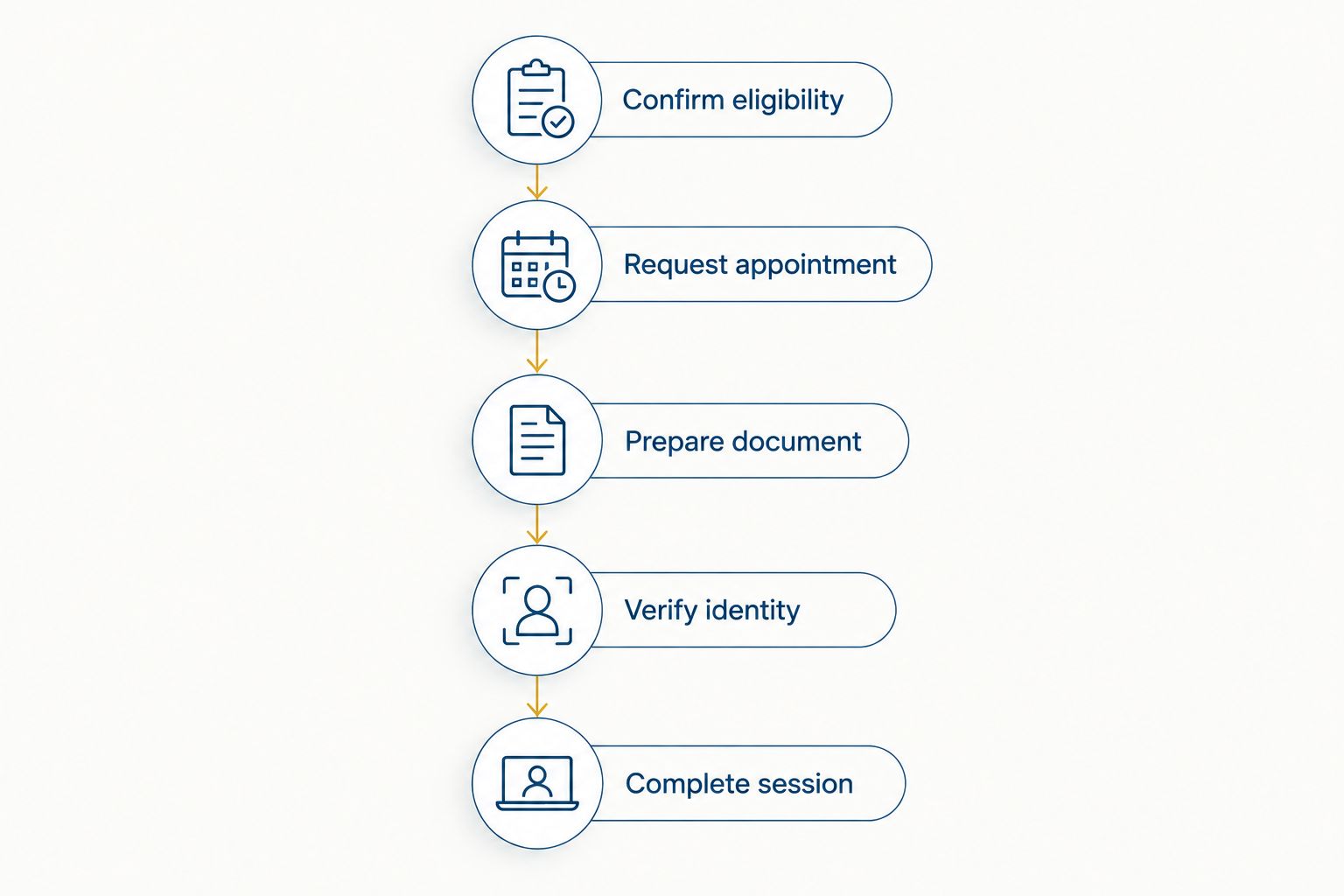
The process has 5 practical steps: confirm eligibility, request an appointment, prepare the document and equipment, verify your identity, and complete the live session. For your 2026 appointment, begin with the document’s requirements—not with an assumption that an online signature will be accepted.
You can request service through Craigvetnotary. A request is not a confirmed appointment; wait for direct contact before treating a proposed time as booked.
Step 1: Confirm eligibility
Identify the document, who will sign it, and which organization will receive it. Ask the recipient whether it accepts a remotely notarized electronic document and whether it requires particular certificate wording, witnesses, or a specific submission format.
Tell the notary about those requirements before scheduling. Remote notarization does not remove restrictions attached to a document, and a recipient’s acceptance requirements are separate from the notary’s ability to perform the act.
Step 2: Request an appointment
Explain that you want Maryland remote online notarization through Proof. Include the document type, the number of signers, any witness requirements you already know about, and your deadline.
Wait for contact about eligibility and scheduling. Do not tell a lender, employer, family member, or business partner that the appointment is confirmed until the provider confirms it with you.
Step 3: Prepare your document
Follow the document-preparation instructions you receive. Have the complete document ready, and resolve missing information with the document’s issuer or an appropriate adviser rather than asking the notary to decide what the document should say.
Use equipment that supports the required live audio-video connection. Check your camera, microphone, internet connection, and access to your document before the appointment; wait for instructions about any signature that belongs in the notarial process.
Step 4: Verify your identity
Complete the identity-verification process required for the session. Have your identification ready and follow Proof’s instructions for the checks presented to you.
Joining a video call does not, by itself, establish your identity. If you cannot complete a required check, contact the provider rather than assume that showing identification on camera will replace it.
Step 5: Complete the session
During the live session, the notary establishes the required facts and directs the notarial procedure. Depending on the notarial act, that includes acknowledging a signature, signing as directed, or taking an oath or affirmation.
The notary completes the applicable electronic notarial certificate after the requirements are satisfied. Follow the instructions for accessing the completed document, then check that you have the version the receiving organization needs.
Why this matters
A successful video connection is only part of a successful notarization. You also need an eligible document, the required identity verification, the correct notarial procedure, and a completed document that meets the recipient’s requirements.
For a 2026 transaction, check those requirements before arranging everyone’s attendance. That is especially useful when a business coordinates several signers or a family member needs help preparing the document.
Notarization does not establish that a document’s terms are legally appropriate for you. Craig is not an attorney and cannot provide legal advice. Questions about legal consequences, document selection, or which notarial act you need belong with the document issuer or a qualified attorney.
Remote online notarization versus a mobile appointment
These are 2 different appointment formats, not interchangeable names for the same service. Remote online notarization uses live audio-video communication; a mobile appointment brings the notary to an agreed in-person location.
| Appointment format | Best for | Practical advantage | Limitation to resolve |
|---|---|---|---|
| Remote online notarization through Proof | Individuals and businesses with eligible electronic documents | You appear remotely rather than arrange an in-person meeting | Document eligibility, recipient acceptance, identity checks, and working technology remain necessary |
| In-person mobile notarization | Signers whose document or circumstances call for an in-person appointment | You meet the notary at an agreed location | Baltimore County availability and appointment details must be confirmed before booking |
Craigvetnotary is best for Maryland individuals and businesses seeking remote online notarization through Proof. Its remote service fits eligible documents; it does not make every document eligible for electronic execution or remove recipient restrictions.
Treat mobile service as the secondary option when the document or signing circumstances require an in-person meeting. Ask about Baltimore County availability before making arrangements, and wait for confirmation rather than assuming a requested visit is booked.
Why the remote notarization process varies
The basic sequence stays consistent, but the instructions depend on your document and circumstances. These factors explain why another person’s appointment is not a reliable checklist for yours:
- Document eligibility: The document and requested notarial act must be suitable for the proposed remote process.
- Recipient requirements: The receiving organization can specify requirements for acceptance, witnesses, certificate wording, or submission.
- Signer arrangements: Multiple signers need clear instructions about attendance and their respective signing roles.
- Identity verification: Each required identity check must be completed; an unresolved check prevents the session from proceeding as planned.
- Technical readiness: A working camera, microphone, connection, and accessible document support the live session.
For your 2026 appointment, send relevant requirements before the session rather than introducing them after signing begins. Keep the request focused: identify the document, explain who must participate, and share the recipient’s instructions.
What should you prepare before your appointment?
Use 3 preparation checkpoints: the document, your identity, and your connection. Each addresses a different reason an appointment cannot proceed as expected.
Document checkpoint
Have the complete document and the receiving organization’s instructions available. Confirm whether anyone besides you must participate, including another signer or a witness.
Do not choose certificate wording or a notarial act based on an online example when you do not know what your document requires. Ask the issuer or an attorney to resolve legal questions before the appointment.
Identity checkpoint
Have your identification ready and follow the requirements supplied for your Proof session. Read the instructions before starting so you understand what you need to present or complete.
If your identification details differ from the document, raise that issue in advance. Do not alter the document or assume the difference will be accepted without review.
Connection checkpoint
Choose a place where you can hear the notary, speak clearly, and participate without avoidable interruptions. Test the equipment you intend to use rather than assuming that another device’s successful video call proves yours is ready.
Keep the appointment instructions accessible. If something fails, explain the issue and ask for the next step instead of moving the session to an unapproved channel.
Can a business use remote notarization repeatedly?
A business can request remote notarization for recurring needs, but each document and signer still requires the appropriate review and procedure. Repeat use does not create blanket eligibility for every document your organization handles.
For repeat appointments with Craigvetnotary, standardize the information your team supplies: document type, signer names, recipient instructions, witness requirements, and deadline. Keep that administrative checklist separate from legal decisions about the document itself.
Assign a coordinator to collect instructions and communicate scheduling details. The coordinator can organize the process, but cannot replace a signer’s required participation or identity verification.
A useful 2026 business procedure also distinguishes appointment requests from confirmed appointments. Tell staff to wait for confirmation before arranging dependent meetings or promising a completed document to a customer.
Does the notary have to be in Maryland?
For a Maryland remote notarial act, the notary must be physically located in Maryland. Remote communication changes how the signer appears before the notary; it does not eliminate the notary’s jurisdictional requirements.
Tell the provider where you will be during the appointment, especially if you will be outside Maryland or outside the United States. Do not assume that every signer location and document combination qualifies simply because the appointment takes place online.
Should you sign the document before the video session?
Follow the notary’s instructions rather than signing in advance as a default. An acknowledgment and an act requiring an oath or affirmation have different procedural requirements, so there is no single signing instruction that fits every document.
Keep the document ready and ask when to sign. If you already signed it, disclose that before the session so the notary can assess the requested act without you guessing whether another signature is needed.
What should you check after the session?
Check that you can access the completed document and that you understand how to deliver it to the recipient. Preserve the completed electronic file rather than assuming a printed copy will meet the same requirements.
Compare the result with the recipient’s submission instructions. If the organization requests a different format, clarification, or correction, contact the provider before editing the notarized file yourself.
For a 2026 business workflow, record the document’s status separately from its delivery status. Completing notarization and submitting the document to the receiving organization are distinct tasks.
FAQ
Can I notarize any Maryland document online?
No. Maryland remote online notarization is for eligible documents and qualifying circumstances. Confirm the document’s requirements and the receiving organization’s acceptance before arranging the appointment.
Do I still need identification for an online notary?
Yes. You must complete the identity-verification requirements for your remote session. Have your identification ready and follow the instructions provided through Proof.
Is requesting an appointment the same as booking it?
No. An appointment request is not a confirmed appointment. Wait for Craigvetnotary to contact you and confirm the arrangements before treating a proposed time as booked.
Can someone from my office handle the video session for me?
An office coordinator cannot replace your required participation as the signer. A coordinator can organize documents and scheduling, but you must complete the applicable identity checks and notarial procedure yourself.
What happens if my camera or identity check does not work?
The session cannot proceed as planned until the required communication or identity-verification issue is resolved. Contact the provider for instructions rather than assuming another method will be accepted.
Can I request a mobile notary instead of an online appointment?
Yes, you can ask about an in-person mobile appointment. Baltimore County availability and appointment arrangements must be confirmed before booking; mobile service is not an automatic substitute for a remote request.
Can Craig tell me which legal document I need?
No. Craig is not an attorney and cannot provide legal advice. Ask the document issuer or a qualified attorney about document selection, legal consequences, or uncertainty about the required notarial act.
One last thing
Ask the receiving organization about acceptance before asking everyone to sign. A properly completed notarial act and a recipient’s acceptance are separate questions; answering only the first leaves your transaction unfinished.
Keep the recipient’s instructions with your appointment materials. For individuals, that provides a clear reference during preparation; for businesses, it gives the next employee handling the file the same instructions without relying on memory.


