

To arrange notarization for a homebound senior in Maryland, first ask whether the document and signer are eligible for remote online notarization through Proof; if an in-person visit is needed, request a mobile appointment and confirm Baltimore County availability before booking. Explain the signer’s identification, communication, accessibility, and document needs in advance, and treat the appointment as unconfirmed until CraigVet Notary Services contacts you.
- For how to arrange a notary visit for a homebound senior in Maryland, start with document eligibility and identification.
- CraigVet Notary Services offers Maryland remote online notarization through Proof; mobile availability requires confirmation.
- The senior must participate personally; a caregiver cannot complete identity verification for the signer.
- Ask the receiving organization about witnesses and electronic acceptance before requesting an appointment.
- Craig is not an attorney and cannot provide legal advice.
How do you arrange a notary visit for a homebound senior in Maryland?
Start with the document, not the travel arrangements. A homebound signer does not automatically need a physical visit: Maryland remote online notarization through Proof is an option for eligible documents and signers. A mobile appointment is the secondary route when an in-person session is appropriate and availability is confirmed.
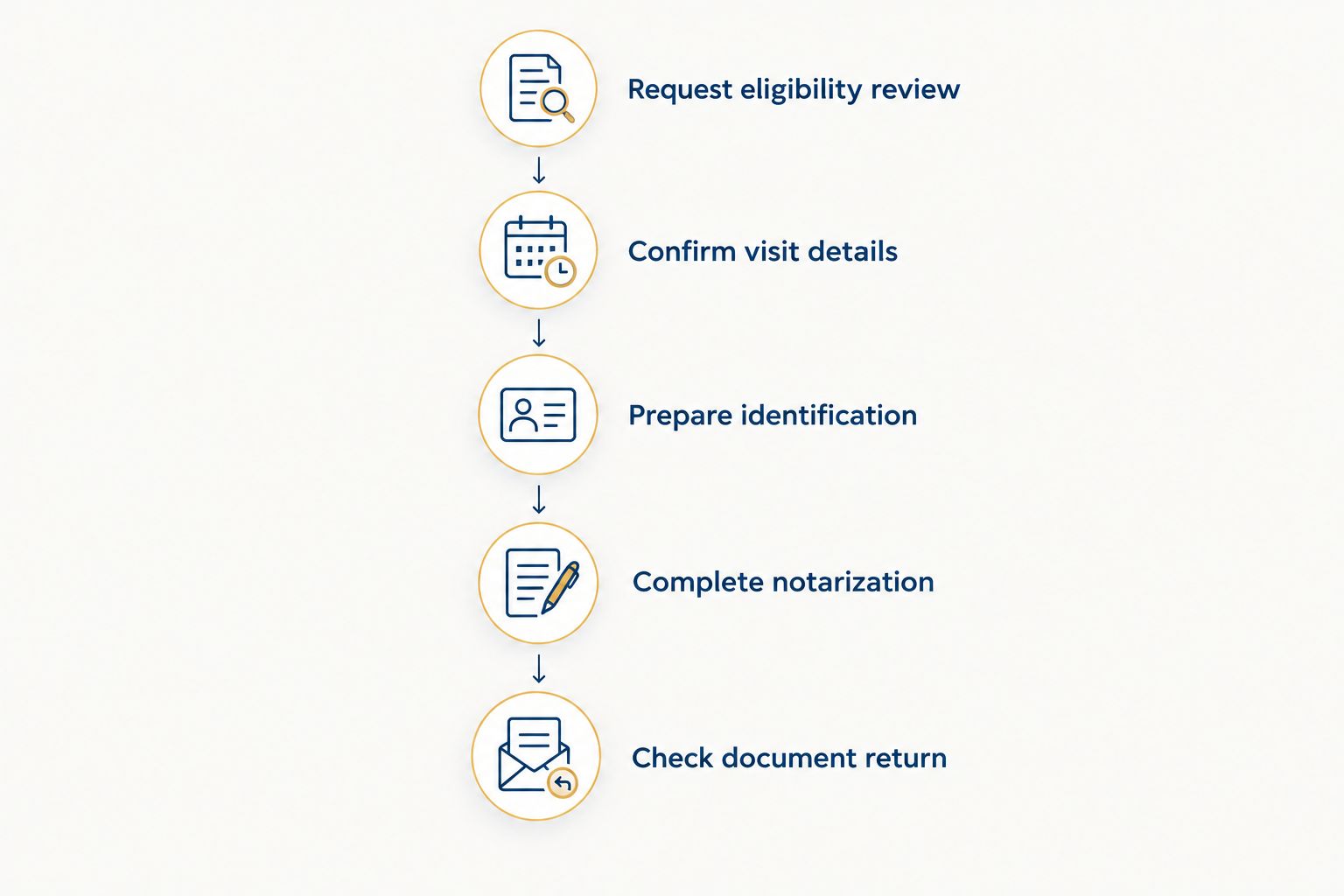
CraigVet Notary Services is best for Maryland families seeking remote online notarization through Proof, with mobile appointments subject to availability. For your 2026 appointment, use these 5 steps to organize the request without confusing a submitted inquiry with a confirmed booking.
1. Request eligibility review
Identify the document by its actual title and explain who will receive it. Ask the receiving organization whether it accepts remote online notarization and an electronically notarized document, or whether it requires a paper document handled in person.
Tell the notary whether the senior will sign personally or whether someone intends to sign in a representative capacity. Those are different situations. Do not assume that being a spouse, adult child, or caregiver gives you authority to sign for another person.
If you do not know which document or notarial act is required, ask the receiving organization or an attorney before proceeding. A notary appointment is not a substitute for choosing the correct legal paperwork.
2. Confirm visit details
For remote online notarization, explain whether the senior can use a device with a camera, microphone, and internet connection. Ask what Proof’s identity-verification process requires before arranging the session, especially if identification is missing or the signer needs technical assistance.
For an in-person request, provide the address, building access instructions, and relevant accessibility needs. Baltimore County mobile availability must be confirmed before booking; submitting a preferred date does not reserve it.
Acknowledge the difference between your requested time and the appointment details CraigVet Notary Services confirms. Coordinate caregivers, witnesses, and facility access around the confirmed arrangements rather than the initial inquiry.
3. Prepare identification
Describe the identification the senior has, including whether it is current and whether the name matches the document. Ask the notary to confirm what is acceptable for the proposed notarization instead of relying on a relative’s assurance that an ID should work.
For a remote session, prepare to follow Proof’s verification instructions. A caregiver can help position the device or explain how to use it, but the senior must participate personally in the required identity-verification and notarial process.
If the document uses a different name from the identification, raise that issue before the appointment. Do not change names or alter legal paperwork simply to make the documents appear consistent.
4. Complete notarization
Have the full document available, along with any instructions supplied by the receiving organization. Ask when the senior should sign; some notarial acts require signing in the notary’s presence, while others concern acknowledgment of an existing signature.
Give the senior space to answer the notary directly. Family members can provide logistical support, but they should not answer questions about willingness or the document on the signer’s behalf.
Tell the notary about fatigue, hearing needs, or communication difficulties before the session begins. A scheduled appointment does not guarantee completion: the notary must be able to satisfy the applicable requirements for the actual signer and document.
5. Check document return
Before the session, establish who needs the completed document and how it must be delivered. Afterward, follow the receiving organization’s instructions for submitting the electronic file or paper original, as applicable.
Do not assume that printing an electronically notarized document satisfies a request for a paper original. Resolve the required format with the recipient before selecting the appointment method, not after the notarization is complete.
Why this matters for a homebound signer
The practical challenge is coordinating the document, the senior’s participation, and the receiving organization’s requirements. Travel is only part of the decision. A physical visit does not resolve an unsuitable document, an identification problem, or uncertainty about who has authority to sign.
For families planning in 2026, the most useful preparation is a clear explanation of the situation. Describe what assistance the senior needs without making assumptions about eligibility based on age, a diagnosis, or being homebound.
Remote online notarization or a mobile visit?
These 2 service formats address different appointment needs. Choose the format that meets the document and signer’s requirements, not simply the format that is easiest for the caregiver. Neither route guarantees that a particular notarization can be completed.
| Appointment format | Best for | Practical advantage | Limitation to resolve first |
|---|---|---|---|
| Maryland remote online notarization through Proof | Eligible signers and documents when remote participation and electronic delivery fit the situation | The senior can participate without arranging a physical notary visit | Document eligibility, recipient acceptance, identity verification, and technology requirements |
| In-person mobile appointment | Situations requiring or preferring an in-person session, subject to availability | The appointment takes place with the signer physically present | Baltimore County availability, access arrangements, identification, and document requirements |
Remote online notarization through Proof
Start here when you want to avoid bringing another visitor into the home or coordinating travel. The senior still needs to take part in the session, complete the required verification, and communicate with the notary.
Remote does not mean that a family member can upload paperwork and finish everything without the signer. Ask about suitability before preparing a device or coordinating helpers, particularly if the senior cannot comfortably use a camera or respond during the session.
In-person mobile appointments
Request a mobile appointment when an in-person session fits the document and signer’s needs. Provide enough location detail to assess the request, including whether the senior is at home or in a facility with visitor procedures.
The benefit is physical attendance without asking the senior to travel. The limitation is that the visit depends on confirmed availability and suitable arrangements; mobile service does not remove identification, willingness, or document requirements.
Why appointment arrangements vary
A homebound senior’s appointment needs depend on the circumstances, not age alone. For a 2026 request, explain these factors before choosing a time:
- Document requirements: The document’s purpose and the receiving organization’s instructions affect whether remote notarization fits.
- Identification: The available identification and any name differences need attention before the session.
- Signer participation: The senior’s ability to communicate directly and participate willingly affects whether notarization can proceed.
- Witness arrangements: Determine whether the document requires witnesses and ask who must arrange them; do not assume the notary supplies them.
- Technology: A remote session requires a suitable setup and completion of the platform’s verification process.
- Location and access: A mobile request depends on availability, building entry, facility procedures, and the signer’s accessibility needs.
Raise an obstacle early rather than trying to solve it during the appointment. If identification is unavailable or the senior cannot participate as expected, describe the issue accurately and ask what the next appropriate step is.
What should you include in the appointment request?
Send 1 appointment request that gives the notary a useful picture of the situation. Start with a document description and logistical information; ask how to provide sensitive paperwork securely before sending copies of identification or private records.
Include:
- The document title and the organization requesting it.
- Whether the senior will sign personally or someone proposes to sign as a representative.
- Whether remote notarization is acceptable to the receiving organization.
- The type of identification available and any name discrepancy.
- The preferred appointment times and any fatigue or accessibility considerations.
- The location for a mobile request, including facility entry instructions.
- Any witness instructions already supplied with the document.
A useful message is direct: explain that the signer is homebound, identify the document, and ask whether a Proof session is suitable before requesting a mobile visit. Keep unrelated medical details out of the initial inquiry unless they are needed to explain participation or access needs.
Request an eligibility review
Explain the document and signer’s needs. Your appointment remains unconfirmed until you receive contact.
Can a caregiver handle the appointment for the senior?
A caregiver can coordinate scheduling, arrange access, gather instructions, and help set up equipment. The caregiver cannot replace the senior’s personal participation when the senior is the signer. Keep logistical assistance separate from answering the notary’s questions.
If someone proposes to sign under a power of attorney or another form of authority, obtain legal guidance about that authority and the correct document procedure. Do not assume that an existing relationship or possession of the senior’s records permits signing on the senior’s behalf.
What if the senior is tired, confused, or unable to communicate?
Tell the notary before the appointment and describe the practical difficulty. Ask whether a different time or an accessibility arrangement would help the senior participate directly, rather than relying on a relative to answer.
Do not pressure the senior to continue simply because the paperwork is urgent. If there is uncertainty about legal capacity, authority, or the appropriate document, consult an attorney; notarization cannot settle those legal questions.
What should a facility or business coordinator prepare?
For a facility or business organizing appointments in 2026, use a consistent intake checklist for document titles, recipient instructions, identification questions, and signer access needs. Repeat requests still need individual review because the documents and signers can differ.
Assign a clear scheduling contact and confirm visitor procedures before requesting a mobile visit. Keep legal questions with the appropriate attorney or receiving organization, and keep the notary focused on the notarial act rather than document selection.
FAQ
Can a homebound senior in Maryland use an online notary?
A homebound senior can use Maryland remote online notarization when the document and signer are eligible and the required process can be completed. CraigVet Notary Services offers remote online notarization through Proof; confirm recipient acceptance and identity-verification requirements before arranging the session.
How do I request a notary to come to my parent’s home?
Request a mobile appointment with the document title, location, preferred times, and the signer’s accessibility needs. Baltimore County availability must be confirmed before booking, and the appointment remains unconfirmed until CraigVet Notary Services contacts you.
Can I use my identification for my elderly parent’s notarization?
Your identification does not replace the signer’s required identity verification. Explain what identification your parent has and ask the notary what is acceptable for the proposed appointment.
Should my parent sign the document before the notary appointment?
Ask the notary when your parent should sign because the procedure depends on the notarial act. Some acts require signing in the notary’s presence, while an acknowledgment can concern a signature already made.
Do I need to arrange witnesses for a home notary visit?
Confirm witness requirements with the receiving organization or an attorney before the visit. Ask who must arrange any required witnesses, and do not assume the notary will provide them.
What if the senior does not have current identification?
Describe the identification available before requesting a confirmed appointment. Do not assume that an expired document, a relative’s identification, or a caregiver’s statement satisfies the applicable requirements.
Can the notary tell us which power of attorney form to use?
Craig is not an attorney and cannot provide legal advice or select a legal document for you. Ask an attorney about the appropriate form, signing authority, and legal effect before arranging notarization.
One last thing
Ask the receiving organization how it wants the completed document delivered before choosing remote or mobile service. An appointment can be correctly organized yet leave you with the wrong submission format if nobody checks that requirement first.
For your 2026 arrangements, keep the recipient’s instructions beside the document and share the relevant requirements when requesting the appointment. Craig is not an attorney and cannot provide legal advice; resolve questions about legal rights, document selection, or signing authority with an attorney before the notarial session.


