

For a Maryland remote online notary appointment through Proof, prepare your complete document, identification for the required identity verification, and a device that supports the online session. For an in-person appointment, bring your complete document and identification, and arrange any required witnesses in advance. Do not sign beforehand unless the notary confirms that your document and notarial act allow it.
- What do I need to bring to a notary appointment in Maryland? Identification, complete documents, and any required witnesses.
- CraigVet Notary Services offers Maryland remote online notarization through Proof for eligible documents.
- Confirm document eligibility, identity verification requirements, and witness arrangements before the appointment.
- Mobile appointments are secondary; confirm Baltimore County availability before booking.
- A request is not a confirmed appointment until CraigVet contacts you.
What do I need to bring to a notary appointment in Maryland?
Use this 2026 preparation checklist to separate what you need for remote notarization from what you need for an in-person appointment. The document's instructions and the receiving organization's requirements still matter; a checklist does not establish eligibility.
| Preparation item | Remote online through Proof | In-person mobile appointment |
|---|---|---|
| Complete document | Prepare a readable electronic document for the requested upload process | Bring the complete paper document, including attachments |
| Identification | Have identification ready and follow the identity verification instructions | Bring identification for the notary to inspect |
| Signing setup | Prepare a compatible device, camera, microphone, and internet connection | Arrange a suitable place to meet and sign |
| Other signers | Confirm how each signer will participate | Confirm who must attend |
| Witnesses | Confirm whether witnesses are required and how they will participate | Arrange required witnesses before meeting |
| Appointment confirmation | Follow the instructions received after contact | Confirm Baltimore County availability and meeting details |
For help checking the appropriate appointment format, start with CraigVet Notary Services. Describe the document and its intended use rather than assuming that every document qualifies for remote notarization.
Why this matters
A successful appointment depends on the document, the people involved, and the required notarial act—not identification alone. Missing attachments, unresolved witness requirements, or signing at the wrong stage can prevent completion.
For your 2026 appointment, confirm the receiving organization's instructions before arranging the session. The organization receiving the document decides whether it meets that organization's submission requirements; notarization does not replace that review.
For a business, this distinction matters when several employees prepare documents but someone else signs them. The employee organizing the appointment should collect instructions without making legal decisions for the signer.
How do I prepare for a remote online notary appointment?
Maryland remote online notarization through Proof is the first service to consider for eligible documents. Prepare the document and identity verification materials before the live session, and follow the specific instructions you receive.
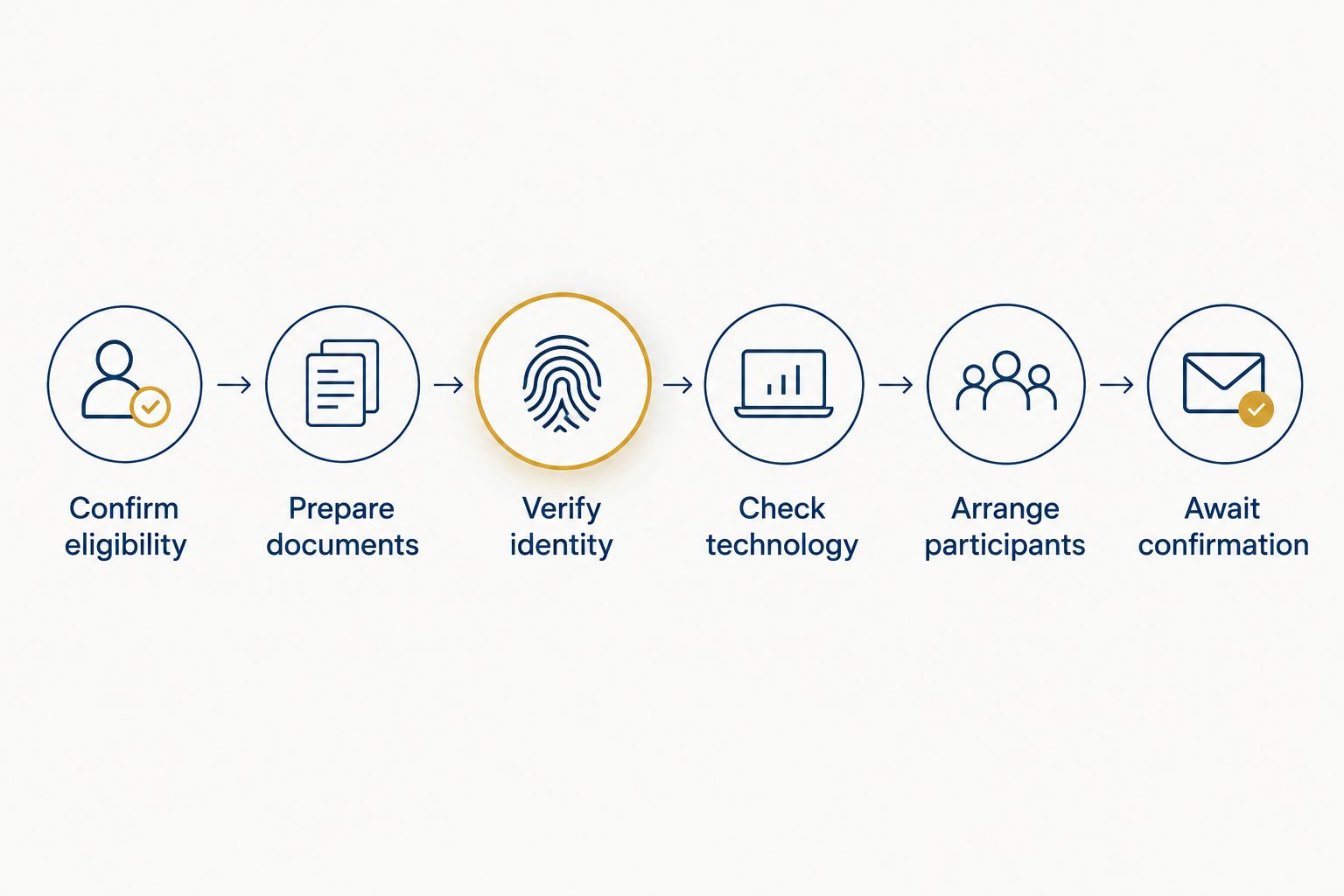
1. Confirm eligibility
Tell the notary what type of document you need notarized and where it will be submitted. Ask the receiving organization whether it accepts remote online notarization for that document.
Do not assume that an electronic document is automatically eligible. Document-specific requirements, witness arrangements, and the receiving organization's instructions need to align with the proposed session.
2. Prepare documents
Have the complete document ready, including referenced attachments and signature pages. Check that names are accurate and that the text is readable before following the upload instructions.
Complete information you are responsible for supplying, but do not guess at legal language or fill out the notary's certificate. If a field is unclear, ask the document's issuer or an attorney before the appointment.
3. Verify identity
Have your identification ready and follow Proof's identity verification instructions. Confirm the accepted identification requirements before the session rather than assuming that an identification card, photograph, or scan will be sufficient.
Raise name differences in advance. If your document uses a name that differs from your identification, explain the discrepancy before the appointment so the notary can address the identification requirements.
4. Check technology
Prepare the device you intend to use, and check its camera, microphone, internet connection, and access permissions. Follow Proof's current technical instructions for your setup.
Choose a quiet, well-lit location where you can hear the notary and show what the session requires. Avoid relying on a device you have not checked until the appointment begins.
5. Arrange participants
Identify every person who needs to sign and ask whether the document requires witnesses. Confirm each person's participation arrangements before the appointment.
A notary and a document witness perform different roles. Do not assume that the notary supplies witnesses or that someone nearby can join without prior arrangements.
6. Await confirmation
Review the appointment instructions after CraigVet contacts you. Resolve questions about documents, identification, participants, and technology before the scheduled session.
Submitting a request does not confirm an appointment. Do not treat your preferred date or time as settled before that contact and confirmation.
The preparation sequence below keeps document review ahead of signing. It is a planning aid, not a substitute for the instructions provided for your appointment.
What identification should I have ready?
Prepare identification that meets the requirements for your appointment format. A driver's license or passport is a useful document to ask about, but confirm acceptance rather than treating either as an automatic guarantee.
When arranging your 2026 appointment, explain any issue that affects identification review:
- Your identification is expired or approaching expiration.
- Your document and identification show different names.
- The identification is damaged or difficult to read.
- You do not have the identification requested in the appointment instructions.
- You are unsure whether the online verification process supports your identification.
For an in-person appointment, bring the identification itself rather than assuming a phone photograph will replace it. For remote notarization, follow the platform's instructions for presenting or submitting identification.
Do not send identification through an unrequested channel. Use the process specified in your appointment instructions, and ask for clarification if a request is unclear.
Should I sign my document before the appointment?
Leave the signature unfinished until you receive instructions if you do not know which notarial act is required. Different acts have different signing requirements.
An acknowledgment involves acknowledging a signature; a jurat involves an oath or affirmation and signing in the notary's presence. The appropriate act must come from the document's requirements or proper instructions—not a guess by the signer or appointment coordinator.
If you have already signed, explain that before the appointment. Do not erase a signature, alter a signed page, or create a replacement version without guidance from the document's issuer or your attorney.
What should I bring to a mobile notary appointment?
For an in-person mobile appointment, prepare the complete paper document, identification, any required attachments, and any required witnesses. Confirm the meeting location and Baltimore County availability before booking.
Best for: signers who need an in-person appointment after the document and location have been reviewed. The practical benefit is an in-person signing format; the limitation is that location, availability, and participant arrangements still require confirmation.
Check these details before the meeting:
- Document completeness: Include every page the receiving organization requires, not just the signature page.
- Signer readiness: Make sure the person signing understands the document and is ready to participate voluntarily.
- Witness attendance: Arrange witnesses according to the document's requirements and appointment instructions.
- Meeting access: Give clear arrival instructions and identify a suitable signing area.
- Final instructions: Bring any relevant directions supplied by the receiving organization.
Do not assume that arranging a mobile visit resolves a document eligibility problem. The notary still needs to follow Maryland notarial requirements.
Which appointment format should I choose?
CraigVet Notary Services is best for Maryland individuals and businesses seeking remote notarization of eligible documents through Proof. Remote notarization is the first option to review, while mobile appointments remain a secondary service with Baltimore County availability confirmed before booking.
- Remote online through Proof — best for eligible documents handled online. You participate through the online process rather than arranging an in-person meeting. The limitation is that document eligibility, identity verification, technology, and recipient acceptance must all be addressed.
- Mobile appointment — best for a confirmed in-person signing arrangement. You prepare paper documents and meet the notary in person. The limitation is that location and availability need confirmation, alongside the document and participant requirements.
Neither format replaces legal advice or guarantees that the receiving organization will accept the finished document. Choose the format after checking the requirements, not before.
Request an appointment review
Describe your document and preferred format. Your appointment is not confirmed until CraigVet contacts you.
Why Maryland notary appointment requirements vary
Your 2026 preparation list depends on more than whether you attend online or in person. These factors determine what needs clarification before signing:
- Notarial act: An acknowledgment and a jurat involve different actions by the signer.
- Document instructions: The document can include attachments, witness provisions, or specific certificate language.
- Receiving organization: The recipient's submission instructions affect whether the proposed format is suitable.
- Identity verification: Remote verification and in-person identification follow different processes.
- Participants: Additional signers and witnesses require coordination before the session.
- Appointment location: Mobile service requires confirmation of Baltimore County availability and meeting arrangements.
Ask the document's issuer about unclear document requirements. Ask the notary about appointment procedures and identification preparation. Ask an attorney when the question requires legal interpretation.
What should a business prepare for repeat notarizations?
Create a reusable preparation checklist for each recurring document type, but review each transaction separately. A familiar form does not remove the need to check the signer, identification, attachments, or recipient instructions.
For your 2026 business workflow, assign an appointment coordinator to collect the document type, intended recipient, signer details, and witness instructions. Keep that administrative role separate from legal advice and from the signer's own participation.
The coordinator should also identify who will receive the completed document and how that organization expects it to be submitted. Avoid assuming that a successful appointment completes the entire business process.
Standardize preparation, not approval. Repeat appointments still require individual review, and a previously notarized document does not establish eligibility for every later version.
Can I attend if I do not know whether witnesses are required?
Confirm witness requirements before attending. Read the document's instructions and ask the receiving organization or your attorney to clarify anything unclear.
Do not assume the notary can supply a witness during the appointment. Advance coordination is necessary for both remote participation and an in-person meeting.
Can a notary tell me which document I need?
A notary cannot replace an attorney's advice about which document protects your interests or creates the legal result you want. Craig is not an attorney and cannot provide legal advice.
Bring the document selected through the appropriate source, along with its instructions. Resolve questions about legal wording before asking the notary to complete the notarial act.
FAQ
What do I need for an online notary appointment in Maryland?
Prepare your complete electronic document, identification for the required identity verification, and a device suitable for the Proof session. Confirm document eligibility, witness arrangements, and the receiving organization's acceptance before the appointment.
Can I bring a photo of my identification to a notary?
Do not assume a photograph replaces identification. For an in-person appointment, bring the identification itself; for remote notarization, follow the platform's identity verification instructions.
Does everyone signing the document need to attend?
Identify every signature that requires notarization and confirm participation arrangements with the notary. Do not assume that one signer can complete another signer's required appearance.
Can I get any document notarized online in Maryland?
No, remote notarization is only for eligible documents. Confirm the document's requirements and the receiving organization's acceptance before arranging the online session.
What if my name is different on my identification and document?
Explain the name difference before the appointment. The notary needs to address identification requirements before proceeding; do not assume the discrepancy will be accepted.
Is my appointment confirmed when I submit a request?
No, your appointment is not confirmed until CraigVet contacts you. Confirm the appointment details and follow the preparation instructions provided.
Can Craig explain the legal effect of my document?
No, Craig is not an attorney and cannot provide legal advice. Ask an attorney about legal meaning, document selection, or changes to legal wording.
One last thing
Check the receiving organization's instructions before focusing on the signature. A properly completed notarial act does not settle separate questions about required attachments, submission format, or the document's legal purpose.
For a 2026 appointment with CraigVet Notary Services, describe your document, confirm eligibility and identity verification requirements, and wait for appointment confirmation. That preparation gives the notary the information needed to assess the proposed session without assuming that every document can be notarized remotely.


