

Instead of manually coordinating document instructions, witnesses, and signing appointments, use a Maryland remote online notarization workflow through Proof for eligible Trust & Will documents, with document review before scheduling. CraigVet Notary Services is best for Maryland individuals and businesses seeking notarization of eligible documents, not estate-planning advice.
- For trust and will documents notarized maryland, confirm signing requirements before requesting remote online notarization through Proof.
- CraigVet Notary Services handles eligible notarizations; notarization does not replace required witnesses or legal review.
- Keep documents unsigned until the applicable signing instructions and notarial procedure are clear.
- Mobile appointments are secondary; confirm Baltimore County availability before booking.
Why this matters
An estate-planning packet is not a single signing task. A will, trust document, power of attorney, and related affidavit can have different execution requirements, even when they arrive together.
Separate document execution from notarization. Execution means completing the signing formalities that apply to the document; notarization addresses a particular notarial act. A completed notarization does not establish that an entire estate plan is legally effective.
For your 2026 appointment, start with CraigVet Notary Services to discuss eligible documents and the appointment process. A request is not a confirmed appointment; wait for CraigVet to contact you before treating a date or format as settled.
Craig is not an attorney and cannot provide legal advice. Questions about which documents you need, whether their terms accomplish your goals, or whether a particular execution method is legally sufficient belong with a Maryland attorney.
Before you start
- Document packet and instructions: Have the complete Trust & Will documents, their accompanying signing instructions, and any receiving-party requirements. Identify the pages that request notarization without assuming every signature needs a seal.
- Identity and technology: Have your identification ready for review and access to a device with a camera, microphone, and dependable internet connection. Follow the Proof identity-verification instructions provided for your appointment; confirm acceptable identification rather than assuming your document qualifies.
- Witness and signature plan: Resolve witness requirements before scheduling. The non-obvious problem is arranging a notary but no required witnesses: a notary appointment alone does not complete every estate-document signing.
Keep the original downloaded files unchanged while you clarify the process. Do not remove certificate pages, combine unrelated signature pages, or add a notarial certificate based on your own interpretation.
Document eligibility review
Build the signing inventory
- List each document separately. Record its title exactly as written, the people who must sign, and any stated witness or notarization instructions. Include attachments and signature certificates rather than reviewing only the main document.
- Identify the requested act. Note whether the instructions specify an acknowledgment, oath, affirmation, or another notarial act. If the document leaves that choice unresolved, ask the document provider or an attorney; do not ask the notary to select a legal requirement for you.
- Flag existing signatures. Tell the notary whether anyone has already signed. The appropriate next step depends on the requested notarial act, so do not assume that every previously signed document must be replaced—or that every existing signature can remain.
- Check the intended recipient. Ask the institution, office, or person receiving the document whether it has format or submission requirements. Acceptance of an electronic document is a separate question from whether a notarial act can be performed remotely.
Expected result: You have 1 document inventory showing which items need clarification before an appointment can proceed. You have not treated the whole packet as automatically eligible for remote notarization.
Resolve will-specific requirements
For a 2026 Maryland will signing, distinguish the will itself from any accompanying affidavit or other notarized document. A notarial certificate attached to one item does not change the execution requirements of another.
Maryland Estates and Trusts §4-102 addresses will-execution requirements, including witness requirements. A notarial seal does not replace those requirements. Ask a Maryland attorney about the execution method appropriate to your will, particularly if you want participants to join from different locations.
If the instructions use terms you do not understand, pause here. The notary can explain the notarial procedure but cannot interpret estate-planning language, decide who should receive property, or determine whether a document protects your interests.
Appointment format and confirmation
Choose the signing format
- Request remote eligibility review first. Explain that the documents came from Trust & Will and identify the individual documents requiring notarization. Ask whether the requested notarial acts can be handled through Proof under Maryland notarial requirements.
- Disclose participant locations. Tell the notary where each signer expects to be during the appointment. Do not assume that an online appointment makes location irrelevant.
- Resolve witnesses separately. Identify who is responsible for arranging witnesses and whether their participation fits the applicable signing procedure. Do not assume that a platform connection supplies witnesses or satisfies witness requirements.
- Discuss mobile service only when needed. If an in-person appointment is appropriate, ask about Baltimore County availability before booking. Confirm the location, participants, documents, and appointment details directly.
Expected result: You know which format is being considered and what remains unresolved. Your appointment is confirmed only after CraigVet contacts you and the arrangements are settled.
| Appointment option | Best for | Practical benefit | Limit to resolve |
|---|---|---|---|
| Remote online notarization through Proof | Eligible documents suited to a remote notarial session | You participate without arranging an in-person notary meeting | Eligibility, identity verification, technology, and receiving-party requirements still apply |
| In-person mobile notarization | Signings that require or use an in-person appointment | You can arrange a physical meeting for the notarial act | Baltimore County availability and appointment details require confirmation |
CraigVet Notary Services offers Maryland remote online notarization and mobile notary appointments. Neither option includes legal advice or a promise that every document in your packet can be completed during the appointment.
Keep the appointment request specific
A useful request identifies the document titles, number of signers, expected signer locations, and any stated witness instructions. Explain whether a recipient has requested paper originals or another particular delivery format.
Do not send account passwords, security codes, or unrelated estate details in an initial inquiry. Ask how to provide the documents and identification information needed for the appointment, then follow the confirmed instructions.
Proof preparation and signing
Prepare the remote session
- Follow the appointment instructions. Use the Proof access instructions supplied for your confirmed appointment. This guide describes the workflow rather than naming platform buttons that can change.
- Complete identity verification as directed. Use your own information and follow the prompts presented to you. If verification cannot be completed, stop and contact the notary rather than having another person answer for you.
- Check the device setup. Confirm camera and microphone permissions, a charged device, and a stable connection. Position the device so you can participate without repeatedly leaving the session to find documents or identification.
- Confirm the document set. Review document titles and signature pages before the notarial act begins. Tell the notary immediately if the uploaded packet is incomplete or differs from the version you intended to sign.
Expected result: Your identity-verification status, connection, and document set are ready for the notary to assess. Passing a technology check does not by itself establish document eligibility.
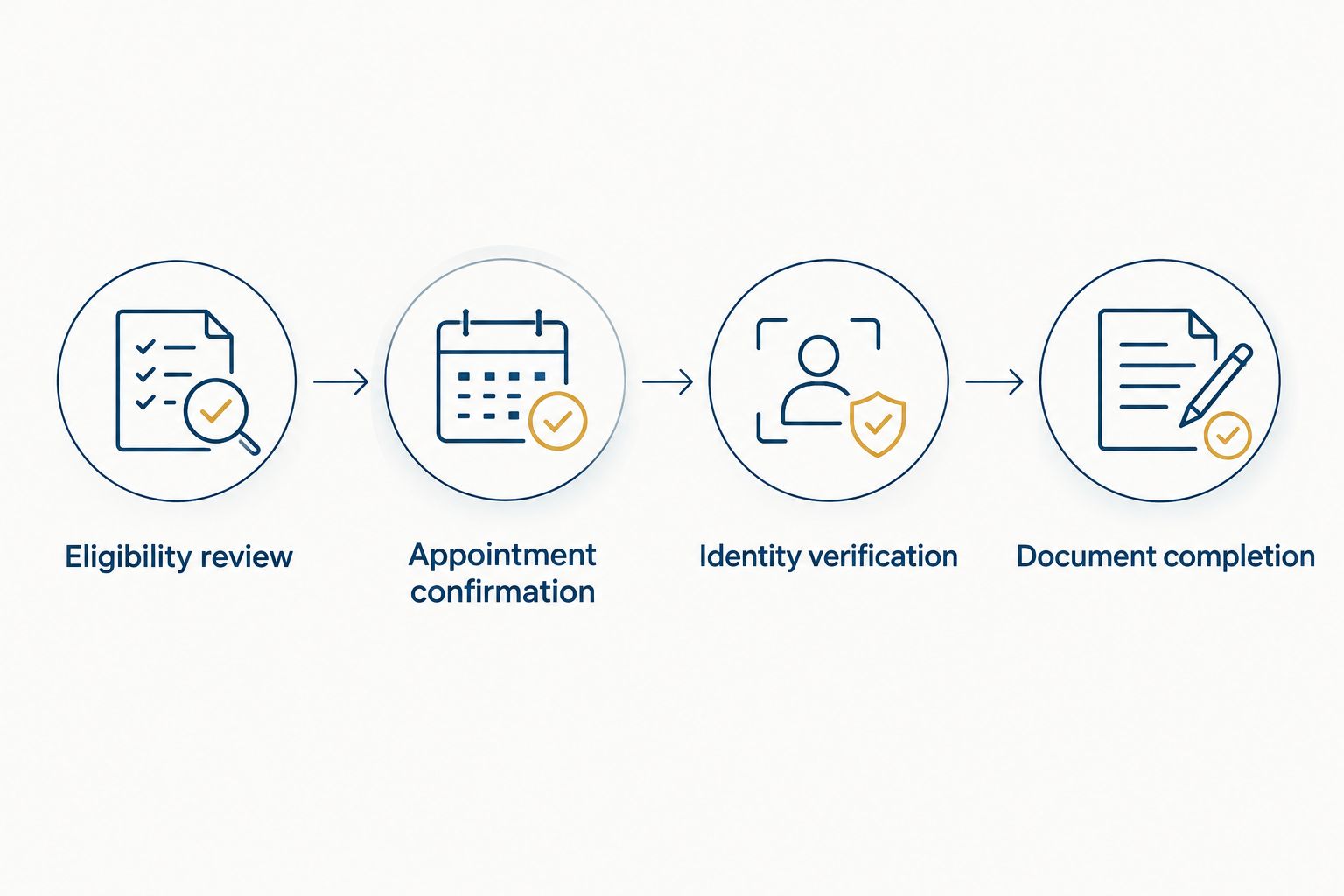
For your 2026 signing, use a 4-stage sequence: Eligibility review, Appointment confirmation, Identity verification, and Document completion. Keep those stages separate so an unresolved document question does not become a signing-session interruption.
Complete the notarial act and document handoff
- Follow the notary's directions. Sign or acknowledge a signature only as the applicable procedure requires. Complete any required oath or affirmation when directed; do not treat it as an optional formality.
- Address discrepancies immediately. Speak up if a name, document version, signature field, or notarial certificate appears incorrect. Do not continue simply because the session has already started.
- Confirm the completed-document process. Ask how you will receive or access the completed document. Do not assume that finishing the session automatically submits it to a bank, court, trustee, or other recipient.
- Check your retained copy. Review the completed document for the expected pages and notarial certificate. If you notice an issue, contact the notary before editing the file or arranging another signature.
Expected result: You understand what was notarized, how to obtain the completed document, and what delivery remains your responsibility. Keep the completed file intact rather than modifying its contents after notarization.
Request a document eligibility review
Discuss eligible documents, Proof appointments, and Maryland notarial requirements before scheduling.
When a document changes or another signer is added
A revised estate document is not simply an updated attachment to an earlier notarization. If the text, signer, or requested notarial act changes, return to document review before arranging the next appointment.
Use 2 separate checks: document version and signing requirements. Confirm which file is current, then confirm who must participate and what procedure applies to that version.
For a replacement document in 2026, repeat this sequence:
- Identify the revised document and set aside superseded working copies.
- Ask the document provider or attorney to clarify any changed execution instructions.
- Tell the notary what changed, including added signers or different locations.
- Request fresh appointment instructions and confirmation.
Expected result: The new appointment concerns the current document, not an earlier version with outdated instructions. Do not copy a completed notarial certificate or seal onto a replacement file.
Troubleshooting
Identity verification does not complete
Check that you followed the current Proof instructions and entered your own information accurately. Contact the notary for next steps if the process remains incomplete; do not repeatedly alter answers or use another person's identity information.
A required witness is missing
Pause the affected signing and clarify the witness requirements with the document provider or attorney. Ask about rescheduling after the participation plan is settled rather than assuming the notary can fill every role.
The recipient requests a different format
Ask the recipient to state its submission requirements before you arrange another notarization. Distinguish a delivery-format problem from a problem with the underlying notarial act; they require different corrections.
The wrong document version was uploaded
Tell the notary before signing and identify the correct file clearly. If the session has already finished, ask how to address the error rather than editing the completed document yourself.
The video or audio connection fails
Stop signing and follow the notary's instructions for reconnecting or rescheduling. Do not finish the affected steps off-camera and assume that an interrupted remote session still satisfies the required procedure.
Customize your workflow
For families handling several estate-planning documents, organize the work by signing requirements rather than by download order. Keep attorney questions, witness arrangements, and notary appointment details in separate lists so each issue reaches the right person.
For Maryland businesses arranging repeat notarizations in 2026, standardize the intake information: document title, requested notarial act, signer names, signer locations, recipient requirements, and confirmation status. Reuse the checklist, not a prior eligibility decision; a different document or signer can change the preparation needed.
CraigVet Notary Services provides notarial services, not estate-plan drafting or legal review. Keep that boundary explicit when employees, relatives, or professional advisers help coordinate an appointment. Share only the information needed for their role.
FAQ
Can I get Trust & Will documents notarized online in Maryland?
Eligible documents can be considered for Maryland remote online notarization through Proof. Confirm each document's requirements before scheduling; an entire estate-planning packet is not automatically eligible.
Does notarizing my will replace the need for witnesses?
No. A notarial seal does not replace Maryland will-execution requirements, including applicable witness requirements. Ask a Maryland attorney to clarify the procedure for your will.
Should I sign my estate documents before the online appointment?
Follow the document instructions and the notary's directions before signing. If you already signed, disclose that fact because the next step depends on the requested notarial act.
What do I need for identity verification through Proof?
Follow the identification and identity-verification instructions supplied for your appointment. Confirm acceptable identification and have a device with a working camera, microphone, and internet connection.
Is my appointment confirmed when I send a request?
No. Wait for CraigVet to contact you and confirm the appointment arrangements before treating the date, time, or signing format as settled.
Can I request a mobile notary instead of a remote appointment?
You can ask about an in-person mobile appointment. Baltimore County availability and the appointment details must be confirmed before booking.
Can Craig tell me whether my trust or will is legally correct?
No. Craig is not an attorney and cannot provide legal advice. Ask a Maryland attorney about document terms, execution requirements, or whether the estate plan meets your needs.
One last thing
Ask the intended recipient about submission requirements before the signing appointment, not after it. That check separates an eligible notarization from the practical task of delivering a document in the format the recipient requires. Keep the recipient's instructions with your signing inventory so the final handoff is planned before you begin.


