

Instead of manually chasing signatures and reconciling document versions, use a controlled handoff from SoftPro documents to Maryland remote online notarization through Proof, followed by recipient review. This 2026 workflow separates document preparation, eligibility review, identity verification, and completed-file handling without assuming a direct SoftPro–Proof integration.
- For softpro documents notarized maryland, confirm document eligibility and recipient acceptance before arranging a Proof appointment.
- CraigVet Notary Services offers Maryland remote online notarization through Proof for eligible documents.
- Keep one approved document version; changes after notarization require review, not silent replacement.
- A request is not a confirmed appointment; wait for direct contact before scheduling signers.
Why this matters
Preparing a document in SoftPro does not establish that it qualifies for remote notarization or that its recipient accepts an electronically notarized copy. Treat those as separate checks before coordinating signers. Otherwise, a completed session can still leave you with a document the recipient will not accept.
CraigVet Notary Services is best for Maryland individuals and businesses seeking eligible-document notarization through Proof. Start with the CraigVet Notary Services appointment inquiry, but wait for direct contact before treating the appointment as confirmed.
This is a document-handling workflow, not a software integration tutorial. It does not depend on a SoftPro connector, automatic transfer, or a particular menu layout. Craig is not an attorney and cannot provide legal advice; questions about document language, legal effect, or the required notarial act belong with an attorney or the party responsible for those instructions.
Before you start
- Prepare the materials and access. Have authorized access to the SoftPro matter, the proposed document version, signer contact information, and the recipient’s delivery instructions. For remote notarization, prepare a device with a working camera, microphone, and internet connection, plus identification for the required verification process.
- Confirm the receiving requirements. Ask the recipient whether remote online notarization is acceptable for this specific document and transaction. Check requirements for signatures, witnesses, attachments, electronic delivery, and any subsequent recording or filing.
- Resolve the hidden blocker: document changes. A revision after eligibility review can change what needs to be signed or notarized. Keep a version reference and send changes back for review; do not replace pages in a completed notarized file.
For your 2026 procedure, assign 1 document owner to coordinate the file. That person should collect corrections, communicate with signers, and identify the version submitted for review. Central ownership prevents separate teams from circulating competing copies.
Document eligibility and recipient requirements
The first configuration unit is the document itself. Before choosing an appointment format, establish what must be notarized and what the receiving party will accept.
- Identify the document. Record its title, associated matter reference, intended recipient, and people expected to sign. Include relevant attachments rather than sending an isolated signature page without context.
- Obtain the recipient’s instructions. Ask whether the recipient accepts remote online notarization and electronically signed documents for this transaction. Obtain any witness, original-paper, recording, or delivery requirements before scheduling.
- Request an eligibility review. Describe the document and intended use to CraigVet Notary Services. Ask whether the proposed document and signer arrangement can proceed through Proof under Maryland notarial requirements.
- Resolve legal questions separately. If the document lacks clear instructions about the required notarial act, obtain direction from the document preparer, receiving party, or an attorney. Do not ask the notary to choose legal language or determine the document’s legal effect.
Expected result: You have a proposed document version, a clear recipient requirement, and an eligibility decision before coordinating a session. An unanswered acceptance question is a reason to pause, not a reason to assume approval.
Use 2 review gates in your internal checklist: document eligibility and recipient acceptance. Passing one does not establish the other. Keep the corresponding instructions with the matter so the next employee does not need to reconstruct the decision.
Document package and appointment request
Once the requirements are clear, prepare the handoff. The goal is a readable, complete file and an appointment request that accurately describes the work.
- Review the proposed file. Check names, document completeness, signature locations, and attachments against the preparer’s instructions. Refer substantive corrections to the responsible preparer rather than rewriting legal provisions yourself.
- Create a version reference. Use your organization’s approved naming convention to distinguish the proposed signing copy from drafts. Keep the reference in your matter notes and correspondence.
- Send the appointment request. Provide the document description, signer arrangement, timing needs, and known recipient requirements. Ask how documents should be submitted securely; do not assume ordinary email is the required transfer method.
- Wait for direct confirmation. CraigVet Notary Services must contact you before the appointment is treated as confirmed. Follow the document-submission and Proof session instructions provided for your appointment.
Expected result: The notary and your document owner are discussing the same proposed file, and signers receive confirmed instructions rather than a tentative calendar assumption.
Keep 1 final packet for the proposed session. This is an organizational recommendation, not a restriction on how many documents an appointment can include. If your matter involves several documents, disclose that scope during the request and confirm what the session will cover.
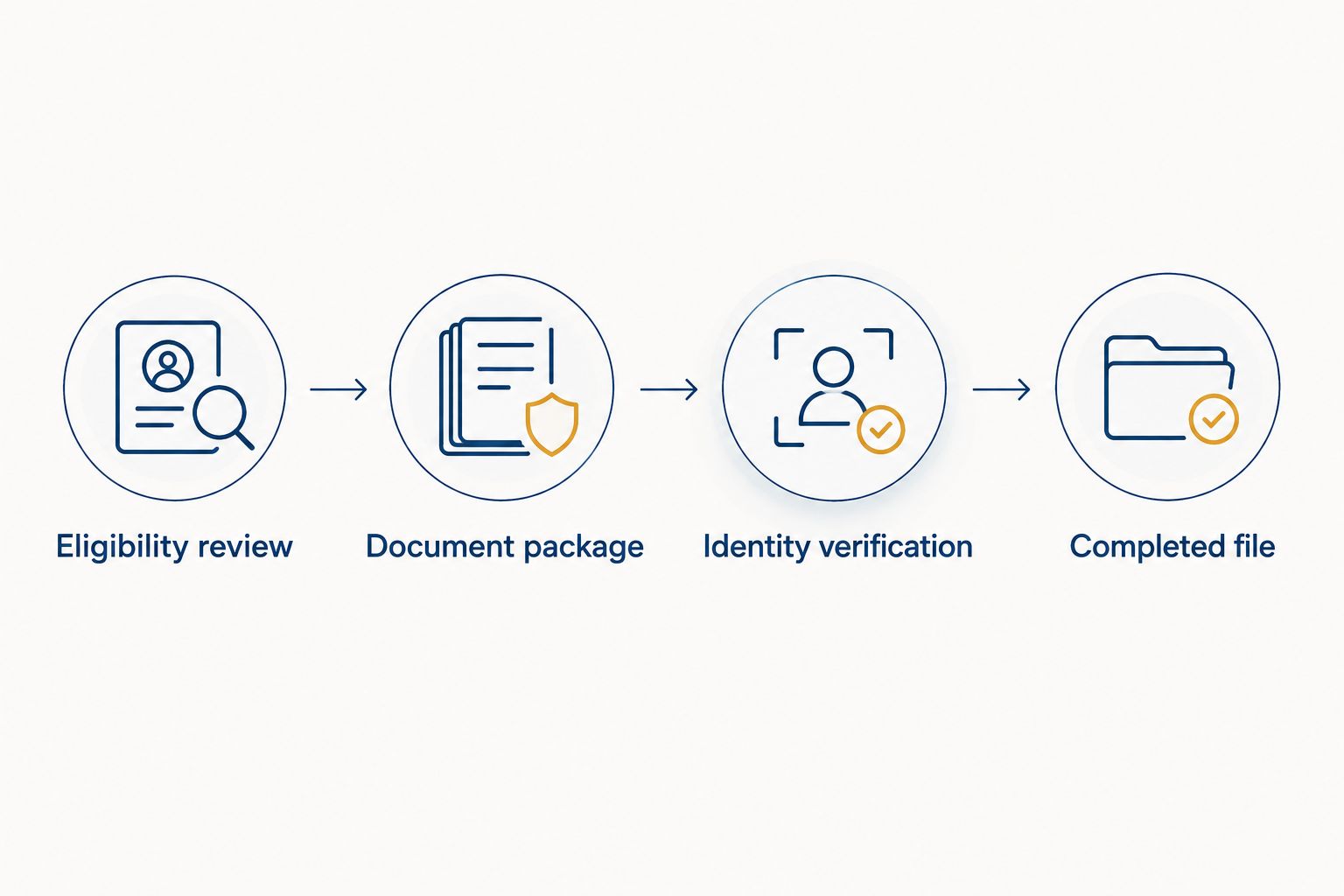
Identity verification and signing session
Identity verification is part of the remote notarization process, not something a business coordinator can complete on a signer’s behalf. Keep preparation instructions practical and let the notary direct the notarial procedure.
- Follow the appointment instructions. Use the session access method provided for the Proof appointment. Do not substitute a general video meeting for the directed notarization session.
- Prepare the signer’s environment. Test the camera, microphone, and connection before joining. Keep identification accessible and arrange a setting where the signer can communicate clearly without exposing the document to unrelated people.
- Complete the required identity verification. Follow Proof’s prompts and the notary’s instructions. If verification does not succeed, stop and request guidance rather than using another person’s credentials or improvising a workaround.
- Review and sign as directed. Confirm that the presented document is the intended version. Follow the notary’s instructions about signatures and any required oath or acknowledgment; do not assume every document uses the same procedure.
Expected result: The signer completes the required process with the notary, or the session pauses with a specific issue to resolve. A scheduled session does not guarantee that every submitted document can be notarized.
For a 2026 business checklist, keep technology preparation separate from legal preparation. A working camera cannot resolve an incomplete document, and an eligible document cannot compensate for an unsuccessful identity-verification process.
Completed-file review and delivery
Notarization and delivery are separate responsibilities. Before closing the matter, verify the returned file against the instructions established at the beginning.
- Obtain the completed file as instructed. Follow the delivery or retrieval instructions associated with the session. Preserve the received file without changing its contents.
- Perform an administrative review. Check that the file corresponds to the intended matter and contains the expected documents. Refer questions about notarial entries to the notary and questions about legal sufficiency to the responsible professional.
- Deliver through the required channel. Follow the recipient’s established submission instructions. Do not assume a printed copy of an electronically notarized document satisfies a requirement for an original paper document.
- Record the outcome. Store the completed file according to your organization’s access and retention rules. Record recipient delivery and acceptance separately from session completion.
Expected result: Your matter record distinguishes the proposed draft, completed notarized file, and recipient response. Staff can identify what was delivered without opening multiple similarly named copies.
Do not edit a completed notarized file to fix a drafting error. Return the issue to the preparer and notary for instructions about a corrected document and any further notarization required.
Repeat the workflow when a SoftPro document changes
Repeat notarizations need a controlled revision process, not a shortcut around review. Apply the same checks when a revised document replaces an earlier signing copy.
- Before the session: Identify what changed, replace the proposed version through the instructed submission method, and ask whether the revision affects eligibility or appointment preparation.
- After the session: Preserve the completed file. Send the correction to the responsible preparer and ask the notary what a new session would require.
- For recurring business matters: Reuse the intake checklist, not previous assumptions. Different documents, recipients, signers, or witness arrangements require fresh confirmation.
Your 2026 repeat-business procedure should record who approved the draft and who confirmed recipient requirements. That creates a useful handoff even when different employees coordinate successive appointments.
Remote notarization versus mobile appointments
Remote notarization through Proof is the primary route to review for eligible documents. Mobile appointments are a secondary service; confirm Baltimore County availability before booking and ask whether an in-person appointment fits the document requirements.
| Appointment format | Best for | Practical benefit | Limitation to confirm |
|---|---|---|---|
| Remote through Proof | Eligible documents accepted electronically by the recipient | Provides a remote signing and notarization process | Document eligibility, identity verification, technology, and recipient acceptance still apply |
| In-person mobile | Matters requiring an in-person signing arrangement | Allows an in-person appointment without using the remote process | Baltimore County availability and appointment details require confirmation |
Choose the format by document requirements, not convenience alone. An in-person appointment does not automatically resolve missing legal instructions, witness requirements, or an incomplete document.
Troubleshooting
The recipient rejects remote notarization
Pause the remote appointment process and obtain the recipient’s specific requirements. Ask whether an in-person notarization is acceptable, then request a suitable appointment; do not assume printing the electronic file resolves the objection.
Identity verification does not succeed
Follow the instructions shown in the session and contact the notary for next steps. Do not create a substitute signer account or repeatedly alter personal details to force a match. A different appointment arrangement requires confirmation.
The signing copy contains the wrong version
Stop before signing and identify the intended version. Ask how to submit the replacement and whether the notary needs to review it again. If notarization is already complete, preserve that file and request correction instructions.
A witness requirement appears during preparation
Do not assume the notary supplies witnesses or that any available person qualifies. Obtain the applicable instructions from the responsible preparer or attorney, then confirm the proposed witness arrangement before the appointment.
Customize your workflow
For repeat business notarizations, create a reusable intake record with fields for document owner, proposed version, signer details, recipient instructions, eligibility status, and appointment status. Keep sensitive documents in your approved storage system rather than copying them into every scheduling message.
Separate the statuses requested, confirmed, completed, and accepted by recipient. This small distinction prevents a calendar invitation from becoming an inaccurate completion report. Review your 2026 procedure when a recipient changes its requirements or your document process changes.
Request a notarization review
Describe your document and signer needs. Wait for direct contact before treating an appointment as confirmed.
FAQ
Can I get documents prepared in SoftPro notarized remotely in Maryland?
Eligible documents can proceed through Maryland remote online notarization after document review and confirmation of recipient requirements. Preparing a document in SoftPro does not, by itself, establish eligibility or acceptance.
Does this workflow require a direct SoftPro integration with Proof?
No. This workflow uses a controlled document handoff and does not depend on a direct SoftPro–Proof integration. Follow the document-submission instructions provided for the appointment.
Can my business book repeat remote notarizations?
Your business can request repeat notarizations and reuse an intake checklist. Each document, signer arrangement, and recipient requirement still needs review, and each appointment requires confirmation.
What should a signer prepare for a Proof appointment?
Prepare identification for the required verification process and a device with a working camera, microphone, and internet connection. Follow the appointment-specific instructions for access, document review, and signing.
Is an appointment confirmed when I submit a request?
No. Wait for CraigVet Notary Services to contact you before treating the appointment as confirmed. Do not direct signers to join a session based only on a submitted request.
What if my document needs an in-person notary instead?
Ask about an in-person mobile appointment and confirm Baltimore County availability before booking. Confirm the document, witness, and recipient requirements before choosing that format.
Can Craig choose the notarial wording or give legal advice?
No. Craig is not an attorney and cannot provide legal advice. Ask an attorney or the party responsible for the document instructions to resolve questions about legal wording or the required notarial act.
One last thing
A notarized document is not the same as an accepted document. Close your matter only after completing the delivery checks appropriate to its recipient—not merely when the signing session ends. That final distinction keeps a successful appointment from becoming an unfinished business task.


