

Instead of manually moving unfinished PandaDoc paperwork between signers and a notary, prepare a final document, confirm eligibility, and arrange Maryland remote online notarization through Proof. This 2026 workflow separates document preparation from identity verification and the notarial act, so you know what to confirm before signing.
- For PandaDoc documents notarized in Maryland, confirm document eligibility and recipient acceptance before arranging a Proof session.
- CraigVet Notary Services handles Maryland remote online notarization through Proof for eligible documents.
- A PandaDoc electronic signature alone is not a notarial act; follow the notary’s signing instructions.
- Appointment requests remain unconfirmed until CraigVet Notary Services contacts you.
Why this matters
A document can be electronically signed without being notarized. Preparing paperwork in PandaDoc does not replace the identity verification, personal appearance, and certificate required for the applicable notarial act.
CraigVet Notary Services is best for Maryland individuals and businesses seeking guided remote notarization of eligible documents through Proof. Start with CraigVet Notary Services to request an eligibility review and appointment guidance; submitting a request does not confirm an appointment.
This guide describes a document handoff, not an automated PandaDoc-to-Proof integration. Keep document preparation, appointment confirmation, and notarization as separate checkpoints in your 2026 process.
Before you start
- Document access: Have access to the PandaDoc document and permission to download the intended version. Obtain the recipient’s instructions, including any required certificate wording, witness arrangements, or original-paper requirements.
- Signer readiness: Each signer needs access to the appointment instructions, suitable identification, and a device that supports the required live audio-video session. Follow Proof’s current identity-verification requirements rather than assuming an identification document will qualify.
- The non-obvious gotcha: A completed PandaDoc signature does not establish that the document is ready for notarization. Ask Craig how an existing signature affects the requested notarial act before signing again or changing the file.
Craig is not an attorney and cannot provide legal advice. Ask the receiving organization or your attorney to resolve questions about document wording, legal effect, or which notarial act you need.
Configuration unit: Document eligibility
Confirm the recipient’s requirements
- Ask the receiving organization whether it accepts remote online notarization for this specific document and purpose. Confirm the required delivery format separately; acceptance of an electronic signature does not answer the notarization question.
- Identify every signer and any witness requirement. Tell Craig about additional participants before requesting the appointment, rather than introducing them during the session.
- Provide a plain description of the document and the recipient’s instructions through the communication method Craig specifies. Do not send sensitive attachments through an unconfirmed channel.
- Ask Craig to confirm whether the requested service fits Maryland notarial requirements. Leave legal questions about document sufficiency with the recipient or your attorney.
Expected result: You know whether to proceed with a remote appointment and what unresolved requirements must be settled first. A document title alone is not an eligibility decision.
For a business handling several similar documents in 2026, confirm the actual document and transaction requirements instead of treating an earlier appointment as blanket approval. A changed recipient, signer, or certificate can change the preparation needed.
Configuration unit: Final document preparation
Prepare the PandaDoc handoff
- Resolve document wording with the appropriate parties before the appointment. Complete the information that should be completed in advance, but leave signatures and notarial sections as Craig instructs.
- Download the intended document from PandaDoc as a PDF using the download controls available to your account. Inspect the exported file itself; do not rely solely on the editing view.
- Check page order, attachments, signer names, and readability. Confirm that the PDF includes the document the recipient actually expects, not a proposal draft or an incomplete attachment set.
- Give the file a clear version label and identify it as the appointment copy in your internal records. Use 1 document version for the handoff, rather than circulating competing copies among staff.
- Keep the downloaded source copy separate from any later notarized file. If the document changes after submission, stop and ask Craig how to replace it before continuing.
Expected result: You have a readable, intended PDF and a clear record of which version is being reviewed. Downloading the file does not make it notarized.
Do not assume PandaDoc signature fields will become Proof fields automatically. Follow the instructions for the actual session, and do not add a notarial seal, certificate signature, or completion date yourself.
Configuration unit: Proof appointment
Follow the confirmed session instructions
- Request Maryland remote online notarization and explain that the document originated in PandaDoc. Include scheduling preferences and participant needs without assuming the requested time is confirmed.
- Wait for Craig to contact you about eligibility, document handling, and appointment arrangements. Use the invitation and submission instructions provided for your appointment; a saved link from an unrelated transaction is not a substitute.
- Review the device and identity-verification instructions before the session. Check camera and microphone permissions, document readability, and your ability to access the required identification materials.
- Complete Proof’s identity-verification process as prompted. Each signer should follow their own instructions rather than having an office coordinator answer identity questions for them.
- Join the live session and follow Craig’s directions about signing or acknowledging a signature. Do not proceed on the assumption that every document requires the same sequence.
Expected result: The signer reaches the session through the correct instructions and completes the required steps before the notarial act proceeds. Failed identity verification or an unresolved document issue requires resolution, not a workaround.
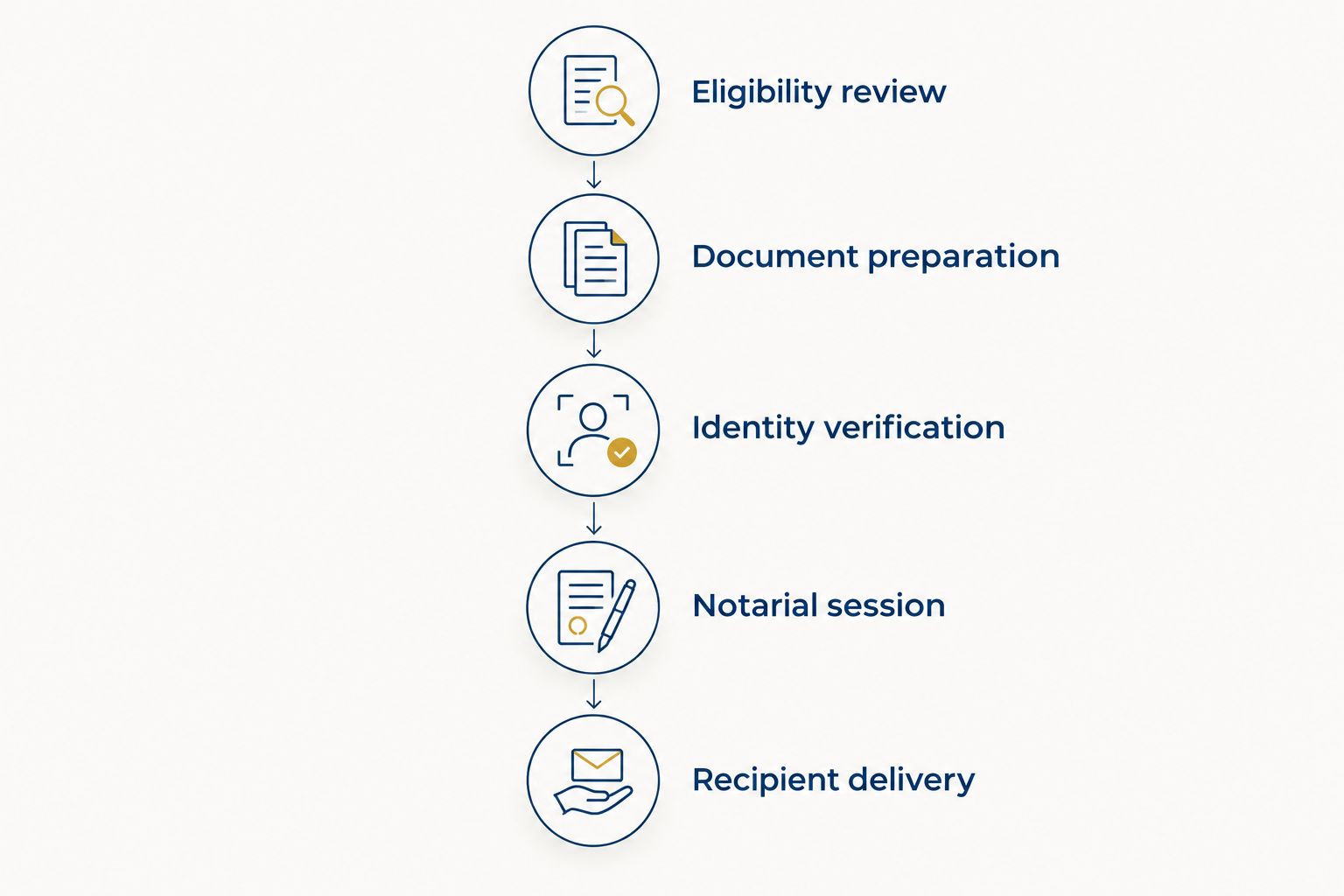
The useful sequence is Eligibility review, Document preparation, Identity verification, Notarial session, and Recipient delivery. Treat these as separate gates rather than one electronic-signature task.
Configuration unit: Completed-file delivery
Check the file before sending it onward
- Retrieve the completed document using the instructions provided after the appointment. Distinguish the completed output from the PandaDoc source file.
- Open the file and check that it is the intended document with the expected pages. Raise omissions or visible discrepancies with Craig instead of correcting the notarized file yourself.
- Deliver the completed file in the format and through the channel the recipient requested. Do not assume a screenshot, printed copy, or newly exported document is interchangeable with the completed electronic file.
- Retain the source document, completed output, and relevant appointment correspondence according to your organization’s records policy. Restrict access to staff who need it.
Expected result: The recipient receives the intended completed file, and your records distinguish preparation from notarization and delivery.
Use 2 separate checks in your 2026 checklist: completion of the notarial process and compliance with recipient delivery instructions. Neither check replaces the other, and notarization does not guarantee that a recipient will accept the underlying document.
Repeat workflow for recurring business documents
For recurring notarizations, reuse the preparation checklist—not a prior notarization. A new document or changed transaction needs its own review and appropriate notarial process.
Assign 1 coordinator to collect recipient instructions, identify participants, manage versions, and request appointments. Keep identity verification and signing with the actual signers; administrative coordination is not authority to act for them.
Record these fields in your internal tracker:
- Document owner and receiving organization.
- Intended file version and participant names.
- Eligibility questions and who must resolve them.
- Appointment status, including whether Craig has confirmed it.
- Completed-file location and recipient delivery status.
When a PandaDoc document changes, return to document preparation rather than assuming an existing appointment covers the revision. Notify Craig before the session and identify which file replaces the earlier copy.
Best for repeat business use: A controlled handoff with a named coordinator reduces ambiguity about versions and responsibilities. Its limitation is that the checklist cannot decide legal eligibility or replace an individual signer’s participation.
Remote or mobile: choose the appropriate route
Maryland remote online notarization through Proof is the primary route to assess for eligible documents. Mobile appointments are a secondary service; confirm Baltimore County service arrangements before booking.
| Route | Best for | Practical advantage | Limitation to confirm |
|---|---|---|---|
| Remote online notarization through Proof | Eligible documents and signers able to complete online verification | Document handling and personal appearance take place electronically | Document eligibility, identity verification, participant needs, and recipient acceptance still require review |
| In-person mobile appointment | Situations needing an in-person arrangement | Provides an alternative when an appropriate in-person process is needed | Confirm Baltimore County service arrangements, document requirements, and appointment details before booking |
Choose the route based on the document and recipient requirements, not convenience alone. A mobile appointment does not resolve a defective document, missing authority, or an unanswered legal question.
If remote verification cannot be completed, ask Craig about an appropriate next step. Do not assume an in-person appointment is automatically arranged or that it removes identification requirements.
Troubleshooting
The PDF does not match the PandaDoc document
Compare the downloaded file with the intended version, including attachments and page order. Resolve export or content problems before submitting it; do not ask the notary to determine which conflicting draft is legally correct.
The document was already electronically signed
Tell Craig before the appointment. Whether an existing signature can be acknowledged or a signature must occur during the session depends on the required act and instructions; do not erase or recreate signatures without direction.
Identity verification does not complete
Follow Proof’s instructions and confirm that the information entered matches the identification being used. If the process still fails, contact Craig about next steps rather than using another person’s information or repeatedly changing details to force a match.
The camera or microphone does not work
Check browser and operating-system permissions, close applications using the camera, and test the device before rejoining. Tell Craig if the session cannot support clear communication; an ordinary telephone conversation does not replace the required remote appearance.
The recipient rejects the completed file
Ask for the specific rejection reason in writing. A format problem, missing attachment, or requirement for a different process needs a different response; share the explanation with Craig without editing the notarized file yourself.
Customize your workflow
For a 2026 business process, put recipient acceptance and signer readiness ahead of scheduling. That order exposes requirements while the document is still being prepared, rather than during the live session.
Keep reminders procedural: review instructions, prepare identification, test equipment, and wait for appointment confirmation. Avoid messages that describe a request as booked or tell signers their document is guaranteed to qualify.
Request a document eligibility review
Ask about Maryland remote notarization through Proof. An appointment requires confirmation from Craig.
FAQ
Can I get a PandaDoc document notarized remotely in Maryland?
An eligible document prepared in PandaDoc can proceed through a Maryland remote online notarization process through Proof. Craig must review the service requirements, and you should confirm that the recipient accepts the intended process and completed format.
Does signing in PandaDoc mean my document is notarized?
No. An electronic signature alone does not perform a notarial act; the applicable identity verification, personal appearance, and notarial certificate requirements still apply.
Should I sign my PandaDoc document before the Proof appointment?
Follow Craig’s instructions before signing. The required sequence depends on the notarial act, so disclose any existing signatures when requesting the appointment.
Can my office coordinator complete identity verification for me?
No. An office coordinator can organize files and appointment requests, but the signer must complete the required identity-verification and participation steps.
Is my requested appointment time confirmed when I submit it?
No. Your appointment is not confirmed until CraigVet Notary Services contacts you about the arrangements; do not treat a submitted request as a booking confirmation.
What if I need an in-person notary instead of Proof?
Ask about a mobile appointment and confirm Baltimore County service arrangements before booking. An in-person appointment still requires appropriate document preparation and compliance with the applicable notarial requirements.
Can Craig tell me which legal document or notarial act I need?
Craig is not an attorney and cannot provide legal advice. Ask your attorney or the receiving organization to resolve legal-document questions and provide the necessary instructions.
One last thing
Do not rebuild the completed document inside PandaDoc just to make your records look consistent. Keep the completed notarized output as its own record and reference it from your internal workflow; editing or re-exporting a document is not the same as preserving the completed file.


