

Small business notary services are notarial acts for eligible business documents, with the aim of completing required notarizations without unnecessary disruption to your workday. For Maryland owners, remote online notarization through Proof is the first option to consider, provided the document, signer, and receiving organization meet the requirements for that process.
- CraigVet Notary Services fits Maryland owners seeking remote notarization for eligible business documents through Proof.
- Notary services for small business owners should start with document eligibility, recipient instructions, and identity verification.
- Use mobile notary appointments when an in-person process fits; confirm Baltimore County availability before booking.
- An appointment request is not confirmed until CraigVet Notary Services contacts you.
Why notary services matter for small business owners
A business notarization involves more than obtaining a stamp. You need the correct signer, an acceptable identification process, and a document that the receiving organization will accept in its completed form. An avoidable mismatch interrupts the transaction even when the underlying business agreement is ready.
For owners handling repeat paperwork in 2026, the practical task is to make those checks repeatable. Separate the business decision about what to sign from the notarial procedure used to complete it. A notary does not approve your transaction or determine whether its terms protect your business.
CraigVet Notary Services offers Maryland remote online notarization through Proof and in-person mobile appointments. Start with remote eligibility, not an assumption that every document needs an in-person visit. Mobile service remains a secondary option, with Baltimore County availability confirmed before booking.
How to arrange business notarizations
Check the document requirements
Start with the organization requesting the notarized document. Ask whether it accepts remote online notarization and whether it requires an original paper document, a particular notarial certificate, or additional participants. Remote eligibility and recipient acceptance are separate questions; resolve both before arranging the session.
Do not assume that a document needs notarization simply because it is a contract or business form. Follow the instructions attached to that specific transaction. If those instructions are unclear, ask the recipient or your attorney rather than selecting a notarial act yourself.
Build your 2026 intake checklist around these checks:
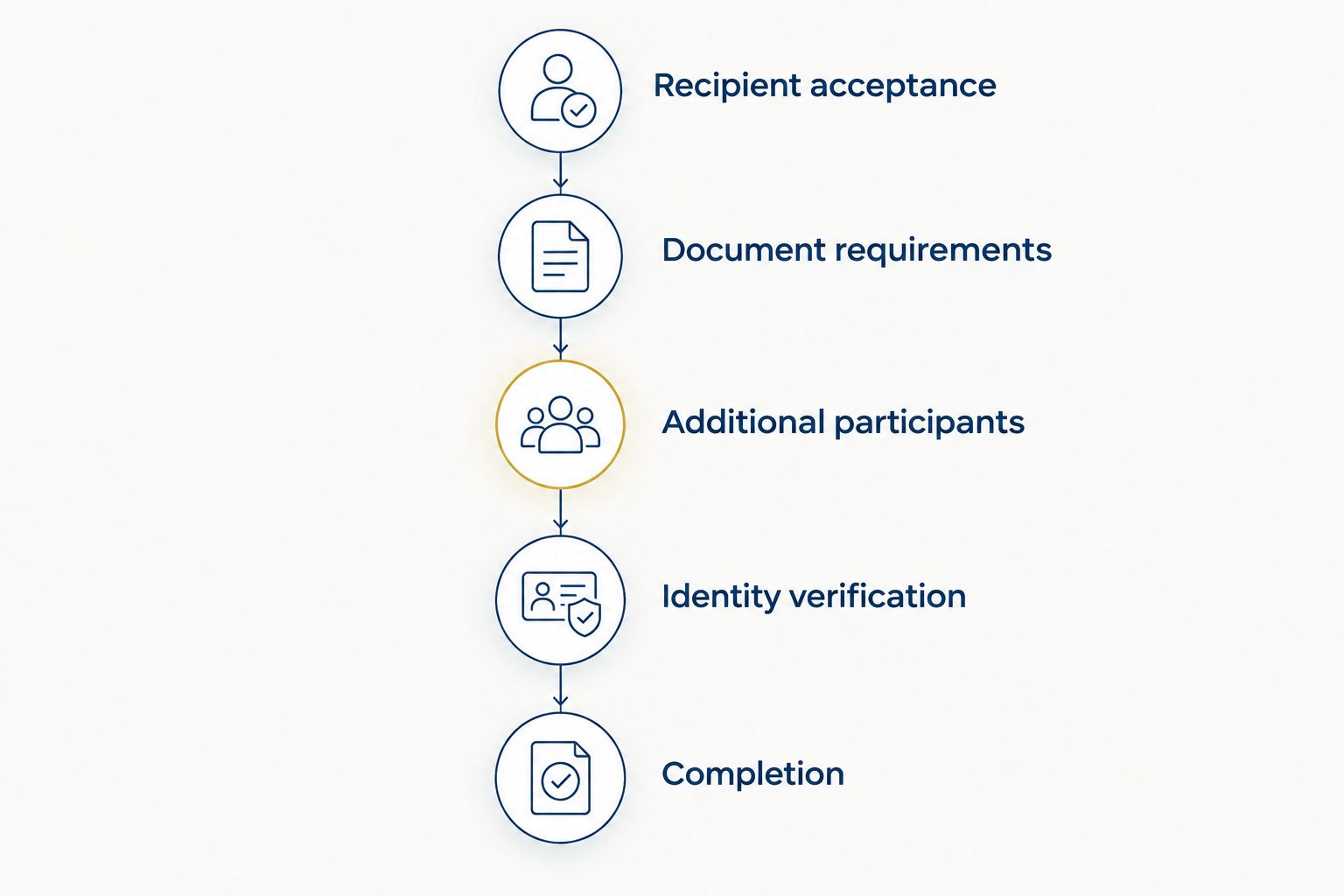
- Recipient acceptance: Confirm whether the recipient accepts remote online notarization.
- Document requirements: Obtain the complete document and its accompanying instructions.
- Signer capacity: Clarify whether you sign personally or on behalf of the business.
- Additional participants: Ask whether witnesses or other signers must participate.
- Legal questions: Refer uncertainty about legal effect or document selection to an attorney.
Prepare the signer and identity verification
For a manual preparation method, give each signer a short written checklist before requesting an appointment. Include the document name, recipient instructions, identification questions, and any technology needs. This prevents an administrator from booking around a signer who is not ready to participate.
Remote notarization includes identity verification; joining a video session alone does not complete that requirement. Proof's applicable verification process and the notary's instructions determine what the signer must do. Ask about identification concerns before the session, particularly when names differ across documents.
Prepare each participant separately, even when several people represent the same business:
- Use the signer's legal name in appointment communications.
- Ask which identification is acceptable for the intended process.
- Flag name differences before the appointment.
- Confirm that each signer can participate personally.
- Arrange a private space with working audio, video, and internet access.
Request the appropriate appointment
You can coordinate an appointment with a simple email checklist and calendar entry; a specialized scheduling system is not a prerequisite. Once the document requirements are clear, choose between a remote session and an in-person request rather than asking the notary to resolve every outstanding question during the appointment.
CraigVet Notary Services is best for Maryland small business owners seeking remote online notarization of eligible documents through Proof. The limitation is eligibility: the remote service is not a substitute for every paper-based or in-person requirement.
For your 2026 appointment request, provide enough detail to assess the next step without sending sensitive documents through an unapproved channel:
- State that the request concerns a business document.
- Describe the document type and recipient requirements.
- Identify the expected signers and any witness instructions.
- Explain whether you prefer remote service or need an in-person appointment.
- Wait for contact before treating the appointment as confirmed.
Complete the session as instructed
Keep the document ready, but do not assume you should sign it before the appointment. Different notarial acts have different signing and acknowledgment requirements. Follow the notary's instructions for the particular document rather than applying a rule from a previous transaction.
For an eligible remote appointment, complete the required Proof steps and participate in the live session as instructed. For a mobile appointment, confirm the meeting details and document format beforehand. Neither format removes the need for the signer to understand the document and participate willingly.
Use these session checks:
- Follow the approved document-submission instructions.
- Complete the required identity-verification steps.
- Keep the complete document available for the session.
- Sign, acknowledge, or take an oath only as instructed.
- Raise a problem immediately if a name, page, or instruction is incorrect.
Verify the completed document
After the appointment, compare the completed document with the recipient's submission instructions. Do not edit a completed notarized file to repair a business error. Ask how to address the problem before changing anything that affects the document or notarial certificate.
For remote work, establish who receives the completed electronic document and who submits it. These are different responsibilities. A successful appointment does not by itself establish that your recipient has received, reviewed, or accepted the paperwork.
Use 3 checkpoints before closing the task: completeness, delivery, and receipt. These are internal workflow checks, not a statement of Maryland legal requirements.
- Check that the expected pages are present.
- Verify that names and business details match the intended transaction.
- Follow the recipient's required submission method.
- Confirm delivery with the person responsible for the transaction.
- Ask the recipient to identify any remaining acceptance issue.
Standardize repeat notarizations
For repeat appointments, start with a reusable document checklist and a shared calendar. Assign 1 document owner per transaction so the signer, notary, and recipient are not receiving conflicting instructions from different staff members. That role coordinates the process; it does not replace the signer's participation.
CraigVet Notary Services provides a remote option through Proof for eligible documents, but each new transaction still needs an eligibility check. A document accepted remotely on one occasion does not establish acceptance for a different recipient or changed document.
Make your repeat workflow explicit:
- Record recipient instructions for each document type.
- Recheck requirements when the document or recipient changes.
- Name the person responsible for arranging the appointment.
- Keep signer instructions separate from internal filing instructions.
- Record completion and delivery without unnecessarily copying identity documents.
The process runs from recipient requirements to appointment readiness, then through verification and completion. Use that sequence as a handoff checklist rather than starting with an appointment time and working backward.
Compare remote and mobile notarization
Choose the format that satisfies the document requirements, not simply the format that looks easiest to schedule. Remote service avoids arranging a shared physical meeting, but depends on eligibility, recipient acceptance, technology, and identity verification. Mobile service provides an in-person appointment, but requires location and scheduling coordination.
| Option | Best for | Practical advantage | Key limitation |
|---|---|---|---|
| Maryland remote online notarization through Proof | Owners with eligible documents and recipients that accept remote notarization | Signers participate remotely through the required online process | Not every document, signer situation, or recipient requirement fits remote service |
| In-person mobile notarization | Owners whose paperwork or circumstances call for an in-person appointment | The appointment takes place at an agreed location | Baltimore County availability and appointment details must be confirmed before booking |
CraigVet Notary Services offers both formats. Its veteran-owned service positioning does not change the procedural checks: eligibility, identity verification, and Maryland notarial requirements still govern the appointment.
Request a business notarization
Ask about remote eligibility through Proof or Baltimore County mobile appointment availability.
Organize recurring business paperwork in 2026
Keep 2 separate records: an operational appointment log and the completed business-document file. The log tracks responsibility and status; the document file holds the transaction materials under your business's access rules. Separating them helps staff coordinate without attaching sensitive paperwork to every scheduling message.
An operational log can record the document label, assigned owner, recipient, requested format, appointment status, and delivery status. Avoid using a calendar invitation as a storage location for identification images or confidential business documents. Follow the approved submission process instead.
Build in a clear escalation point. If a signer cannot complete identity verification, a recipient changes its instructions, or an appointment remains unconfirmed, pause the affected task and contact the appropriate person. Do not mark the transaction complete because a request was submitted.
For a small team, a checklist is enough to establish responsibility. The useful distinction is between requested, confirmed, notarized, and delivered—not between different software systems. Keep those statuses separate so colleagues know what still needs attention.
Common mistakes small business owners make
Assuming an online signature is a notarization
An electronic signature and a remote notarization are different processes. A remote notarization includes the required notarial procedure and identity verification; an ordinary document-signing workflow does not establish that those steps occurred. Ask what the recipient actually requires before choosing a process.
Booking before checking recipient acceptance
A signer being ready for a remote session does not establish that the receiving organization accepts the resulting document. Obtain the recipient's instructions first. When a document will be submitted to a lender, agency, or other organization, direct acceptance questions to that organization rather than relying on a previous transaction.
Treating an appointment request as confirmation
Submitting a preferred time is a request, not a confirmed appointment. Wait until CraigVet Notary Services contacts you before organizing staff around a fixed session. For mobile appointments, confirm Baltimore County availability and the meeting details before treating the visit as booked.
Asking the notary to choose legal terms
Craig is not an attorney and cannot provide legal advice. Questions about which document to use, whether an agreement protects your business, or which notarial act a document needs belong with the document's issuer or an attorney, as appropriate. Resolve those questions before the appointment rather than asking for a legal judgment during signing.
Reusing instructions without checking for changes
Repeat business does not make every appointment identical. A new signer, revised document, or different recipient changes the preparation questions. Keep the checklist, but recheck its answers for each transaction; do not carry forward acceptance or identification assumptions merely because the business name is unchanged.
FAQ
What's the best notary option for a Maryland small business?
Remote online notarization through Proof is the first option to consider for eligible documents when the recipient accepts it. Use an in-person appointment when the document requirements or signer circumstances call for that format.
Can every business document be notarized remotely?
No, not every business document is eligible for remote notarization. Confirm the document requirements, recipient acceptance, signer circumstances, and applicable Maryland notarial requirements before requesting the session.
What should I prepare before a remote notary appointment?
Prepare the complete document, recipient instructions, signer details, and the information needed to address identification questions. Follow the approved submission instructions and check that each signer has working audio, video, and internet access.
Can I sign for my business during a remote appointment?
Signing on behalf of a business requires clarity about the capacity in which you are signing. Resolve authority and document-language questions with the recipient or your attorney before the appointment; the notary does not provide legal advice.
Is my appointment confirmed when I submit a request?
No, an appointment request is not confirmed until CraigVet Notary Services contacts you. Wait for that contact before treating the requested time or mobile location as agreed.
Can I arrange a mobile notary appointment in Baltimore County?
You can request an in-person mobile appointment, with Baltimore County availability confirmed before booking. Provide the location, document details, and participant requirements so the request can be assessed.
Does a notary review my contract for legal protection?
No, notarization is not a legal review of your contract. Craig is not an attorney and cannot provide legal advice; ask an attorney about the agreement's terms, legal effect, and suitability for your business.
One last thing
Keep recipient acceptance separate from appointment completion. A notarized document still needs to reach the correct person in the required format. Your final business check is whether the receiving organization has what it needs—not simply whether the notarial session ended.
For your next 2026 transaction, ask the recipient about remote acceptance before requesting an appointment. That question establishes whether to prepare for Proof or discuss an in-person option, while leaving legal questions with the appropriate adviser.


