

Remote workers and expats’ notarization is the process of completing required notarial acts for work or personal documents, with the aim of meeting recipient requirements while away from an office or home country. Maryland remote online notarization through Proof is an option for eligible documents, subject to document review, identity verification, and the receiving organization’s requirements.
- Craigvetnotary is best for Maryland remote online notarization of eligible documents when you need clear appointment guidance.
- Notary services for remote workers and expats start with recipient acceptance, document eligibility, and identity verification.
- A signer abroad needs location-specific review; an online connection alone does not establish eligibility.
- Mobile notary appointments are secondary; confirm Baltimore County availability before booking.
Why notarization matters for remote workers and expats
Working remotely separates the person signing from the office requesting a document. Living abroad adds another question: whether a notarial act completed under Maryland requirements will satisfy the organization receiving it. A completed notarization and an accepted document are different outcomes.
Craigvetnotary provides notary services through Maryland remote online notarization on Proof, with mobile appointments as a secondary option. For your 2026 appointment, start by identifying the recipient and the document’s intended use—not by assuming that every electronic document qualifies.
Your practical constraints determine the route. A remote employee handling a domestic business document has different acceptance questions from an expat submitting paperwork to a foreign authority. Neither situation establishes eligibility by itself.
For repeat business notarizations, prepare a reusable intake checklist, but review each document separately. A prior successful appointment does not establish that a different form, signer, or destination meets the same requirements.
The service boundary matters throughout: Craig is not an attorney and cannot provide legal advice. Ask the recipient for its submission instructions and an attorney for legal interpretation or advice about which document or notarial act you need.
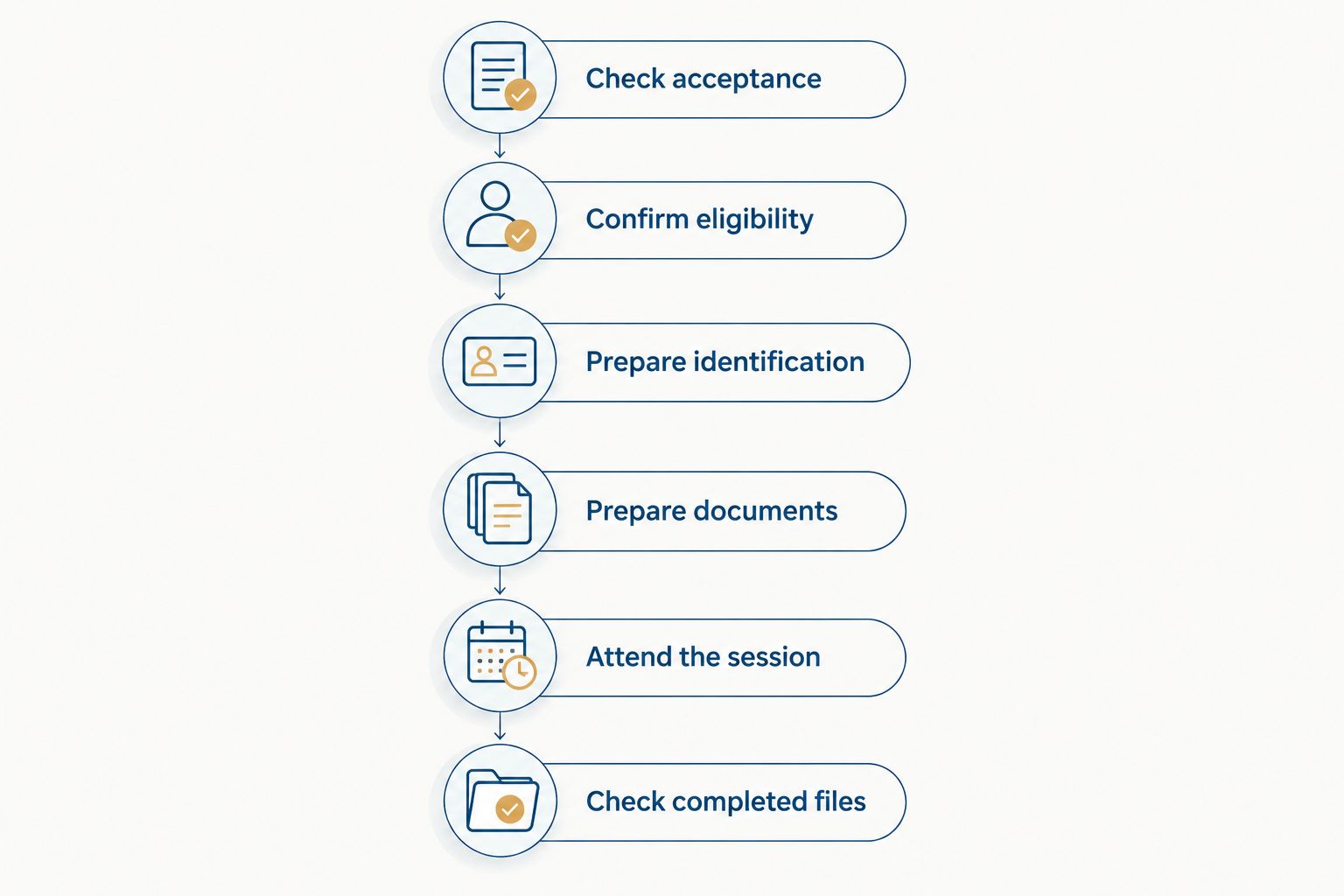
How to prepare for a Maryland remote notary appointment
Check acceptance
Ask the receiving organization whether it accepts remote online notarization before requesting an appointment. Describe the actual arrangement: you will sign electronically during a remote session with a Maryland notary, rather than appear in person with a paper document.
For an employer, ask the person responsible for accepting the completed form. For a bank, government office, or overseas recipient, obtain instructions from the department handling your submission. General website language about notarization does not settle a document-specific question.
Keep the response with your working file. If the recipient changes its instructions, you need to know before signing—not after submitting the completed document. Treat document format, notarization, and any authentication requirements as separate checks.
- Name the receiving organization and the department handling your document.
- Ask whether electronic signatures and remote notarization are accepted.
- Confirm whether the recipient requires an electronic file or paper original.
- Ask about witnesses, attachments, and submission instructions.
- Record any separate authentication or legalization requirements.
Confirm eligibility
Once the recipient’s instructions are clear, request a document-specific eligibility review. Craigvetnotary notary services offer Maryland remote online notarization through Proof, but remote completion is not a blanket promise for every document or signer location.
If you are abroad, disclose the country where you will physically be during the session. Maryland requirements and restrictions affecting an overseas signing need review; nationality, a Maryland mailing address, or an employer’s location does not resolve those questions alone.
For a 2026 request, provide your actual signing circumstances rather than relying on an earlier appointment. A request is not a confirmed appointment until Craigvetnotary contacts you. Keep your calendar flexible until the arrangements are confirmed, especially when coordinating across time zones.
- Identify the document and its intended recipient.
- State your physical location for the proposed session.
- Explain whether the document will be used domestically or abroad.
- Flag any witness instructions or unusual signing requirements.
- Wait for contact confirming eligibility and appointment arrangements.
Prepare identification
Identity verification is part of the remote appointment process, not an administrative detail to leave until the call. Ask what identification and verification steps apply to your circumstances before setting aside time to sign.
Follow the Proof session instructions supplied for your appointment. Do not assume that identification accepted by an employer, airline, or other organization automatically meets the requirements for your notarial session. If your document uses a different name from your identification, disclose the difference beforehand.
An expat should also raise identification questions early rather than discovering a problem during a scheduled session. A suitable device and internet connection help you participate, but technical readiness does not replace successful identity verification.
- Confirm which identification you should have available.
- Check whether the document and identification use consistent names.
- Follow the appointment’s identity-verification instructions.
- Test your camera, microphone, and internet connection.
- Ask how to resolve a verification issue before proceeding.
Prepare documents
Create 1 document checklist for each signing request. Include the document version, recipient, signer names, witness instructions, and submission deadline. This is especially useful when an employer sends several similar forms with different destinations or signature requirements.
Ask whether you should leave signatures blank until instructed. Requirements differ by notarial act, so do not assume every appointment involves the same signing sequence. Likewise, do not select or change notarial wording based on a guess.
For recurring work in 2026, keep a current template separate from the file prepared for an individual signer. An outdated attachment or a missing page creates a document problem that identity verification cannot solve. If you discover unclear legal language, resolve it with the recipient or an attorney before the appointment.
- Use the current, complete document supplied by the recipient.
- Review names, attachments, and required signature locations.
- Ask when and how you should sign.
- Resolve questions about notarial wording with the appropriate adviser.
- Keep unrelated personal or business files out of the submission.
Attend the session
Choose a quiet place where you can hear instructions, respond directly, and use your device without interruption. Remote notarization is an interactive appointment; uploading a document does not complete the notarial act.
For an overseas appointment, write the confirmed time in 2 time zones: your local time and the notary’s stated appointment time. Include the calendar date for both locations when they differ. This simple scheduling practice prevents confusion without assuming a particular session length.
Follow the notary’s instructions throughout the session. If a connection fails, a document changes, or a required participant is missing, ask what must happen next rather than attempting to finish independently. A business coordinator can organize logistics, but should not answer identity or willingness questions on a signer’s behalf.
- Join using the appointment instructions you receive.
- Keep the required identification and document information ready.
- Answer the notary’s questions directly.
- Sign or acknowledge signatures as instructed.
- Stop and ask for guidance if the session is interrupted.
Check completed files
Before submitting the result, use 3 checkpoints: document completeness, recipient instructions, and delivery method. Review the returned file without changing the completed notarial certificate or altering the signed document yourself.
Confirm how the recipient wants the completed material delivered. Printing an electronically notarized document is not the same as confirming that the recipient accepts that printed copy. If a recipient requires further authentication, establish the correct process separately.
For business records in 2026, retain the completed document according to your organization’s retention and access rules. Keep the recipient’s acceptance instructions alongside the submission record. If the recipient identifies a problem, describe the issue precisely instead of editing the notarized file and resubmitting it.
- Check that the returned document includes the expected pages.
- Review names and completed notarial information for apparent errors.
- Preserve the completed file without unauthorized changes.
- Submit it through the recipient’s required channel.
- Report any rejection or correction request before taking further action.
These steps separate recipient acceptance from the notarial appointment itself. Finish the acceptance and eligibility checks before investing time in session preparation.
Compare notarization options for your situation
Remote online notarization is the first option to evaluate for eligible documents—not a substitute for checking acceptance. For your 2026 decision, compare the route against your location and the recipient’s instructions, rather than convenience alone.
| Option | Best for | Practical advantage | Key limitation |
|---|---|---|---|
| Maryland remote online notarization through Proof with Craigvetnotary | Remote workers and expats whose documents and circumstances qualify | Allows eligible notarial acts without an in-person meeting | Requires eligibility review, identity verification, suitable technology, and recipient acceptance |
| Mobile notary appointment | Signers who need an in-person appointment in an available service area | Provides an in-person route when remote signing does not fit | Baltimore County availability must be confirmed before booking; it does not serve a signer who remains abroad |
| U.S. embassy or consulate notarial services | Expats whose document needs fit the post’s published services | Offers an overseas route to investigate when remote notarization is unsuitable | Services, appointment procedures, and document requirements depend on the post |
| Local notary in the signer’s country | Signers whose recipient accepts that jurisdiction’s notarization | Provides a local, in-person option abroad | Recipient acceptance and any additional authentication require separate checks |
None of these options determines which legal document you need. Embassy or consulate services and a foreign local notary are alternatives to investigate, not services provided by this business.
If the recipient rejects remote notarization, ask what it will accept before arranging an alternative. Otherwise, changing the appointment format simply moves the same acceptance problem elsewhere.
Request an eligibility review
Share your document type, recipient, and signing location. Wait for contact before treating an appointment as confirmed.
Common mistakes remote workers and expats make
Treating remote work as proof of eligibility
An employer’s remote-work policy does not decide whether a document qualifies for Maryland remote online notarization. Start with the document, the required notarial act, the signer’s circumstances, and recipient acceptance. Keep employment arrangements separate from notarial requirements.
Assuming an overseas location changes nothing
Your physical location during the appointment matters. Tell the notary where you will actually be, even if you maintain a U.S. address or use a U.S.-issued document. Do not book around a home address when you expect to join from another country.
Confusing notarization with an apostille
An apostille authenticates the origin of a public document for qualifying international use; it is not the notarization itself. Not every overseas submission follows the same authentication route. Ask the recipient which process applies and confirm it with the relevant authority before making arrangements.
Scheduling against an unconfirmed request
Submitting an inquiry does not reserve a signing time. Avoid promising your employer or recipient that a document will be completed at a particular hour before the appointment is confirmed. If your deadline is fixed, disclose it when requesting guidance rather than after arrangements are underway.
Reusing a business checklist without reviewing the document
A repeat client still needs a document-specific check. Changes in the recipient, signer location, witness instructions, or document version can change the preparation needed. In 2026, use a reusable checklist to capture those differences—not to bypass them.
FAQ
What are the best notary services for remote workers and expats?
The best option is the one that meets the document’s requirements and the recipient’s acceptance rules. Craigvetnotary offers Maryland remote online notarization through Proof for eligible documents; overseas signers need location-specific review.
Can I use a Maryland online notary while living abroad?
Living abroad does not automatically establish eligibility for a Maryland remote notarial act. Disclose your physical location, document purpose, and recipient so the applicable requirements can be reviewed before an appointment.
Can every document be notarized remotely through Proof?
No, remote online notarization is limited to eligible documents and circumstances. The receiving organization must also accept the resulting document, and the signer must complete the required identity-verification process.
What identification do I need for a remote notary appointment?
Use the identification specified in your appointment instructions. Confirm the applicable identity-verification requirements beforehand, especially if your identification and document show different names.
Is a mobile notary better than an online notary?
A mobile notary is the better fit when an eligible in-person appointment meets requirements that remote signing does not. Baltimore County availability must be confirmed before booking, and a mobile appointment does not solve an overseas signer’s location constraint.
Does submitting an appointment request confirm my booking?
No, submitting a request does not confirm an appointment. Wait until the business contacts you and confirms the arrangements before relying on a particular signing time.
Can Craig tell me which legal document or notarial act I need?
Craig is not an attorney and cannot provide legal advice. Ask the recipient for its requirements and consult an attorney when you need legal interpretation or advice about the correct document or notarial act.
One last thing
Ask for acceptance instructions before asking for an appointment. The most useful preparation is often a written answer from the organization that will receive the document—not another scan, attachment, or calendar invitation.
For repeat business requests, add the recipient’s requirements to your intake checklist and recheck them when circumstances change. That gives each signer a clear starting point without treating a previous notarization as approval for the next one.
Craigvetnotary is a veteran-owned option for eligible Maryland remote online notarization, with mobile appointments as a secondary service. Start with your document, your recipient, and your actual signing location; wait for contact before treating the appointment as confirmed.


