

Nonprofit organization notary services are notarial acts performed for an organization’s authorized signers, with the aim of completing document requirements for its work. For Maryland nonprofits, remote online notarization through Proof is an option for eligible documents; preparation starts with document eligibility, signer identity, and the receiving organization’s instructions.
- CraigVet Notary Services suits Maryland nonprofits seeking remote online notarization through Proof for eligible documents.
- Notary services for nonprofit organizations require document-specific preparation, identity verification, and clear signing instructions.
- Confirm signer authority separately from notarization; a notarized signature does not establish organizational authority.
- Request mobile appointments only after confirming Baltimore County availability; booking is not confirmed until CraigVet contacts you.
Why notary services matter for nonprofit organizations
Nonprofit paperwork brings together people with different responsibilities: a board member signs, an administrator coordinates, and a separate institution receives the document. Your appointment needs to account for each role without treating notarization as approval of the underlying transaction.
CraigVet Notary Services is best for Maryland nonprofits seeking remote online notarization for eligible documents through Proof. Start with CraigVet Notary Services to request an appointment, then wait for direct contact before treating the appointment as confirmed.
For your 2026 workflow, distinguish a document that actually requires notarization from one that merely requires an authorized signature. A request from a bank, grant administrator, or other recipient should guide preparation, but questions about legal requirements belong with an attorney or the requesting institution.
Craig is not an attorney and cannot provide legal advice. Notarization does not replace advice about bylaws, organizational authority, contract terms, or whether a particular document meets your nonprofit’s legal obligations.
How to prepare a nonprofit notary appointment
Start manually with a written checklist, the document recipient’s instructions, and a designated coordinator. You do not need a new administrative system to organize an appointment. Remote online notarization becomes the practical alternative to coordinating an in-person meeting only after eligibility and appointment requirements are confirmed.
The process below follows seven stages, from checking the document to routing the completed copy. Keep the administrative work separate from the notarial act itself.
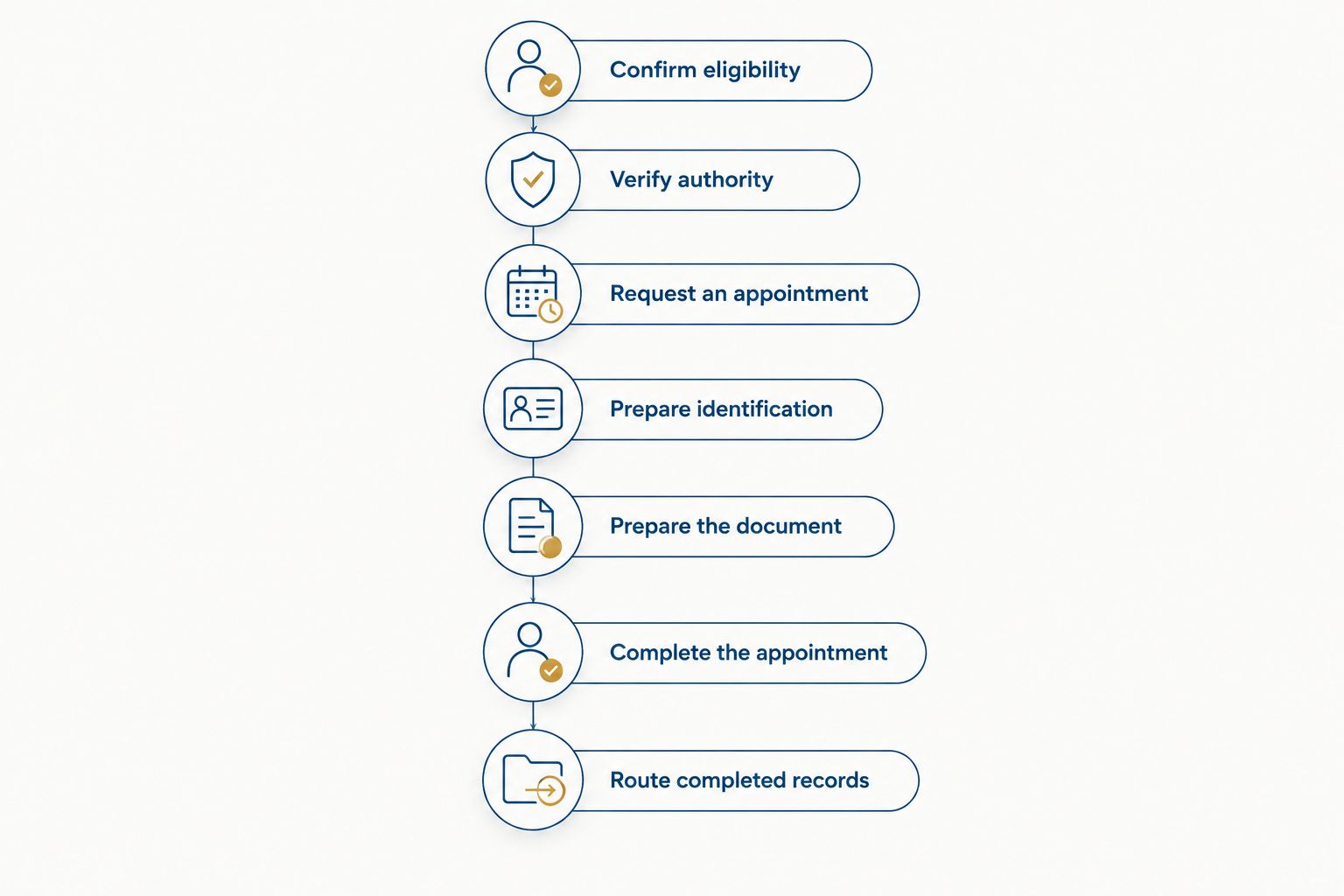
Confirm eligibility
Read the document and the recipient’s instructions before choosing an appointment format. Identify where notarization is requested, who must sign, and whether the recipient has specified an original paper document or accepts an electronically notarized document.
Do not assume that every document can be notarized remotely. Document requirements, the requested notarial act, signer circumstances, and receiving-party instructions need review. If the instructions are unclear, ask the recipient to clarify them rather than selecting a notarial act yourself.
For a 2026 submission, use the recipient’s current instructions rather than an older checklist from a previous transaction. Keep those instructions with the appointment request so the coordinator and signer work from the same information.
- Identify the document title and intended recipient.
- Locate the signature lines and notarial wording.
- Ask whether remote online notarization is acceptable.
- Confirm any original-paper or witness requirements.
- Resolve legal questions with an attorney before scheduling.
Verify authority
Check your nonprofit’s internal approval process before arranging the signing. The person coordinating an appointment is not necessarily the person authorized to sign, and a board title alone should not substitute for checking the applicable organizational records.
Use 2 separate checks: confirm who is authorized to sign for the nonprofit, then confirm who must appear for notarization. The notary’s identity-verification process does not establish that your organization approved the underlying transaction.
If your nonprofit needs legal interpretation of a resolution, delegation, or governing document, obtain that advice before the appointment. Keep unnecessary internal records out of the appointment materials unless they are requested for a specific purpose.
- Confirm the signer’s name and organizational role.
- Check the applicable internal authorization records.
- Resolve approval questions with your organization’s decision-maker.
- Tell the coordinator if multiple signers are involved.
- Separate internal approvals from notarial requirements.
Request an appointment
Assign 1 coordinator to gather instructions, communicate scheduling needs, and keep the signer informed. A shared checklist works for this task; the coordinator should track status without circulating sensitive identity documents through a broad email group.
CraigVet Notary Services offers Maryland remote online notarization through Proof. Request review of the document and appointment requirements before planning around a particular time. An appointment request is not a confirmed appointment; wait until CraigVet contacts you.
Remote online notarization is the primary option to discuss for eligible documents. If an in-person appointment is needed, ask about mobile service and confirm Baltimore County availability before booking. Do not assume that a preferred location or time is available.
- Describe the document without including unnecessary sensitive details.
- State the number of signers and any recipient deadline.
- Ask what information is needed for eligibility review.
- Confirm the appointment format through direct contact.
- Share confirmed instructions with every participating signer.
Prepare identification
Each signer needs to understand the identity-verification instructions for the selected appointment format. For a remote appointment through Proof, follow the instructions supplied for that session rather than relying on a coworker’s experience with a different transaction.
Confirm the identification requirements before the appointment. Do not assume that a work badge, organizational email address, or recognition by another board member satisfies the required identity-verification process.
For remote participation, check the device, internet connection, camera, and microphone you intend to use. Raise access or technology concerns in advance so the appointment requirements can be discussed without promising a particular accommodation or outcome.
- Review the identification instructions provided for the appointment.
- Check that names and document details are consistent.
- Test the device and connection intended for remote participation.
- Choose a private space for the session.
- Report identification or access concerns before the appointment.
Prepare the document
Use the document version the recipient expects you to execute. A nonprofit can create avoidable confusion by circulating a draft for review while a different version reaches the signer. Maintain 1 appointment checklist that identifies the intended version and required participants.
Follow the notary’s instructions about when to sign. Different notarial acts have different requirements, so neither signing everything in advance nor leaving everything unsigned is a universal rule.
For repeat work in 2026, standardize preparation rather than copying completed notarial certificates. Your coordinator can track document titles and routing instructions, but should not choose or alter legal wording on the notary’s behalf.
- Confirm that the document is the intended final version.
- Check all pages and required attachments.
- Follow instructions about completing fields and signing.
- Resolve unclear notarial wording with the appropriate professional.
- Identify witnesses separately if the transaction requires them.
Complete the appointment
The signer, not just the administrative coordinator, must participate as required for the notarial act. During a remote session, follow the Proof appointment instructions and the notary’s directions for identity verification, document review, and signing.
A coordinator can help organize the appointment but cannot answer personal verification questions or sign for someone merely because the organization has a deadline. If something changes, explain it before proceeding.
Stop and clarify discrepancies rather than treating notarization as a way to fix them. A mismatch in names, an unexpected document version, or uncertainty about the signer’s role needs attention from the appropriate party.
- Have the required signer ready to participate.
- Follow the identity-verification process personally.
- Review the intended document before signing.
- Tell the notary about changed circumstances.
- Follow the notary’s directions for completing the act.
Route completed records
After the appointment, follow the instructions provided for receiving the completed document and sending it to the intended recipient. Confirm the required delivery format before assuming that a printed copy or an electronic attachment will satisfy the recipient.
Keep your nonprofit’s transaction records separate from any records the notary is required to maintain. The organization should retain its own approvals and completed documents according to its policies and applicable requirements.
A useful 2026 appointment log records status without becoming a repository for unnecessary identity information. Track what was completed and where it went; do not copy identification documents into a general administrative folder merely for convenience.
- Obtain the completed document using the provided instructions.
- Check that the returned document matches the intended transaction.
- Deliver it in the recipient’s requested format.
- Record completion and delivery status.
- Restrict access according to your organization’s records policies.
Compare appointment options for your nonprofit
Choose the format around document eligibility and recipient requirements, not convenience alone. Remote appointments address the need to participate without meeting in person, while mobile appointments address an in-person signing need. Neither option removes identity-verification or document requirements.
| Option | Best for | Practical benefit | Key limitation |
|---|---|---|---|
| Maryland remote online notarization through Proof | Nonprofits with eligible documents and signers prepared to participate remotely | Supports remote participation in the notarial appointment | Requires eligibility review, identity verification, and suitable technology; not every document qualifies |
| In-person mobile notary appointment | Nonprofits needing an in-person appointment at an agreed location | Brings the appointment to a location agreed with the notary | Baltimore County availability must be confirmed before booking; location and time are not assumed |
CraigVet Notary Services offers both formats, but the appointment must match the actual document and signer circumstances. Veteran-owned service is part of the business’s positioning; eligibility, identity verification, and Maryland notarial requirements remain the procedural priorities.
Common mistakes nonprofit organizations make
Treating notarization as organizational approval
A notarized signature does not establish that your board approved a transaction or that a signer has the necessary organizational authority. Complete the internal authorization process separately and seek legal advice when interpretation is required.
Sending an administrator instead of the required signer
Your coordinator can arrange the appointment, but coordination does not replace the signer’s required participation. Identify the actual signer early, especially when board members and staff share responsibility for the paperwork.
Assuming a previous document proves remote eligibility
A prior remote appointment does not settle the requirements for a different document or recipient. Recheck the current instructions, particularly when a bank, funder, or other receiving institution changes its forms.
Treating a request as a confirmed booking
Do not notify every participant that an appointment is fixed immediately after submitting a request. Wait for contact confirming the arrangements, and confirm Baltimore County availability separately for a mobile appointment.
Keeping identity documents in shared folders
An appointment checklist does not need to become an unrestricted archive of sensitive personal information. Follow the supplied verification instructions and your organization’s records policies rather than collecting extra copies for convenience.
FAQ
Can a Maryland nonprofit use remote online notarization?
A Maryland nonprofit can request remote online notarization for eligible documents through Proof. Confirm the document requirements, signer circumstances, and recipient instructions before arranging the appointment; not every document qualifies.
Does notarization prove that our board approved a document?
No, notarization does not establish board approval or organizational signing authority. Check your nonprofit’s governing records and approval process separately, and consult an attorney when legal interpretation is needed.
Can our office manager handle the appointment for a board member?
An office manager can coordinate the appointment but cannot replace the required signer’s participation. Confirm who must appear and complete identity verification before scheduling around the board member’s availability.
What identification should a nonprofit signer prepare?
Prepare the identification specified in the instructions for your appointment. For a remote session through Proof, review the supplied verification requirements in advance and raise any concerns before the session.
Should we sign nonprofit documents before the notary appointment?
Follow the notary’s instructions about when to sign because requirements differ by notarial act. Do not assume that every document should be signed beforehand or that every signature must wait until the session.
Can we book a mobile notary at our nonprofit’s office?
You can request an in-person mobile appointment, with Baltimore County availability confirmed before booking. The location and time remain unconfirmed until CraigVet contacts you about the arrangements.
Can Craig tell us which legal document our nonprofit needs?
No. Craig is not an attorney and cannot provide legal advice, including advice about which legal document your nonprofit needs. Ask an attorney or the requesting institution to resolve document-selection questions.
One last thing
Standardize your preparation, not your assumptions. For recurring notarizations in 2026, keep a reusable checklist for authority, recipient instructions, identity preparation, and delivery. Then review each new document on its own requirements. A familiar signer or a familiar form does not remove the need to confirm what this transaction requires.


