

HR department notary services are identity-verification and notarial services used to complete eligible employment-related documents with the aim of keeping personnel processes moving. Maryland remote online notarization through Proof provides an option for eligible documents; HR teams must also coordinate signer privacy, recipient requirements, and repeat appointments.
- CraigVet Notary Services fits Maryland HR departments seeking remote notarization through Proof for eligible documents.
- Notary services for HR departments should begin with document eligibility, recipient acceptance, and identity-verification requirements.
- Form I-9 completion is not notarization; keep employment verification separate from requests for a notarial act.
- Mobile notary appointments are secondary; confirm Baltimore County availability before booking.
Why notary services matter for HR departments
HR departments handle documents on behalf of employers, but employees remain individual signers. A workable process separates the employer’s administrative needs from the signer’s identity verification, willingness to participate, and responsibility for understanding the document.
CraigVet Notary Services is best for Maryland HR departments seeking remote online notarization through Proof for eligible documents. The service also offers mobile appointments, with Baltimore County availability confirmed before booking. Start with the CraigVet Notary Services website when requesting an eligibility review and appointment information.
For your 2026 HR process, make notarization a document-specific decision rather than a default onboarding task. An employer’s request for a signature does not automatically create a need for a notarial act, and a notarization does not replace legal review or employment-verification procedures.
The practical benefit is a clear handoff: HR identifies the requirement, the signer prepares, and the notary determines whether the requested act can proceed under Maryland notarial requirements. That division matters when different offices or employees use the same workflow.
How to organize HR notarization appointments
Check document eligibility first
Start manually with the document and the receiving organization’s instructions. Identify whether notarization is actually requested, which pages need attention, and whether the recipient accepts remote online notarization. Do not add a notarial requirement because a document looks formal.
Form I-9 deserves separate treatment. USCIS does not require notarization of Form I-9, and acting as an employer’s authorized representative is different from performing a notarial act. Do not assume that a provider offering notarization also offers authorized-representative services.
Your first review should produce a specific question for the notary, not a conclusion about legal sufficiency. If the document lacks instructions about the required notarial act, obtain direction from its preparer, recipient, or qualified legal counsel.
- Identify the document title and the organization receiving it.
- Locate any notarial certificate or written notarization instructions.
- Ask the recipient whether remote notarization is acceptable.
- Separate employment eligibility verification from notarization requests.
- Refer legal questions to counsel rather than the appointment coordinator.
Choose the appropriate appointment format
You can manually coordinate a remote or mobile appointment by collecting the document requirements, signer locations, and scheduling constraints. Compare formats only after eligibility is clear. Convenience does not override the recipient’s requirements or Maryland notarial requirements.
For eligible documents, CraigVet Notary Services offers Maryland remote online notarization through Proof. This is a direct option for arranging the notarial session without planning an in-person visit. The service is not a promise that every HR document qualifies for remote handling.
Use mobile appointments as the secondary route when an in-person meeting is appropriate. Confirm Baltimore County availability before booking; submitting an inquiry does not confirm an appointment. For a 2026 repeat-use process, keep the format decision attached to each document request rather than assuming all future requests follow the same route.
- Confirm whether the document is eligible for remote notarization.
- Check that the signer can participate in an online session.
- Ask about identity-verification requirements before scheduling.
- Request mobile availability when an in-person appointment is needed.
- Wait for direct contact before treating an appointment as confirmed.
Prepare the signer for identity verification
A manual preparation checklist is enough to start. Tell the employee what information to gather, where appointment instructions will come from, and whom to contact if identity verification presents a problem. Do not substitute HR’s familiarity with the employee for the notary’s verification process.
For remote appointments, follow the instructions provided for the Proof session. The signer should have the requested identification available and use a device that supports the appointment’s audio and video requirements. Avoid promising that a particular identification document will be accepted before the applicable requirements are checked.
Protect privacy during preparation. HR does not need to collect additional identification copies merely to coordinate scheduling, and employees should not send sensitive information through an improvised channel. Ask the provider which submission method to use.
- Review the appointment’s identification instructions with the signer.
- Check camera, microphone, and internet access beforehand.
- Arrange a private setting for the session.
- Follow instructions on when and how to sign.
- Request guidance early if names or identification details differ.
Assign a clear appointment owner
Use an ordinary spreadsheet or your existing HR task system to manage requests. Assign 1 coordinator per request as an internal workflow rule, not a requirement imposed by the notary. That person tracks questions, communicates changes, and prevents conflicting instructions.
Keep 3 status labels in the tracker: requested, confirmed, and completed. A submitted inquiry belongs under requested until the provider contacts you and confirms the arrangement. Completed should mean the notarial appointment is finished, not that the receiving organization has accepted the document.
For repeat appointments, record the provider’s instructions without turning a previous approval into a standing guarantee. Changes to a document, signer, or recipient can change what needs review. Your 2026 tracker should make those changes visible before the next request is submitted.
- Name the coordinator responsible for the request.
- Record the signer’s preferred appointment windows.
- Track requested, confirmed, and completed separately.
- Note outstanding eligibility or recipient questions.
- Communicate cancellations and document changes promptly.
Keep personnel records separate from scheduling records
Start with your existing records policy rather than creating a new repository for notarization. Maintain 2 separate records where your policy permits: an administrative appointment record and the completed document in its appropriate personnel or business file. Their access needs are different.
The scheduling record should contain only what the coordinator needs to manage the appointment. The completed document belongs wherever your organization’s retention, confidentiality, and access rules require. A spreadsheet used for appointment reminders should not become an uncontrolled archive of employee documents.
Notarization also does not establish that an agreement is enforceable or that its terms comply with employment law. Keep counsel’s review, the notarial act, and the recipient’s acceptance as distinct parts of the process. Craig is not an attorney and cannot provide legal advice.
- Limit scheduling records to necessary administrative details.
- Store completed documents under the applicable records policy.
- Restrict access according to employee roles and business needs.
- Use the submission and return methods provided for the appointment.
- Ask counsel to resolve legal-content or retention questions.
Review the handoff before repeating the process
A manual review after the appointment helps you correct instructions before another employee follows them. Ask whether the signer understood the preparation steps, whether the appointment status was clear, and whether the recipient received the required document. Do not treat a completed session as proof that every downstream requirement is satisfied.
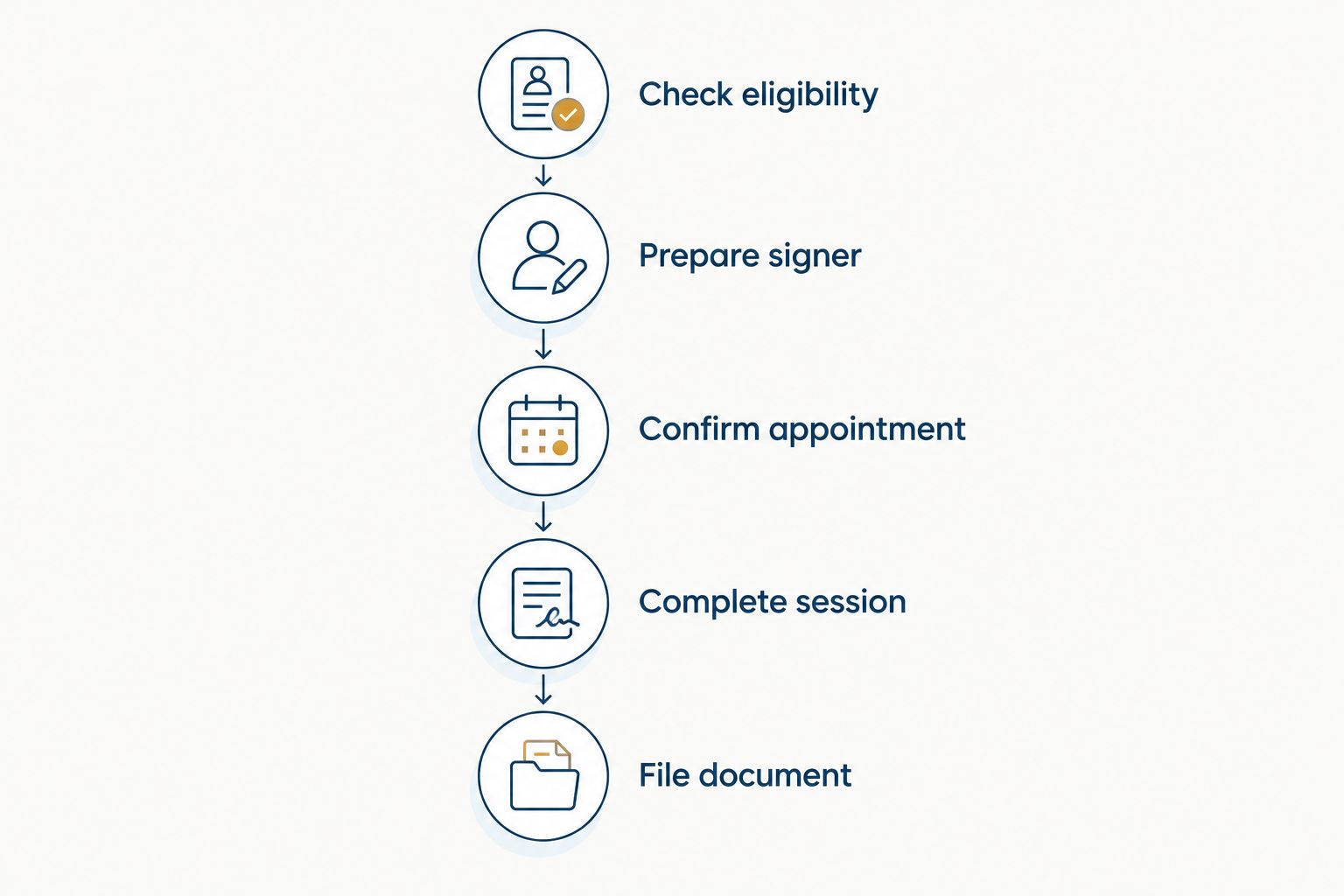
For repeated requests, keep a short process with these stages: Check eligibility, Prepare signer, Confirm appointment, Complete session, and File document. Reuse the administrative checklist, not an assumption that every document is eligible.
Your 2026 review should focus on preventable confusion rather than unnecessary reporting. If employees repeatedly ask the same preparation question, improve that instruction. If recipient requirements change, update the document-specific notes before scheduling another session.
- Check eligibility for each new document request.
- Prepare signer instructions using the current appointment guidance.
- Confirm appointment details before issuing calendar invitations as final.
- Complete session follow-up without assuming recipient acceptance.
- File document records according to your organization’s policy.
Compare appointment options for HR teams
Choose the format around the document and signer, not around a blanket department preference. Remote appointments remove the need for an in-person meeting, while mobile appointments address situations where an in-person visit is appropriate. Neither format eliminates preparation or identity verification.
| Option | Best for | Practical advantage | Key limitation |
|---|---|---|---|
| Maryland remote online notarization through Proof | Eligible documents and signers able to participate online | Supports a remote notarial session | Eligibility, recipient acceptance, and identity verification still require review |
| In-person mobile notary appointment | Requests suited to an in-person meeting | Brings the appointment to an agreed location | Baltimore County availability and appointment details must be confirmed |
| Recipient or legal review before scheduling | Unclear instructions or uncertainty about the required act | Resolves questions before an appointment is arranged | Does not itself complete a notarization |
CraigVet Notary Services offers the remote and mobile appointment options described above. The boundary is equally important: notarization is not legal advice, and submitting a request does not confirm a booking. If you need guidance on document wording or legal effect, obtain that guidance separately.
Request an HR notary appointment
Ask about eligible documents, Proof preparation, or Baltimore County mobile availability.
Common mistakes HR departments make
Treating Form I-9 as a notarization request
Form I-9 employment verification is not a notarial act. If your organization needs an authorized representative, ask about that service explicitly rather than booking a notarization and assuming it covers the task. Follow current USCIS instructions for the employer’s process.
Assuming one approval covers every employee document
A document accepted remotely for one request does not establish eligibility for another. Check the document, receiving organization’s instructions, and signer requirements each time. Reuse preparation materials only after confirming they still apply.
Asking employees to sign before instructions arrive
An early signature can conflict with the procedure required for the requested notarial act. Tell employees to follow the notary’s signing instructions instead of applying a department-wide sign-first rule. Send the document for review using the method the provider specifies.
Treating a request as a confirmed appointment
An inquiry is not a booking confirmation. Keep the request provisional until CraigVet Notary Services contacts the client and confirms the arrangements. This is particularly important when coordinating mobile availability or several employees’ calendars.
Asking the notary to resolve employment-law questions
A notary appointment does not replace advice about an agreement’s wording, enforceability, or employment-law implications. Craig is not an attorney and cannot provide legal advice. Resolve those questions with qualified counsel before asking an employee to complete the document.
FAQ
What's the best notary option for a Maryland HR department?
Maryland remote online notarization through Proof is an option for eligible HR documents when the signer can meet the appointment requirements. Confirm document eligibility and recipient acceptance first; use an in-person appointment when appropriate.
Can every HR document be notarized online?
No, remote notarization is not available for every document or situation. The document, requested notarial act, identity-verification requirements, and receiving organization's instructions need review before scheduling.
Do we need a notary to complete Form I-9?
No, Form I-9 does not require notarization under USCIS instructions. An employer's authorized representative performs a separate employment-verification function, so do not assume a notary appointment includes that service.
What should an employee prepare for a remote notary appointment?
The employee should prepare the document, the identification requested in the appointment instructions, and a device suitable for the online session. Follow the Proof session instructions and ask about signing before adding signatures.
Can HR book repeated notarizations for employees?
HR can coordinate repeated appointment requests, but each request still needs document and signer preparation. Use a coordinator and a consistent checklist without treating previous eligibility decisions as approval for future documents.
Are mobile notary appointments available in Baltimore County?
Baltimore County mobile availability must be confirmed before booking. An inquiry does not confirm an appointment; wait for direct contact and confirmation of the arrangements.
Can Craig advise us on an employment document's legal wording?
No, Craig is not an attorney and cannot provide legal advice. Ask qualified legal counsel about document wording, legal effect, and which notarial act is required when the instructions are unclear.
One last thing
A completed notarization and an accepted HR document are different outcomes. Build your 2026 workflow around both: confirm the recipient’s requirements before the appointment, then verify the document reached the right destination afterward. That final administrative check belongs to HR, not to the notarial certificate.


