

Notary services for elder care professionals are coordinated notarization appointments that help care teams obtain required notarial acts without taking over a resident’s decisions. For your 2026 Maryland workflow, start with remote online notarization through Proof for eligible documents, then confirm identity-verification requirements, the signer’s ability to participate, and the receiving organization’s instructions.
- CraigVet Notary Services offers notary services for elder care professionals through Maryland remote online notarization and mobile appointments.
- Use Proof for eligible documents only after confirming document requirements and the signer’s ability to participate.
- Confirm Baltimore County mobile availability before booking; a request is not a confirmed appointment.
- Keep identity verification, witness arrangements, and legal advice separate from appointment scheduling.
Why notary services matter for elder care professionals
Elder care teams coordinate more than signatures. A resident, family contact, receiving organization, facility staff member, and notary can each have a different role. An appointment fails its purpose when everyone attends but the document, identity requirements, or signing instructions remain unresolved.
For Maryland teams, CraigVet Notary Services offers remote online notarization through Proof and in-person mobile appointments. Remote service is the first option to review for eligible documents; mobile service is secondary, with Baltimore County availability confirmed before booking.
The practical benefit is a defined handoff. You gather instructions and arrange access, the signer participates directly, and the notary handles the notarial act. Do not treat notarization as legal review or assume a family member’s approval replaces the signer’s participation.
For your 2026 procedure, separate 3 checks: document eligibility, identity verification, and appointment confirmation. Passing one check does not settle the others.
How to coordinate an elder care notarization
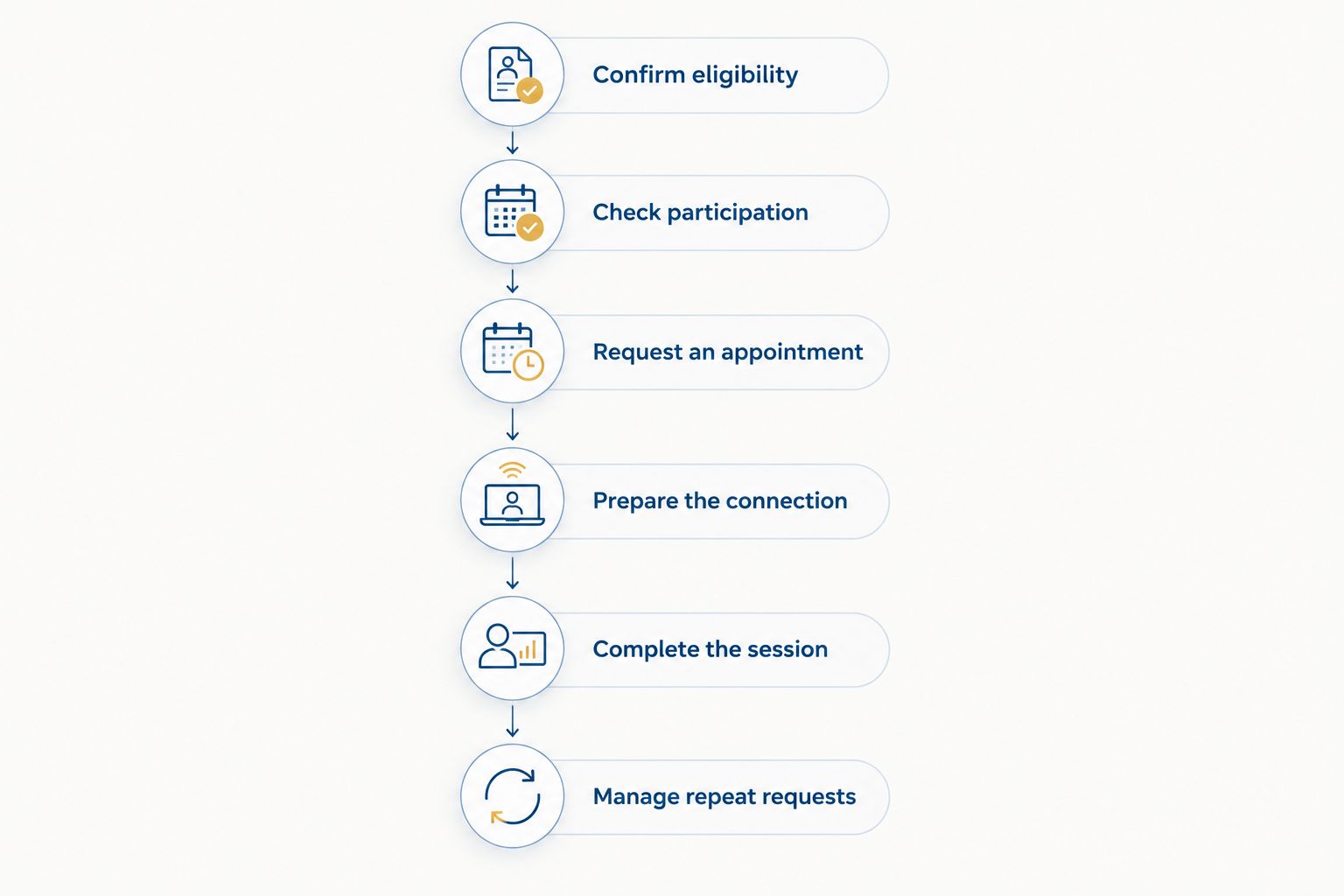
Confirm eligibility
Start manually: ask the document’s receiving organization what it requires and collect the current instructions. Identify the document by name and purpose without choosing legal language for the resident. A signature line alone does not establish whether notarization is necessary or whether remote notarization is acceptable.
Keep document acceptance separate from notarial eligibility. The receiving organization explains its submission requirements; the notary reviews whether the requested notarial service can proceed. If those instructions conflict or remain unclear, resolve the question before scheduling around staff or family availability.
Do not assume documents connected with elder care all follow the same process. A form’s title does not answer questions about witnesses, the required notarial act, or remote acceptance. Refer legal interpretation and document selection to an attorney.
- Identify the receiving organization and its contact person.
- Obtain the current document and signing instructions.
- Ask whether remote online notarization is accepted.
- Identify any stated witness or original-document requirements.
- Refer unresolved legal questions to an attorney.
Check participation
Speak directly with the intended signer when arranging the appointment. Explain that the person will need to communicate with the notary and complete the required identity-verification process. A family member’s familiarity with the resident does not, by itself, complete that process.
Choose a setting that supports direct communication. Hearing, vision, language, fatigue, or technology needs belong in appointment planning, not in a last-minute explanation after the session begins. Ask the notary how to address a specific communication need rather than assuming a caregiver can answer for the resident.
Age, a care setting, or a diagnosis alone is not your instruction to approve or reject an appointment. Describe practical concerns without making a legal determination. If willingness or understanding is in question, raise the concern before proceeding and seek appropriate professional guidance.
- Ask the signer whether they want to participate.
- Identify hearing, vision, language, or accessibility needs.
- Ask what identification and verification steps are required.
- Plan for direct communication without family members answering instead.
- Report concerns about pressure, confusion, or distress before the session.
Request an appointment
Once the basic requirements are clear, move from your manual checklist to a service request. CraigVet Notary Services is best for Maryland elder care teams seeking remote notarization for eligible documents. The veteran-owned service uses Proof for remote online notarization and also offers mobile appointments.
Send a concise summary: document type, number of signers, requested appointment format, relevant participation needs, and any instructions from the receiving organization. Ask how to provide sensitive documents securely rather than attaching resident records to a broad staff email.
A request starts coordination; it does not confirm the appointment. Do not tell a resident, family member, or facility team that the appointment is booked before CraigVet contacts you. For a mobile request, Baltimore County availability must be confirmed before booking. Keep this distinction explicit in your 2026 scheduling template.
- Name 1 coordinator for scheduling communications.
- Request remote notarization for eligible documents first.
- Describe accessibility needs without sending unrelated medical details.
- Ask about Baltimore County availability if mobile service is needed.
- Wait for direct contact and confirmation before announcing the appointment.
Prepare the connection
For remote notarization, use the appointment instructions to prepare the signer’s device and access to Proof. Check the camera, microphone, internet connection, and ability to open the required materials. A working video call does not establish that identity verification or document preparation is complete.
Staff can help with the physical setup while preserving the resident’s direct participation. Position the device so the signer can see and hear, arrange a quiet location, and keep instructions accessible. Ask in advance how any required witnesses will participate; do not assume staff attendance satisfies a witness requirement.
For an in-person mobile appointment, replace the technology check with an access check. Confirm the meeting location, facility entry procedure, and who will meet the notary. Do not assume a mobile appointment removes identification or document requirements.
- Test the camera, microphone, and connection.
- Follow the provided Proof access and document instructions.
- Arrange a quiet space for direct communication.
- Confirm witness arrangements separately from staff attendance.
- Check facility access instructions for a confirmed mobile visit.
Complete the session
During the appointment, let the notary guide the notarial process. Give the signer room to answer directly. Staff and family members should identify their roles rather than speak as though they are the signer.
Follow the notary’s instructions about when and how to sign. Some notarial acts involve different signing requirements, so avoid a blanket facility rule that every document must be signed beforehand. If instructions are unclear, ask before anyone adds a signature or changes the document.
The appointment should not become a document-drafting meeting. Craig is not an attorney and cannot provide legal advice. Questions about the meaning of a document, the authority it grants, or whether it protects someone’s interests belong with an attorney, not with the scheduling coordinator or notary.
- Have the requested identification and materials ready.
- Let the signer answer the notary directly.
- Follow the session’s signing instructions.
- Raise discrepancies before continuing.
- Stop coordination and seek clarification when legal questions remain unresolved.
Manage repeat requests
Build a repeatable administrative process without assuming the same answer applies to every resident or document. Reuse the checklist, not a previous eligibility decision. A new document, signer, receiving organization, or witness instruction calls for a fresh review.
Keep 2 separate checks in your closeout process: completion of the notarial appointment and acceptance by the receiving organization. A completed appointment does not establish that the recipient has accepted the submission. Confirm delivery instructions and track outstanding questions through the appropriate contact.
For your 2026 team procedure, record scheduling information and document status in the appropriate controlled system. Avoid copying identification details or sensitive documents into shared calendars. The goal is a clear handoff, not a second collection of resident records scattered across inboxes.
- Maintain a reusable intake and appointment checklist.
- Recheck eligibility for each new request.
- Record confirmation and completion status separately.
- Follow the receiving organization’s delivery instructions.
- Limit internal records to information your team needs.
The sequence is eligibility first, direct participation next, then scheduling and completion. This keeps a convenient appointment time from becoming a substitute for readiness.
Compare appointment options for elder care teams
Choose the format around the document and signer, not staff convenience alone. Remote service avoids arranging the notary’s physical attendance, but it adds technology and remote identity-verification requirements. Mobile service brings the appointment in person, but availability and facility access still require coordination.
| Option | Best for | Main advantage | Key limitation |
|---|---|---|---|
| CraigVet Notary Services remote notarization through Proof | Maryland teams coordinating eligible documents with signers able to participate remotely | No in-person notary visit to arrange | Eligibility, identity verification, technology, and recipient instructions still need confirmation |
| In-person mobile notarization | Signers whose appointment needs an in-person format | Direct, in-person interaction with the notary | Baltimore County availability must be confirmed before booking; facility access needs coordination |
| Legal review before scheduling | Residents or families with unresolved questions about document meaning or authority | Separates legal decisions from the notarial appointment | Legal review is not notarization and does not replace the appointment |
Remote and mobile appointments are different delivery formats, not different levels of legal protection. Neither format substitutes for advice about whether a resident should sign a particular document. Keep service selection and legal decision-making separate.
Request a notarization appointment
Ask about eligible remote documents or Baltimore County mobile availability. Wait for direct confirmation.
Common mistakes elder care teams should avoid in 2026
Treating family permission as signer participation
A relative arranging the appointment does not replace the resident’s role. Ask who will sign, who is coordinating, and whether anyone claims authority to act for another person. Refer uncertainty about that authority to an attorney instead of resolving it through scheduling assumptions.
Assuming every care-related form needs notarization
Start with the receiving organization’s instructions. Do not add notarization merely because a document concerns health, finances, or family arrangements. If the form lacks clear instructions, obtain clarification rather than choosing a notarial act for the resident.
Calling a request a confirmed booking
Tentative calendar holds are internal planning tools. They are not confirmation from the service provider. Wait for direct contact before arranging resident transport, changing staff coverage, or telling family members the appointment is settled.
Bringing witnesses without checking the requirements
A person who helps with a device is not automatically an appropriate witness. Confirm whether witnesses are required and what instructions apply to their participation. Resolve those arrangements before the appointment rather than asking whoever is nearby to join.
Reusing an old resident’s verification plan
A previous appointment is a process example, not approval for another signer. Recheck the current document, identification instructions, communication needs, and receiving organization’s requirements. Preserve the checklist while reviewing the individual request afresh.
FAQ
What’s the best notary option for an elder care team in Maryland?
Start by reviewing remote online notarization for eligible documents when the signer can participate through Proof. CraigVet Notary Services offers that format and mobile appointments; confirm Baltimore County mobile availability before booking.
Can every elder care document be notarized online?
No, remote notarization is not suitable for every document or appointment. Confirm document eligibility, the receiving organization’s instructions, and the signer’s ability to complete identity verification before scheduling.
Can a caregiver answer identity questions for a resident?
Do not plan for a caregiver to answer identity-verification questions in place of the signer. A caregiver can help with logistics, but the signer must complete the applicable process under the notary’s instructions.
Does submitting an appointment request mean the appointment is booked?
No, submitting a request does not confirm an appointment. Wait until CraigVet contacts you and confirms the arrangements before telling residents, relatives, or staff that the appointment is booked.
Should a resident sign the document before the appointment?
Follow the notary’s instructions rather than signing in advance by default. Signing requirements depend on the notarial act, so ask before the resident signs if the instructions are unclear.
Can the notary explain whether a power of attorney is right for a resident?
No, Craig is not an attorney and cannot provide legal advice about whether a power of attorney is appropriate. An attorney should address document selection, legal effect, and questions about authority before the notarial appointment.
What should a care facility prepare for a mobile notary visit?
Prepare the requested documents and identification, a suitable meeting space, and clear facility access instructions. Confirm Baltimore County availability, witness arrangements, and the appointment itself before organizing the visit.
One last thing
An unfinished notarization can be the correct outcome when a requirement remains unresolved. Your team’s job is to prepare a suitable appointment, not to obtain a signature at any cost.
Put a pause instruction in your 2026 checklist: if the document, identity process, willingness, or legal authority raises an unresolved concern, stop and ask the appropriate professional. A clear pause protects the resident’s role and prevents scheduling pressure from deciding what happens next.


