

Instead of printing and arranging travel to get your LegalZoom documents notarized in Maryland, request a remote online appointment for eligible documents through Proof. Start with document review and recipient acceptance, then complete identity verification and the notarial session after your appointment is confirmed.
- LegalZoom documents notarized Maryland workflow: check eligibility and recipient acceptance before arranging a Proof appointment.
- CraigVet Notary Services offers Maryland remote online notarization for eligible documents, with mobile appointments as a secondary option.
- Submitting an appointment request does not confirm an appointment; wait for direct contact.
- Notarization does not replace legal review, witness requirements, or delivery to the receiving organization.
Why this matters
Downloading a document from LegalZoom and completing a Maryland notarization are separate tasks. A completed template does not establish whether remote notarization fits the document, whether witnesses are needed, or whether the receiving organization accepts an electronically notarized copy.
CraigVet Notary Services is best for Maryland individuals and businesses seeking remote online notarization of eligible documents. You can start with CraigVet Notary Services, explain what needs notarizing, and ask about the appointment process before signing.
For your 2026 paperwork, separate these decisions: what the document needs, how the notarization will happen, and where the completed document must go. Resolving them in that order prevents an appointment from becoming a document-preparation discussion that the notary cannot provide.
Before you start
- Prepare the document and recipient instructions. Have the intended final LegalZoom document, its signature and notarial pages, and any written requirements from the organization receiving it. Identify every signer and ask about witnesses before scheduling.
- Prepare for Proof identity verification. Have identity documents ready and access to a device with a working camera, microphone, and internet connection. Follow the identification and technical requirements supplied for your appointment rather than assuming a particular credential will qualify.
- Check the acceptance gap. A document being eligible for remote notarization does not establish that its recipient accepts electronic execution or delivery. Ask the recipient first, and do not sign until the instructions for your notarial act are clear.
You do not need to guess which notarial certificate applies. If the required act or document language is unclear, obtain direction from the receiving organization or an attorney before the session.
Document eligibility and recipient requirements
Establish the document requirements
- Identify the document. Record its name, purpose, signer names, and intended recipient. Explain whether you are signing personally or on behalf of a business; do not assume those capacities are interchangeable.
- Review the complete packet. Check that the intended version includes all pages, attachments, signature areas, and any existing notarial certificate. Resolve drafting questions before arranging execution.
- Ask the recipient about acceptance. Confirm whether it accepts remote online notarization and an electronic document. Ask separately about witnesses, original-paper requirements, and any submission or recording instructions.
- Clarify the required notarial act. Pass along the recipient's instructions. If no act is specified and you need help deciding what the document legally requires, ask an attorney rather than asking the notary to make that legal choice.
Expected result: You can describe the document, identify its signers, and explain what the recipient requires without relying on the document's source as proof of eligibility.
Use these 3 checks for every 2026 request: document readiness, remote eligibility, and recipient acceptance. Each answers a different question; passing one does not settle the others.
For example, a recipient's willingness to accept an electronic copy does not answer whether the document needs witnesses. Likewise, a signature line does not, by itself, identify the notarial act required.
Appointment request and confirmation
Arrange the appropriate appointment
- Describe your request accurately. Tell CraigVet Notary Services that your document originated with LegalZoom, identify its purpose, and explain whether you want remote online notarization through Proof.
- Disclose participation requirements. Identify additional signers, requested witnesses, accessibility needs, or a signer joining from another location. Ask how those circumstances affect eligibility and appointment arrangements.
- Follow the document-sharing instructions provided. Do not send sensitive documents or identification through a channel merely because it is convenient. Ask which method to use before transmitting personal information.
- Wait for direct confirmation. A submitted request is not a confirmed appointment. Wait until CraigVet Notary Services contacts you about eligibility, scheduling, and next steps before telling other participants that the session is booked.
Expected result: You have confirmation of the appointment and instructions that match your document and participants, rather than an unanswered request or assumed booking.
For business requests, identify a coordinator who can collect recipient requirements and relay scheduling information. The coordinator can organize the process, but each signer still needs to satisfy the applicable participation and identity-verification requirements.
Remote online or mobile appointment?
Remote online notarization is the first route to check for eligible documents. Mobile appointments are a secondary service; confirm Baltimore County availability before booking.
| Appointment route | Best for | Practical benefit | Limitation to resolve |
|---|---|---|---|
| Remote online notarization through Proof | Eligible documents whose recipients accept remote electronic notarization | You participate without arranging an in-person meeting | Document eligibility, identity verification, technology, and recipient acceptance must align |
| In-person mobile appointment | Documents or circumstances requiring an in-person process | You can discuss an in-person appointment instead of using a remote session | Baltimore County availability and appointment details require confirmation |
Choose the execution method the document and recipient support, not simply the method that feels easier. Neither route resolves missing legal instructions or an incomplete document.
Request a document eligibility review
Explain your document and recipient requirements before arranging a remote or mobile appointment.
Proof preparation and live session
Prepare for identity verification
- Use the appointment instructions you receive. Open the supplied session instructions and follow the current Proof prompts. Do not assume that an unrelated LegalZoom account connects automatically to your notary appointment.
- Check your equipment. Test camera and microphone access on the device you intend to use. Choose a quiet, private setting where you can hear instructions and keep the document accessible.
- Complete the requested identity steps. Follow Proof's instructions for the verification method presented to you. Do not substitute another person's identification or ask another person to complete your verification.
- Keep the signing sequence clear. Follow the notary's instructions about when to sign, acknowledge a signature, or take an oath or affirmation, as applicable. Do not treat every notarial act as the same procedure.
Expected result: Your equipment works, the required identity process is completed, and you understand how to participate in the live session.
For your 2026 appointment, use the current instructions rather than screenshots from an older walkthrough. Interface labels and verification steps can change; the instructions supplied for your session take precedence over a generic guide.
Complete the notarial session
- Confirm the intended document. Before execution, check that the document presented is the version you prepared and that your name and signing capacity are correct.
- Participate directly. Answer the notary's questions yourself and follow the instructions for the required act. Raise any uncertainty before completing a signature or other action.
- Address unresolved requirements before proceeding. If a witness, attachment, or recipient instruction is missing, stop and clarify it. Do not assume it can be added afterward without affecting the completed packet.
- Follow the completion instructions. Ask how you will receive the completed notarized document and what to do if you cannot access it. Do not mistake a draft or unsigned download for the completed record.
Expected result: The required notarial act has been completed, and you know how to access the resulting document.
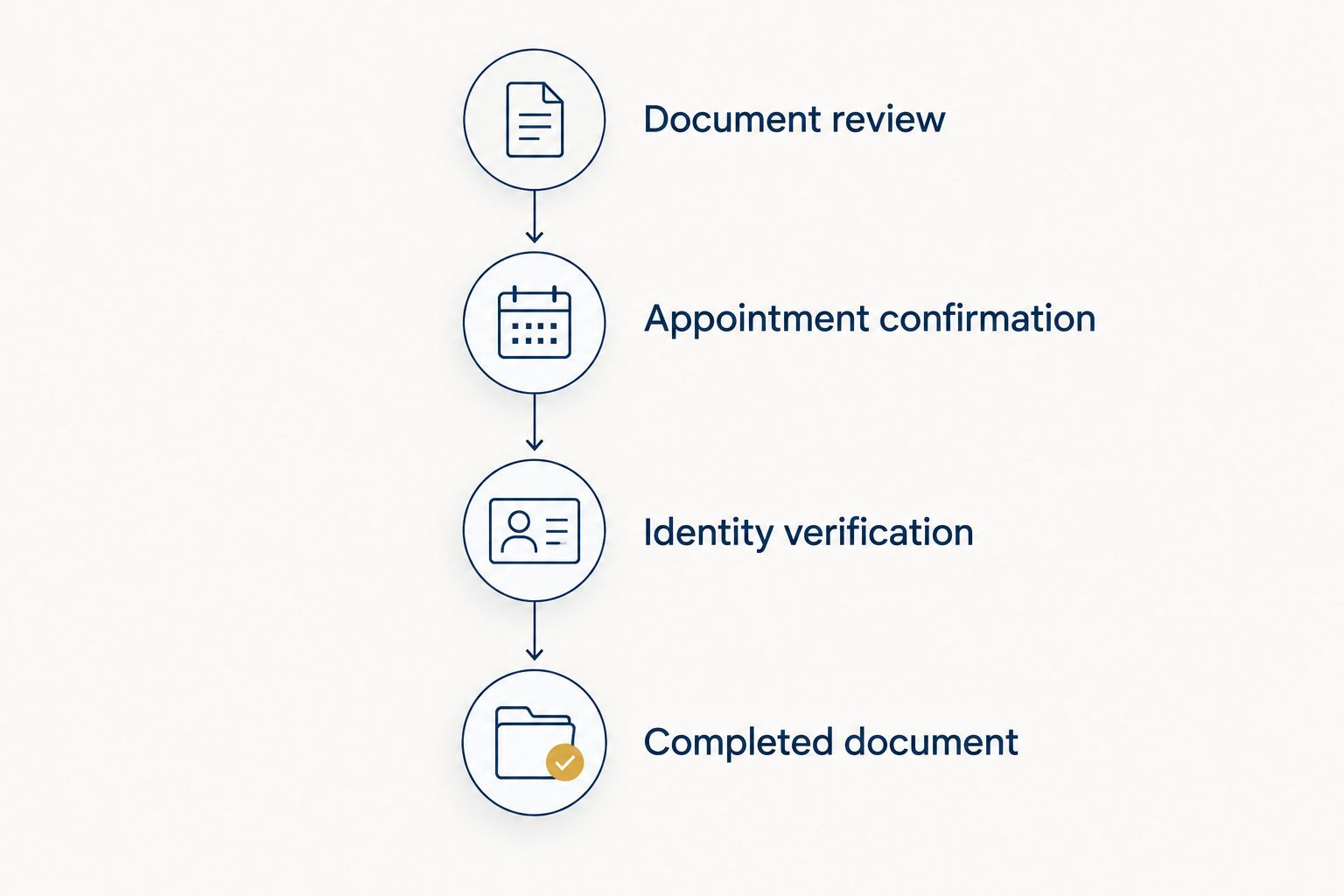
The workflow has four distinct checkpoints: Document review, Appointment confirmation, Identity verification, and Completed document. Keep them separate in your own checklist so that submitting a request never gets mistaken for finishing the notarization.
Completed document and delivery
Preserve and submit the completed record
- Identify the completed file. Distinguish the notarized document from your original LegalZoom download, preparation copies, and any incomplete versions.
- Preserve the file as delivered. Do not edit or rebuild an electronically signed document to improve its appearance. If something needs correction, ask about the proper correction process before changing it.
- Submit it using the recipient's instructions. Confirm whether the recipient wants an electronic file or another delivery method. Printing an electronic document does not settle whether the paper copy meets the recipient's requirements.
- Record the submission outcome. Keep the completed document and the recipient's acknowledgment of receipt separately. Ask about any additional filing or acceptance steps instead of assuming notarization finishes the transaction.
Expected result: You retain the completed record and know whether the intended recipient has received it.
Keep 2 records in your administrative file: the completed notarized document and the recipient's submission response. This is a practical recordkeeping recommendation, not a statement about a mandatory retention period.
Repeat workflow for Maryland businesses
For recurring LegalZoom documents in 2026, standardize preparation without treating every document as identical. A repeatable intake checklist reduces repeated questions while preserving a fresh eligibility check for each request.
Use this adjacent workflow whenever a new document or revised version needs notarization:
- Create a fresh intake entry. Record the document type, current version, recipient, signers, and requested completion date.
- Recheck execution instructions. Ask whether the recipient's remote-notarization, witness, or delivery requirements have changed.
- Request the next appointment. Send the updated circumstances through the instructed channel and wait for confirmation.
- Repeat verification and completion. Do not assume an earlier appointment exempts a signer from requirements for a later session.
- Close the record. Store the completed version separately from the working document and record the recipient's response.
Do not edit an already notarized document to reuse its completed notarization. Ask about the proper process when substantive changes are needed. A new version requires its own execution review; an earlier completed file is not a reusable approval stamp.
This guide describes a coordinated document-to-appointment process. It does not depend on a claimed automatic connection between LegalZoom and Proof.
Troubleshooting
The receiving organization rejects remote notarization
Ask what execution and delivery method it requires before arranging another session. If an in-person appointment is needed, request mobile appointment information and confirm Baltimore County availability; do not assume changing the delivery format resolves the rejection.
Identity verification does not complete
Follow the error instructions shown in Proof and tell the notary where the process stopped without sending identification through an unrequested channel. Ask about the appropriate next step rather than repeatedly changing personal information to force a match.
The camera or microphone is blocked
Check device and browser permissions, close applications using the same camera or microphone, and reopen the session as instructed. Tell the notary about the interruption; do not assume an incomplete connection counts as participation.
A witness or certificate requirement appears late
Pause and obtain the missing instructions. The notary cannot provide legal advice about which certificate your transaction needs, and an appointment should not proceed on the assumption that an omitted witness requirement is optional.
The document changes after notarization
Preserve the completed file and ask about the process for the revised document. Do not replace pages, modify signed content, or attach an old completed certificate to a new version.
Customize your workflow
For repeat business appointments, separate preparation work from signing work. Your office can gather recipient instructions and coordinate participants, while the signer remains responsible for participating in identity verification and the notarial session.
Maintain a 2026 checklist with document purpose, recipient requirements, signer details, witness questions, appointment status, and delivery status. Mark each item as confirmed only when the relevant person or organization has actually confirmed it.
Craig is not an attorney and cannot provide legal advice. CraigVet Notary Services provides notarial services, not a legal determination that a LegalZoom document accomplishes your intended purpose; take questions about legal effect, drafting, or enforceability to an attorney.
FAQ
Can I get LegalZoom documents notarized online in Maryland?
Eligible LegalZoom documents can be considered for Maryland remote online notarization through Proof. Confirm the document requirements, signer eligibility, and recipient acceptance before arranging execution.
Does downloading my LegalZoom document complete the notarization?
No. Downloading a document is separate from completing the required notarial act. Prepare the intended final version and follow the appointment instructions before signing.
Do I need to sign my LegalZoom document before the Proof appointment?
Follow the notary's instructions rather than signing automatically before the session. The signing or acknowledgment procedure depends on the required notarial act.
Is my appointment confirmed when I submit a request?
No. Your appointment is not confirmed until CraigVet Notary Services contacts you about the arrangements. Wait for confirmation before treating a requested time as booked.
What should I do if my document needs witnesses?
Identify the witness requirement before scheduling and ask how it must be satisfied. Do not assume remote notarization removes witness requirements or that witnesses are automatically supplied.
Can I use a mobile notary instead of Proof?
Ask about an in-person mobile appointment when remote notarization is unsuitable or an in-person process is required. Baltimore County availability and appointment arrangements must be confirmed before booking.
Can the notary tell me whether my LegalZoom document is legally sufficient?
No. Craig is not an attorney and cannot provide legal advice. Ask an attorney about legal sufficiency, document wording, or whether the document achieves your intended result.
One last thing
Ask the receiving organization about acceptance before you ask anyone to sign. A completed notarization and an accepted submission are separate outcomes. Save the recipient's written instructions with your working document so that the appointment follows the requirements of the transaction, not assumptions about the template.


