

No. An electronic signature records your act of signing, while a notarized signature involves a notary performing a required notarial act; eligible documents can also be signed and notarized electronically through Maryland remote online notarization. Signing electronically does not, by itself, satisfy a requirement for notarization.
- Is an electronic signature the same as a notarized signature? No; electronic signing alone does not include a notarial act.
- Maryland remote online notarization combines electronic documents with a notary-led process for eligible documents.
- CraigVet Notary Services offers Maryland remote online notarization through Proof; eligibility must be checked before proceeding.
- Ask the receiving organization whether it requires notarization and accepts the proposed document format.
Why this matters
An electronic signature and notarization answer different questions. The signature records the signer’s action; the notarial act addresses requirements such as acknowledgment or an oath, depending on the document and instructions.
For your 2026 paperwork, identify both requirements before signing. A document can need an electronic signature without notarization, or it can need notarization even though you have already signed it electronically.
CraigVet Notary Services is best for Maryland individuals and businesses seeking remote online notarization for eligible documents through Proof. Mobile appointments are a secondary option, with Baltimore County availability confirmed before booking; neither route removes the need to check document eligibility.
Is an electronic signature the same as a notarized signature?
An electronic signature is a signing method, not a substitute for a required notarial act. Notarization adds a separate procedure performed by a notary, including identity verification and completion of the appropriate notarial certificate.
Electronic signing and notarization are therefore not competing technologies. They describe different parts of a transaction and can occur together.
| Option | Best for | What it involves | Main limitation |
|---|---|---|---|
| Electronic signature without notarization | Documents whose instructions require signing but not notarization | Signing electronically through an accepted method | Does not satisfy a separate notarization requirement |
| In-person notarization | Eligible documents requiring physical appearance before a notary | Meeting the notary and completing the required notarial act | Requires coordinating an in-person appointment |
| Remote online notarization | Eligible documents accepted in remotely notarized electronic form | Appearing before a notary through an online audiovisual process | Requires document eligibility, identity verification, and suitable technology |
The practical advantage of an electronic signature is that you can sign without handling a paper original when the transaction permits it. Its limitation is equally important: a signature field does not establish that a notary participated.
Remote online notarization addresses that separate need without an in-person meeting. Its limits include document requirements, the receiving organization’s instructions, and the signer’s ability to complete the online process.
How do you arrange Maryland remote online notarization?
Start with the receiving organization’s instructions, then confirm whether the document is eligible for remote notarization. CraigVet Notary Services provides Maryland remote online notarization through Proof, but an appointment request is not a confirmed appointment.
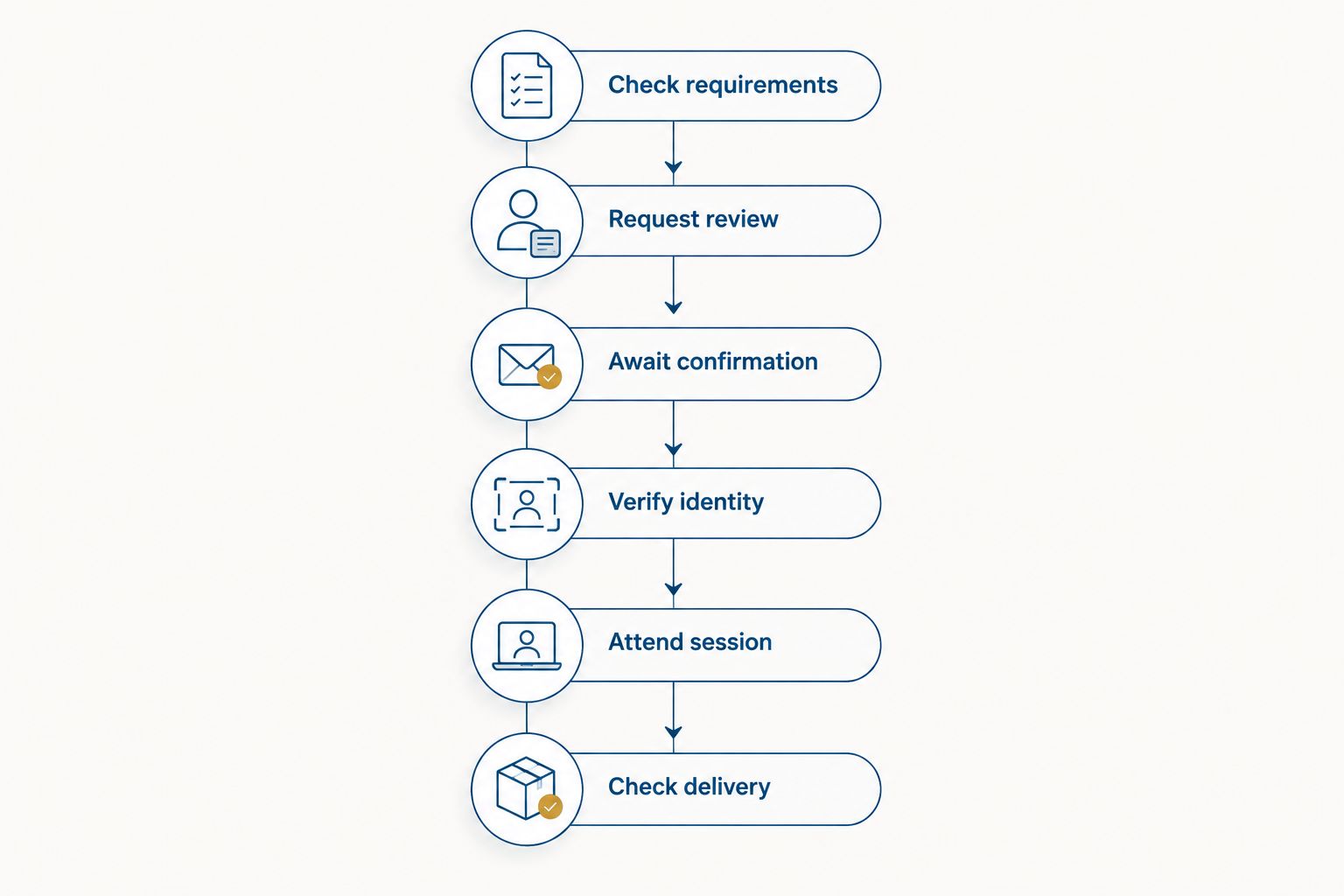
Use this sequence for your 2026 appointment preparation:
- Check requirements. Ask the receiving organization whether notarization is necessary and whether it accepts a remotely notarized electronic document. Identify any requirements for originals, witnesses, or document-specific wording.
- Request review. Describe the document and the requested notarial act. Ask how to provide the document securely for eligibility review rather than sending sensitive information through an unrequested channel.
- Await confirmation. Wait for CraigVet to contact you about eligibility, appointment details, and preparation. Do not treat a submitted inquiry or preferred appointment time as a booking confirmation.
- Verify identity. Follow the identity-verification instructions provided for the Proof appointment. Prepare the identification requested and resolve questions about names or credentials before the session.
- Attend session. Join the online audiovisual appointment with the necessary document and working equipment. Follow the notary’s directions about signing, acknowledgment, or any required oath or affirmation.
- Check delivery. After completion, follow the instructions for obtaining the notarized document and submitting it to the receiving organization. Confirm whether the recipient needs the electronic file rather than a printed copy.
These steps separate document preparation from the actual notarial act. Completing an upload, identity check, or appointment request alone does not mean your document has been notarized.
What does identity verification change?
Identity verification is part of the notarial process, not simply a substitute for a signature. An electronic-signature service’s login or verification feature does not, on its own, establish that a notary performed a notarial act.
For a remote appointment, follow the verification process provided for that session. Do not assume that an identification document accepted for another transaction will automatically satisfy the appointment’s requirements.
Prepare these details before the appointment:
- The signer’s name as it appears on the document.
- The identification requested in the appointment instructions.
- Any difference between the document name and identification name.
- A device and connection that support the required audiovisual session.
- Access to the document and the instructions from its recipient.
Ask about a name discrepancy before signing rather than trying to correct it during the session. Do not change legal wording or choose a notarial certificate based on guesswork.
Why signing and notarization requirements vary
The right process depends on the document and its intended use, not just whether a signing app offers a signature button. These factors determine what you need to confirm:
- Document instructions. Read whether the document calls for a signature, acknowledgment, oath, affirmation, witnesses, or another requirement. Those terms are not interchangeable.
- Receiving organization. Ask what the recipient accepts, including electronic files, remote notarization, and any required original. A completed notarial act does not answer every submission question.
- Notarial act. An acknowledgment and a jurat involve different procedures. Obtain direction from the document preparer, receiving organization, or an attorney if you do not know which act is required.
- Identity verification. The signer must meet the applicable identification requirements. A saved electronic signature or an existing online account does not eliminate that step.
- Appointment format. Remote appointments require an eligible document and suitable technology. Mobile appointments require an agreed location and confirmed availability.
- Additional participants. Documents involving witnesses or multiple signers need advance coordination. Do not assume that booking a notary also arranges every other participant.
For a 2026 business workflow, record these requirements by document type. A single instruction to have everything electronically signed leaves the notarization question unanswered.
Can a document be electronically signed and notarized?
Yes. An eligible document can carry both an electronic signature and an electronic notarial certificate. In remote online notarization, the signer and notary participate through the required online process rather than meeting in person.
The key distinction is participation by a notary performing the appropriate act. A signature image, typed name, or electronic-signature completion record does not become notarization merely because it appears in the same file.
Before using remote notarization, ask whether the recipient accepts that format for the specific document. Do not treat acceptance of ordinary electronic signatures as confirmation that every remotely notarized document will be accepted.
Can you notarize a document you already signed electronically?
An existing electronic signature does not establish whether the document can be notarized as submitted. The answer depends on the required notarial act, the document, and the process available for that appointment.
For example, an acknowledgment concerns acknowledging execution, while a jurat involves an oath or affirmation and signing as required before the notary. Send the instructions for review before deciding whether to sign again or prepare a fresh copy.
Do not delete a signature, change a date, or replace certificate wording simply to make the file look ready. Ask the document preparer or receiving organization how to correct a document that was signed in the wrong sequence.
Does notarization prove that the document is legally valid?
No. Notarization does not establish that a document’s terms are legally correct or suitable for your situation. It records the notarial act; it is not a legal review of the agreement.
Craig is not an attorney and cannot provide legal advice. Ask an attorney about legal effect, document selection, disputed wording, or which legal arrangement protects your interests.
This distinction matters even when every appointment step is completed correctly. A properly notarized signature cannot replace the legal advice you need about the document itself.
What should businesses with repeat notarizations standardize?
Standardize the preparation, not assumptions about eligibility. A repeat business process works better when staff know which questions to resolve before requesting an appointment.
For your 2026 document procedures, keep a short instruction sheet for each recurring document type:
| Record | Practical purpose | Boundary to preserve |
|---|---|---|
| Recipient instructions | Shows what the receiving organization requests | Recheck instructions when the recipient changes them |
| Signing and notarization requirements | Separates an ordinary signature from a notarial act | Staff should not select legal wording without proper direction |
| Signer details | Helps identify name discrepancies early | Do not circulate identification unnecessarily |
| Witness requirements | Identifies whether other participants need arranging | Do not assume the notary supplies witnesses |
| Submission format | Clarifies electronic-file or original-document requirements | Do not assume a printout replaces the completed electronic file |
Keep access to sensitive documents limited to people who need it. Use the document-sharing method provided for the appointment rather than creating additional copies across unrelated systems.
For repeat Maryland remote online notarization, CraigVet Notary Services can be a service contact while your business maintains its own recipient instructions. Eligibility and appointment confirmation still apply to each request.
When should you ask about a mobile appointment?
Ask about mobile notarization when an in-person appointment better matches the document’s requirements or the signer’s circumstances. A mobile notary meets you in person; the travel arrangement does not change the required notarial act.
Baltimore County availability must be confirmed before booking. Provide the proposed location, document type, signer details, and any witness instructions when making your request.
Do not assume that switching to mobile service solves every eligibility issue. Questions about the document’s legal wording or the recipient’s requirements still need answers before the appointment.
FAQ
Is typing my name the same as having my signature notarized?
No. Typing your name can function as an electronic signature in an appropriate transaction, but it does not establish that a notary performed a notarial act. Check whether the document separately requires notarization.
Can I use Maryland remote online notarization instead of meeting a notary?
Yes, for eligible documents that can proceed through the required remote process. Confirm document eligibility and the receiving organization’s format requirements before arranging the appointment.
Does an electronic-signature completion certificate count as notarization?
An electronic-signature completion certificate alone does not establish notarization. Look for the completed notarial certificate and confirmation that the required notarial act occurred.
Should I sign my document before the online notary appointment?
Follow the appointment instructions before signing. The required notarial act determines the signing procedure, so ask about an existing signature rather than assuming it is acceptable.
Can my business arrange recurring remote notarizations?
Your business can request remote notarization appointments for recurring needs. Each document still needs eligibility review, and each signer must complete the applicable identity-verification and notarial requirements.
Is my appointment confirmed when I submit a request?
No. Your appointment is not confirmed until CraigVet contacts you. Wait for confirmation and preparation instructions before treating your requested time as booked.
Can Craig tell me which legal document or notarial wording to use?
Craig is not an attorney and cannot provide legal advice. Ask the document preparer, receiving organization, or an attorney for the direction appropriate to your question.
One last thing
Keep the completed electronic file, not just a screenshot of the signature. A visible signature is only part of the document, and a screenshot leaves out the rest of the file and its notarial certificate.
Before closing a 2026 transaction, confirm that you have the completed document and know how the recipient wants it submitted. That final check keeps electronic signing, notarization, and document delivery from being mistaken for the same task.


