

Instead of arranging a notary stamp for Form I-9, use your employer’s authorized verification process: Form I-9 is not notarized. For separate eligible documents, CraigVet Notary Services offers Maryland remote online notarization through Proof; keep that appointment separate from employment eligibility verification.
- For i-9 remote verification notary maryland, the answer is employer-authorized verification, not a notarial seal.
- Only qualifying E-Verify employers can use the DHS-authorized remote document examination procedure.
- CraigVet Notary Services offers Maryland remote online notarization through Proof for separate eligible documents.
- An appointment request is not confirmation; wait for CraigVet Notary Services to contact you.
Why this matters
A remote employee can need two different services: employment eligibility verification and notarization of a separate document. Combining them creates the wrong expectation. A notarial seal does not satisfy an employer’s Form I-9 responsibilities, and an ordinary video call does not automatically qualify as authorized remote document examination.
CraigVet Notary Services is for Maryland clients needing eligible documents notarized, not a replacement for employer I-9 verification. The employer must identify the permitted verification route before the employee schedules anything.
For your 2026 workflow, use the current USCIS Form I-9 instructions, USCIS I-9 Central guidance, and the Department of Homeland Security’s alternative procedure requirements. Those federal sources govern employment verification; Maryland notarial requirements govern a separate notarial act.
Before you start
- Get employer instructions. Identify the person responsible for Form I-9, the employment start date, and whether the employer has designated an authorized representative or qualifies for the DHS-authorized alternative procedure.
- Prepare the right materials. Have the current Form I-9 and acceptable employment verification documents ready. For a separate Proof appointment, prepare the eligible document, identity verification materials requested for that session, and a device that supports the required audio and video connection.
- Do not confuse the two identity checks. Proof identity verification for notarization does not replace Form I-9 document examination. Do not assume a notary accepts authorized-representative assignments, or that a submitted appointment request confirms an appointment.
Choose the correct route
These routes answer different questions. Select the employment verification route with your employer, then address any separate notarization requirement.
| Route | Best for | What it accomplishes | Main advantage | Main limitation |
|---|---|---|---|---|
| Physical document examination | Employers using the standard I-9 procedure | An employer or authorized representative examines acceptable documents in the employee’s physical presence | Supports verification without the remote alternative procedure | Requires an in-person meeting; it is not notarization |
| DHS-authorized alternative procedure | Qualifying E-Verify employers with remote employees | Uses document copies and live video under federal requirements | Allows qualifying employers to examine documents remotely | An ordinary video call or E-Verify enrollment alone is insufficient |
| Separate Maryland notarization | People with an independently required, eligible document | Performs the requested notarial act after applicable checks | Addresses the separate document’s notarization requirement | Does not complete or validate Form I-9 |
Employer instructions and eligibility review
Establish the verification route
- Contact the employer’s Form I-9 administrator. Ask whether the employer requires physical document examination or uses the DHS-authorized alternative procedure. Do not choose remote examination merely because the job is remote.
- Confirm who will act for the employer. For physical examination, the employer can designate an authorized representative. The employer remains responsible for errors made by that representative; a notary commission is not what authorizes the I-9 work.
- Check remote-procedure eligibility. The alternative procedure is for qualifying employers enrolled in E-Verify and in good standing, subject to the applicable hiring-site and implementation requirements. Ask the employer to confirm eligibility rather than treating enrollment as sufficient.
- Record the deadline. The employee completes Section 1 no later than the first day of employment for pay, after accepting the job offer. The employer generally completes Section 2 within 3 business days of that first day. Employment lasting fewer than 3 business days has an earlier completion requirement: Section 2 is due on the first day.
Expected result: You know the permitted examination method, the responsible person, and the completion deadline before sending documents or arranging an appointment.
For a repeat-hiring business, put these decisions into the onboarding checklist. Your 2026 procedure should distinguish the person who schedules meetings from the person authorized to complete the employer’s verification responsibilities. A calendar invitation alone establishes neither authority nor compliance.
Employment document examination
Complete the employer’s selected procedure
- Complete Section 1 accurately. The employee enters the required information and signs the employee attestation. Use the applicable preparer or translator supplement when someone assists in that capacity.
- Choose acceptable documents. The employee chooses an acceptable List A document, or an acceptable List B document together with an acceptable List C document, subject to the form’s instructions. Employers must not demand a particular document because of citizenship, immigration status, or national origin.
- Follow the examination route. Under the standard procedure, the employer or designated representative physically examines the documents in the employee’s presence. Under the authorized alternative procedure, the employer first examines copies, including the back when a document is two-sided, and then conducts a live video interaction in which the employee presents the same documents.
- Complete Section 2. The employer or authorized representative records the required document information, employment information, and certification. When using the DHS-authorized alternative procedure, the employer checks the designated alternative-procedure box on the current form.
- Handle required records. Employers using the alternative procedure retain clear, legible copies of all documents examined under that procedure. Follow the applicable E-Verify case-creation requirements separately; completing Form I-9 does not itself create an E-Verify case.
Expected result: The employer has a completed verification record based on the permitted procedure, not a stamped form or a generic video identity check.
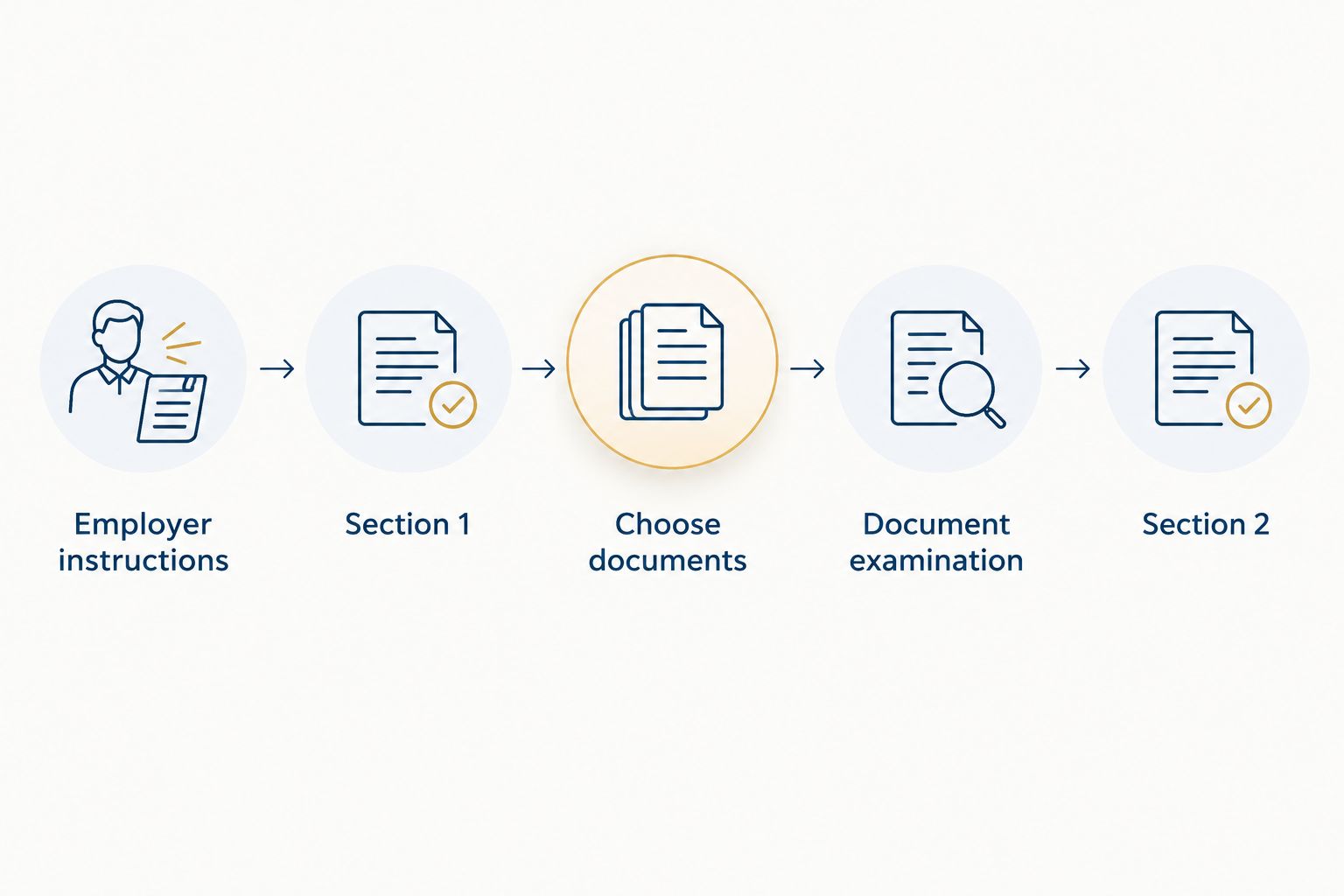
The diagram separates document selection from examination because they are different responsibilities. The employee chooses acceptable documents; the employer determines and performs the authorized examination procedure.
Keep the records under the employer’s retention policy and federal requirements. Form I-9 generally must be retained for 3 years after the date of hire or 1 year after employment ends, whichever is later. Do not substitute a notarial certificate for those records.
For 2026 onboarding, use the current USCIS instructions for receipts, document extensions, reverification, and other exceptions. An unfamiliar document is a reason to check those instructions, not to ask the employee for an extra document by default.
Separate Maryland notarization appointment
Prepare an eligible document through Proof
- Identify the separate document. Ask the requesting organization whether a document other than Form I-9 requires notarization. Confirm the required notarial act with that organization or an attorney; do not ask the notary to make a legal choice for you.
- Request an eligibility review. Tell CraigVet Notary Services what document needs notarization, who will sign, and where the completed document will be submitted. Remote eligibility and the recipient’s acceptance must be addressed before proceeding.
- Wait for contact and appointment instructions. A request is not a confirmed appointment. Follow the instructions provided after contact rather than assuming that submitting details reserves a session.
- Prepare for identity verification and live participation. Follow the Proof session instructions for identity verification and device access. Have the document and any required participants ready, and follow the notary’s directions about signing or acknowledging a signature.
- Check the completed document. Confirm that you received the completed notarized document and that the requesting organization’s submission instructions are clear. Send Form I-9 materials through the employer’s approved channel, not as part of an unrelated notarization request.
Expected result: The eligible document receives its own notarial process, while the employer’s I-9 file remains a separate record.
Craig is not an attorney and cannot provide legal advice. Questions about legal effect, document drafting, or which notarial act to request belong with the requesting organization or an attorney.
Request an eligible document review
Ask about Maryland remote online notarization through Proof. Wait for contact before treating an appointment as confirmed.
Alternative workflow: physical examination for a remote employee
A remote job does not require remote document examination. Best for employers that do not qualify for the alternative procedure: designate an authorized representative to meet the employee and physically examine the acceptable documents.
- Have the employer approve the representative and provide written completion instructions.
- Arrange an in-person meeting within the applicable Form I-9 deadline.
- Have the representative examine the documents and complete the employer certification as instructed.
- Return the completed record through the employer’s approved process and check it for omissions.
The benefit is a standard examination route without relying on the remote alternative. The limitation is logistical: the employee and representative must meet physically. Ask any proposed provider whether they accept this assignment; do not infer acceptance from their notary services.
A separate mobile notarization appointment is another matter. Baltimore County mobile availability must be confirmed before booking, and that appointment does not establish an I-9 authorized-representative arrangement.
Troubleshooting
HR asks you to get Form I-9 notarized
Ask HR whether it actually needs an authorized representative to complete Section 2. Explain that Form I-9 is not notarized, then obtain corrected written instructions. If another document needs a notarial act, identify it separately.
The employer offers only an ordinary video call
Ask whether the employer qualifies for and is following the DHS-authorized alternative procedure. If not, arrange physical examination through the employer or its designated representative. Video convenience does not change the federal requirements.
Identity verification for Proof does not succeed
Follow the platform’s instructions and contact the notary about the next permitted step. Do not assume a failed check can be waived or that switching to an ordinary video call completes notarization. The I-9 deadline remains a separate employer issue.
The document recipient rejects remote notarization
Confirm the recipient’s acceptance requirements before rescheduling. Discuss an eligible in-person notarial appointment if needed, with Baltimore County availability confirmed first. Changing the notarization method does not resolve incomplete employment verification.
A deadline is approaching and the appointment is unconfirmed
Notify the employer immediately about the I-9 deadline and ask for an authorized verification arrangement. Do not wait for an unrelated notary request to resolve onboarding. Treat only the appointment details communicated after contact as confirmed.
Customize your workflow for repeat hiring
Build two separate checklists for your 2026 business process: employment verification and documents requiring notarization. Assign an owner to each, and keep their instructions distinct even when the same employee needs both.
- Employment verification: record the start date, deadline, examination route, responsible representative, and completion status.
- Remote notarization: record the separate document, recipient requirements, eligibility decision, appointment status, and delivery instructions.
- Access control: use the employer’s approved channels for employment identity documents. Do not circulate copies through general scheduling messages.
- Exception handling: route document questions to the Form I-9 administrator and legal questions to an attorney.
This separation prevents a recurring administrative mistake: treating evidence of a notary appointment as evidence that employment verification is complete.
FAQ
Does Form I-9 need to be notarized in Maryland?
No. Form I-9 requires employment eligibility verification, not notarization. A notarial seal does not replace the employer’s document examination or Section 2 certification.
Can a Maryland notary verify my I-9 remotely?
A notary commission does not authorize remote I-9 examination. The employer must qualify for and follow the DHS-authorized alternative procedure, or arrange physical examination under the standard procedure.
Does verifying my identity through Proof complete my I-9?
No. Proof identity verification for a notarial appointment is separate from Form I-9 employment verification. Your employer must complete its required verification process.
Can my employer appoint someone nearby to examine my documents?
Yes. An employer can designate an authorized representative to physically examine acceptable documents and complete its Form I-9 responsibilities. The employer remains responsible for the representative’s errors.
How quickly does my employer need to complete Section 2?
The employer generally must complete Section 2 within 3 business days after employment begins. If employment will last fewer than 3 business days, Section 2 must be completed on the first day.
Can I book a mobile notary appointment in Baltimore County?
Request confirmation of Baltimore County mobile availability before booking. A mobile notarization request does not confirm an appointment or establish that the provider accepts I-9 representative assignments.
Who decides whether my separate document can be notarized online?
The notary must assess whether the requested act can proceed under applicable requirements, and you should confirm the recipient’s acceptance requirements. Craig is not an attorney and cannot provide legal advice about the document.
One last thing
For your 2026 onboarding checklist, replace the label I-9 notarization with I-9 document examination. That small change directs staff toward the correct procedure before anyone schedules the wrong service. Keep separate document notarization as its own task, with its own eligibility review and appointment confirmation.


