

To notarize a document electronically in Maryland in 2026, confirm that the document is eligible and its recipient accepts remote online notarization, then arrange a live online appointment, complete identity verification, and follow the notary’s instructions for signing. CraigVet Notary Services offers Maryland remote online notarization through Proof; submitting an appointment request does not confirm your appointment. Electronic signing alone is not notarization, and some documents or receiving organizations require a different process.
- How to notarize a document electronically in Maryland: confirm eligibility, verify identity, and complete a live online notarial session.
- CraigVet Notary Services offers Maryland remote online notarization through Proof for eligible documents.
- Ask the recipient whether it accepts remote online notarization before arranging an appointment.
- An appointment request is not confirmation; wait for CraigVet to contact you.
- Mobile notarization is a secondary option; confirm Baltimore County availability before booking.
How do you notarize a document electronically in Maryland?
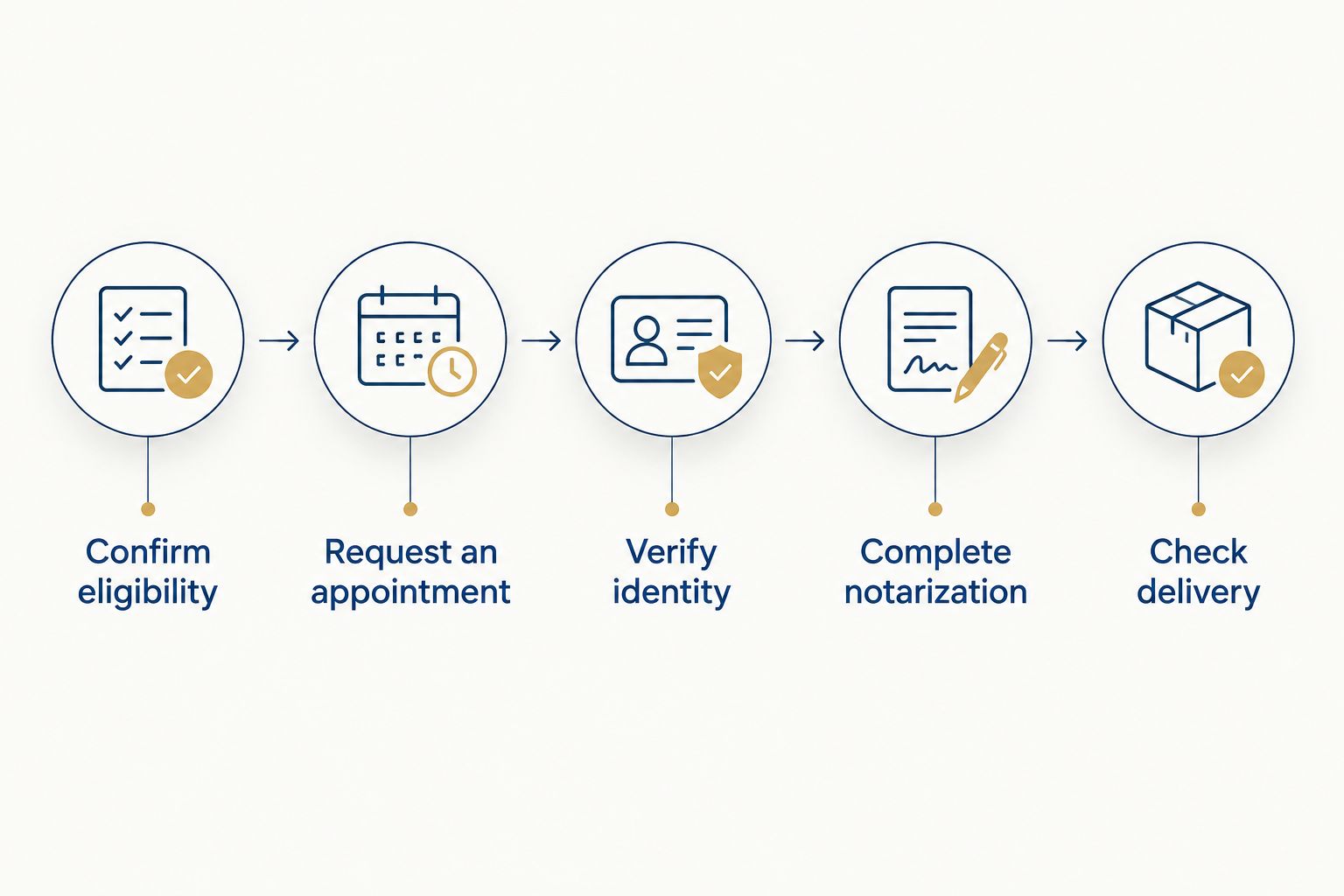
Use the following process for an eligible document. Confirm acceptance before signing or arranging the session. A technically completed electronic document is not useful if its intended recipient requires a different format or procedure.
For service information, start with CraigVet Notary Services. Remote online notarization through Proof is the primary service; in-person mobile appointments are a separate option.
1. Confirm eligibility
Ask the organization receiving the document whether it accepts Maryland remote online notarization for that specific document. Identify any instructions about witnesses, the notarial certificate, attachments, and how the completed document must be delivered.
Then ask the notary to review whether the requested notarization can proceed remotely. Recipient acceptance and notarial eligibility are separate checks: approval from one does not replace the other.
2. Request an appointment
Explain what document needs notarization, who will sign it, and whether the recipient supplied special instructions. If your business needs repeat notarizations, describe that need rather than assuming an appointment covers multiple future transactions.
Wait for direct contact about the request. Your appointment is not confirmed until CraigVet contacts you. Resolve questions about eligibility and preparation before treating a proposed time as booked.
3. Verify identity
Follow the identity-verification instructions provided for your Proof session. Have your identification ready, and check that your device can support the required camera, microphone, and internet connection.
Do not assume that emailing an identification image completes verification. Remote online notarization includes identity checks and a live interaction with the notary; the instructions for your session determine what you must complete.
4. Complete notarization
Join the live session and follow the notary’s instructions. The notary must communicate with the signer and complete the appropriate notarial act, not merely apply an electronic stamp to a file.
Do not sign in advance unless instructed. Whether you must sign during the session depends on the notarial act and the document’s requirements; an acknowledgment and an oath-based notarization do not involve identical procedures.
5. Check delivery
After the session, confirm how you will receive the completed electronic document. Follow the recipient’s submission instructions and keep the completed file in the form provided.
Check the document before forwarding it. If a name, attachment, signature, or notarial detail appears incorrect, contact the notary rather than editing the completed notarization yourself.
Why this matters
An electronic signature answers a different question from a notarization. Signing shows that a person applied a signature; notarization involves a notary performing a specified notarial act, including the required identity and appearance procedures.
For your 2026 paperwork, distinguish between signing electronically, appearing remotely before a notary, and sending a scanned paper document. These are not interchangeable. A recipient asking for a notarized document has not necessarily authorized every electronic method of completing it.
CraigVet Notary Services is best suited to Maryland individuals and businesses seeking remote online notarization for eligible documents through Proof. Its scope does not mean every document qualifies or every recipient accepts the result.
Remote online notarization or a mobile appointment?
Remote online notarization uses a live online session rather than an in-person meeting. A mobile appointment brings the notary to an agreed physical location, subject to confirmed arrangements.
Choose based on the document’s requirements and the signer’s ability to complete the process, not simply on which format sounds easier. Neither option removes identity-verification requirements or permits the notary to provide legal advice.
| Option | Best for | Practical advantage | Limitation to resolve |
|---|---|---|---|
| Remote online notarization through Proof | Eligible documents whose recipients accept remote notarization | The signer can participate without an in-person meeting | Document eligibility, recipient acceptance, and technical requirements must be satisfied |
| In-person mobile notarization | Documents or signers requiring an in-person appointment | The notary and signer meet physically at an agreed location | Baltimore County availability and appointment details require confirmation |
For a 2026 business workflow, use remote notarization only after checking the actual document and recipient instructions. A previous successful session does not establish that a different document can use the same process.
Mobile service is the secondary option here. Confirm Baltimore County availability before booking, and do not treat a service request as a confirmed visit.
What should you prepare before the online appointment?
Prepare the document and the session environment separately. A complete file does not resolve an identity problem, and a working camera does not resolve missing recipient instructions.
Use this preparation list before the agreed appointment:
- Document: Have the version intended for notarization, including relevant attachments and instructions.
- Recipient requirements: Confirm acceptance of remote online notarization and the required delivery format.
- Identification: Have the identification requested for the verification process ready.
- Signer details: Check names and identify everyone expected to participate.
- Technical setup: Check your internet connection, camera, microphone, and access to the session instructions.
- Witness questions: Raise witness requirements before the appointment instead of assuming the notary will supply witnesses.
Choose a setting where you can hear clearly, respond directly, and review the document without interruption. If you need assistance using the device, tell the notary beforehand so the arrangements do not interfere with the signer’s participation.
For documents prepared in 2026, check that you are using the intended version rather than an earlier draft. Do not make substantive changes solely to make the document seem easier to notarize; ask the issuing organization or an attorney about content questions.
Why does the electronic notarization process vary?
The steps depend on the document, the notarial act, and the receiving organization. There is no single appointment checklist that establishes eligibility for every transaction.
These factors determine what you need to resolve:
- Document instructions: The issuing organization can specify signature placement, attachments, and submission requirements.
- Recipient acceptance: The organization receiving the completed document determines whether the proposed format meets its requirements.
- Notarial act: An acknowledgment and an oath or affirmation involve different actions by the signer and notary.
- Identity verification: The signer must complete the applicable checks; possession of an electronic file is not proof of identity.
- Additional participants: Multiple signers or required witnesses need advance coordination.
- Technical access: The signer must be able to participate in the live session and complete the electronic steps.
Raise exceptions before the appointment, not during signing. Tell the notary about recipient instructions, witness needs, or difficulties using the platform when requesting the session.
Can I just sign a PDF and email it to a notary?
Signing a PDF and emailing it does not, by itself, complete a Maryland notarization. You still need the appropriate appearance, identity verification, and notarial procedure.
Ask for instructions before signing. Sending a signed file does not authorize the notary to add a certificate without completing the required process.
Does the recipient have to accept an electronically notarized document?
Do not assume that a recipient accepts an electronically notarized document. Ask the receiving organization about the specific transaction before arranging the session.
A general statement that an organization accepts electronic signatures does not necessarily answer whether it accepts remote online notarization. Ask about both, including whether the completed electronic file must be submitted through a particular channel.
What if identity verification or the connection fails?
An incomplete identity check or interrupted session is not a completed notarization. Follow the platform and notary’s instructions rather than attempting to bypass the problem.
Tell the notary what happened and ask what must be completed before the session can proceed. Do not assume an unsuccessful attempt automatically converts into a mobile appointment or confirms another appointment time.
How should businesses handle repeat notarizations?
Build a repeatable preparation process, but keep document review specific to each transaction. The same customer, employee, or business relationship can involve documents with different signing and recipient requirements.
For your 2026 internal procedure, assign responsibility for obtaining the correct document, checking recipient acceptance, coordinating participants, and receiving the completed file. Keep legal questions separate from scheduling questions so the notary is not asked to decide what the document should say.
A business preparation checklist should answer:
- Who is the signer, and in what capacity are they signing?
- Which organization receives the completed document?
- Has that organization accepted remote online notarization for this document?
- Are witnesses or additional signers required?
- Who will check and submit the completed electronic file?
CraigVet Notary Services offers remote online notarization for eligible business documents, but repeat needs do not establish a standing appointment or blanket approval. Confirm the arrangements and requirements for each requested session.
Request an online notarization
Ask about document eligibility and a Proof appointment. Your request requires direct confirmation.
FAQ
Can I notarize a document online in Maryland in 2026?
Yes, eligible documents can be notarized through Maryland remote online notarization in 2026. Confirm document eligibility, recipient acceptance, identity-verification requirements, and the appointment arrangements before proceeding.
Is an electronic signature the same as an electronic notarization?
No, an electronic signature alone is not an electronic notarization. Notarization requires a notary to complete the appropriate notarial act and its required procedures.
What do I need for a remote online notary appointment?
You need the document, the requested identification, and a device that supports the session’s camera, microphone, and internet requirements. Follow the specific preparation and identity-verification instructions provided for your appointment.
Should I sign my document before joining the online session?
Do not sign beforehand unless the notary’s instructions tell you to do so. The required signing procedure depends on the document and the notarial act.
Can my business arrange repeat online notarizations?
Businesses can request remote online notarization for eligible documents. Coordinate recurring needs directly, and confirm each document’s requirements rather than assuming prior approval covers later transactions.
Is my appointment confirmed when I submit a request?
No, submitting a request does not confirm your appointment. Wait for CraigVet to contact you about the arrangements.
Can I request a mobile notary instead of an online appointment?
You can ask about an in-person mobile appointment as an alternative. Baltimore County availability and appointment details must be confirmed before booking.
Can Craig tell me which legal document or notarial act I need?
Craig is not an attorney and cannot provide legal advice. Ask the document’s issuing or receiving organization for its requirements, and consult an attorney when you need legal guidance.
One last thing
Before your 2026 appointment, ask the recipient this specific question: Do you accept this document when it is notarized through Maryland remote online notarization and delivered as an electronic file? That question separates acceptance of an electronic signature from acceptance of a remotely notarized document.
Keep the answer with your appointment instructions. Craig is not an attorney and cannot provide legal advice; document selection, legal effect, and legal strategy belong with an attorney, not the notarization appointment.


