

Instead of manually chasing loan files, identity checks, and completion updates, use a controlled handoff from Encompass to Maryland remote online notarization through Proof for eligible documents. Confirm lender and settlement requirements first, request an appointment, and return the completed documents to the authorized loan-file owner.
- For encompass loan documents notarized maryland, confirm lender acceptance and document eligibility before scheduling.
- Craigvetnotary provides Maryland remote online notarization through Proof for eligible documents, subject to appointment confirmation.
- Keep Encompass document preparation, Proof identity verification, and completed-file review as separate checkpoints.
- Use mobile notarization only after confirming Baltimore County availability and the transaction’s signing requirements.
Why this matters
A loan document being ready in Encompass does not establish that it is ready for remote notarization. The lender, settlement team, document recipient, and notary have different responsibilities. Your workflow must preserve those boundaries.
For your 2026 procedure, separate document preparation from approval to sign. An exported package is not permission to begin a remote session, and a completed notarization does not establish that every closing requirement has been satisfied.
Craigvetnotary is best for Maryland individuals and businesses seeking an eligibility review before remote notarization through Proof. Start with Craigvetnotary to request service; an appointment is not confirmed until the business contacts you.
The workflow below uses a deliberate file handoff. Do not assume that exporting an Encompass package creates a Proof transaction, sends an invitation, or books a notary.
Before you start
- Access and authority: Have authorized access to the relevant Encompass file, the current documents, and instructions from the lender or settlement team. Identify who can approve document changes and who receives the completed files.
- Signer preparation: Arrange access to the device, identification, and connection required by the Proof invitation. Each signer must follow the applicable identity-verification instructions; do not assume an existing lender identity check replaces them.
- The critical gotcha: Confirm that the specific documents and transaction can use remote notarization before uploading or signing. Lender acceptance, recipient requirements, witness arrangements, and Maryland notarial requirements are separate checks. Ask Craig to review eligibility rather than treating an electronic document as automatically eligible.
Craig is not an attorney and cannot provide legal advice. Send questions about legal effect, document wording, ownership, or which notarial act is required to the appropriate attorney or document issuer.
Document package preparation
Your first configuration unit is the document package, not the appointment. Keep preparation inside the lender’s authorized process so that the notary receives the correct documents without becoming responsible for selecting them.
- Identify the current package. Locate the lender-approved version in Encompass using your organization’s established document controls. Confirm which documents actually require notarization; a signature requirement alone does not establish a notarial requirement.
- Identify the decision-maker. Record who approves remote execution and who resolves document questions. For a managed closing, coordinate with the settlement team rather than sending an independent request that bypasses its instructions.
- Check signing requirements. Ask the responsible party about remote acceptance, witnesses, signer capacity, execution order, and the required return method. Resolve these matters before arranging the session.
- Prepare the authorized files. Follow your organization’s approved export or document-delivery procedure. Preserve page order, signature pages, and notarial certificate wording. Do not alter substantive language to make a document fit the workflow.
- Record a version reference. Use an internal reference that distinguishes the approved package from drafts. Avoid putting unnecessary personal information into filenames or appointment messages.
Expected result: You have an identifiable, approved package, an authorized document owner, and clear instructions for requesting notarization. You have not yet treated the documents as remotely eligible or the appointment as booked.
For a repeatable 2026 process, recommend 1 loan file per preparation checklist. That is a document-control choice, not a limit on the service or a reason to combine unrelated signers’ information.
Appointment and eligibility review
The next configuration unit is the appointment request. Give the notary enough information to assess the request without sending sensitive loan information through an unapproved channel.
- Describe the request. State that the documents originate from an Encompass loan workflow and identify the document types, signer locations, and relevant execution requirements. Ask which materials are needed for review and how to provide them.
- Request remote review first. Ask whether the eligible documents can proceed through Proof under the applicable Maryland notarial requirements. Explain any lender, title, witness, or recipient instructions that affect execution.
- Resolve document questions upstream. If the document wording, signer capacity, or required notarial act is unclear, obtain direction from the document issuer or appropriate legal adviser. Do not ask the notary to choose a legal solution.
- Wait for direct confirmation. Treat a submitted request as a request only. Follow the appointment details provided after Craigvetnotary contacts you, including the process for receiving and using the Proof invitation.
- Prepare each participant. Make sure every required signer understands the session instructions. Confirm witness arrangements in advance rather than assuming the service supplies witnesses.
Expected result: You have a confirmed appointment and a clear preparation path, or you have a specific issue to resolve before scheduling. Neither a calendar entry created internally nor an Encompass status change substitutes for that confirmation.
Use 2 approval gates in your 2026 checklist: transaction acceptance from the responsible lender or settlement party, followed by notarial eligibility review. One does not replace the other.
Proof session preparation and execution
Proof is the remote notarization platform for this service. Use the actual invitation and on-screen instructions for your appointment rather than searching for an assumed Encompass integration or following screenshots from a different workflow.
- Open the authorized invitation. Check that the invitation relates to the expected transaction and signer. If anything differs, stop and confirm it through a known contact before providing identification or documents.
- Complete identity verification. Follow Proof’s prompts using the identification and information requested for that session. Each signer must complete the applicable process; a coworker cannot complete it on the signer’s behalf.
- Check the connection. Follow the platform’s device instructions and confirm that audio and video work. Choose a setting where the signer can communicate clearly and protect private information from bystanders.
- Confirm the documents. Before signing, check that the displayed documents match the approved package. Raise missing pages, incorrect names, or unexpected changes immediately.
- Follow signing instructions. Complete the required actions as directed during the session. Do not pre-sign documents that the instructions require you to sign during the appointment.
Expected result: The signer has completed the required session steps, or the session has stopped at an identified issue. An invitation, successful upload, or completed identity check alone is not a completed notarization.
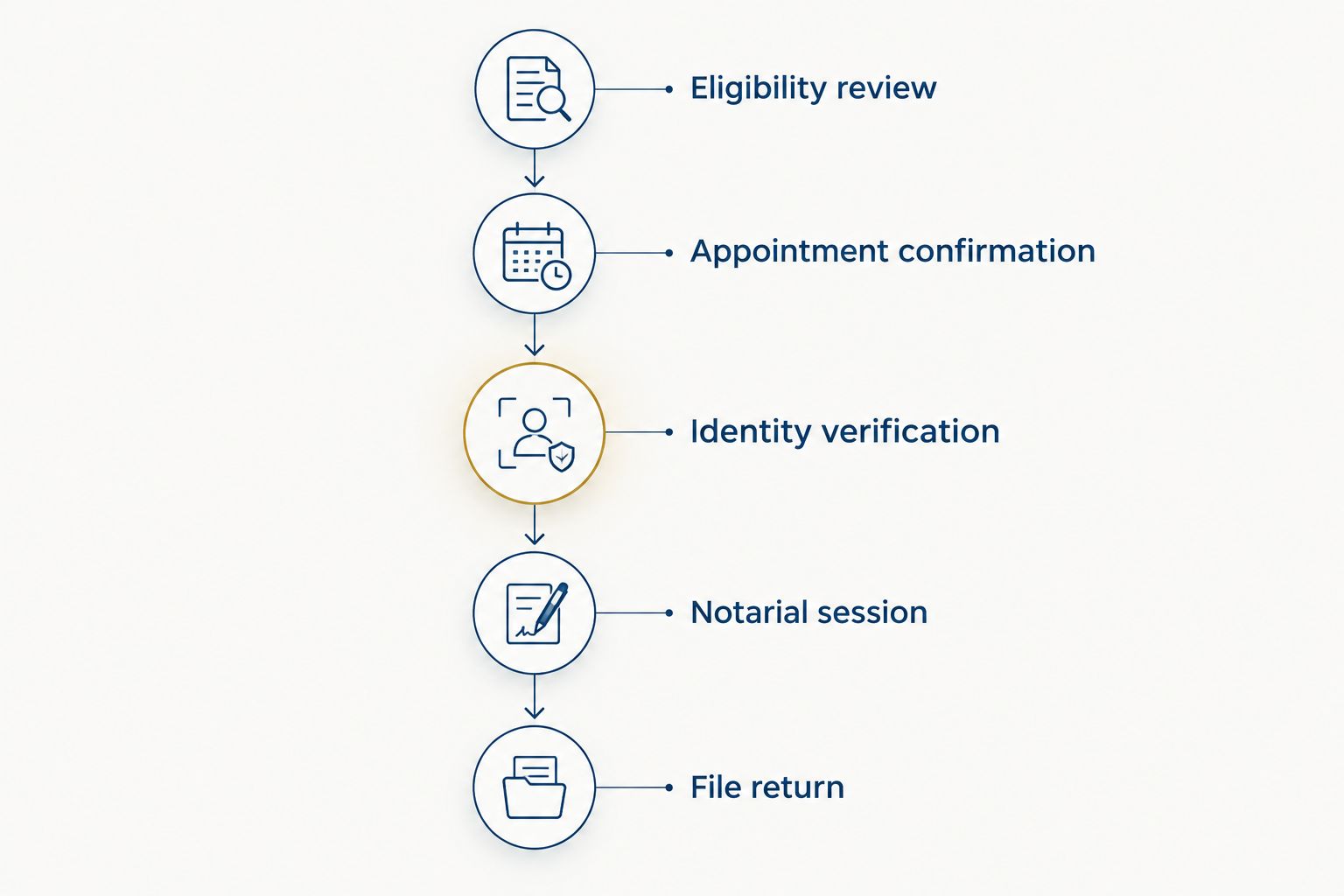
Keep these phases distinct: Eligibility review, Appointment confirmation, Identity verification, Notarial session, and File return. Progressing through one phase does not establish completion of the next.
Completed-file review and return
The final configuration unit is the return package. Your job is to make the completed documents traceable within the authorized loan workflow, not to infer that notarization means the loan is cleared to close or fund.
- Obtain the completed documents. Follow the delivery instructions provided for the transaction. Use the completed files, not a draft retained before the session.
- Check package completeness. Compare the returned documents with the approved package. Check for expected pages, signatures, and completed notarial certificates without modifying the notary’s work.
- Escalate discrepancies. Send missing-page or execution questions to the appropriate notary, lender, or settlement contact. Do not paste signatures, replace certificate pages, or silently correct a completed document.
- Return through the approved channel. Follow your organization’s Encompass document-management procedure and the recipient’s delivery requirements. Keep the completed version distinguishable from unsigned drafts.
- Update the operational status. Record the actual outcome and any unresolved review. Do not mark the broader transaction complete merely because a notarized file has been received.
Expected result: The authorized recipient has the completed package, the loan file identifies the correct version, and unresolved issues have a named owner.
For your 2026 handoff log, use 3 status labels: requested, confirmed, and returned. Add a separate exception note when review remains open; returned does not mean accepted by the lender or recorder.
When the Encompass package changes
A revised loan package needs a fresh document check, not an automatic resend. First determine whether the changes affect unsigned documents, documents scheduled for execution, or documents already notarized.
For changes before the appointment:
- Identify the revised version and obtain the responsible party’s approval.
- Tell the notary that the package has changed and ask how to replace the pending documents.
- Confirm whether the revision changes eligibility, witnesses, signer roles, or appointment arrangements.
- Give all participants clear instructions about which version controls.
For changes after notarization, return to the lender or settlement team for instructions. Do not edit the executed package or assume a prior notarization carries over to a replacement document. Ask whether corrected documents require a new execution and appointment.
Keep version approval upstream of signing. This variant is especially useful for businesses handling repeat requests, where familiar filenames can conceal a substantive document change.
Remote or mobile: choose the execution method
Start with Maryland remote online notarization for eligible documents through Proof. Use mobile service as a secondary route when in-person execution is appropriate and Baltimore County availability has been confirmed.
| Method | Best for | Practical advantage | Constraint |
|---|---|---|---|
| Remote online notarization through Proof | Eligible documents with approved remote execution | The signer participates remotely and completes platform-directed identity verification | Requires document eligibility, recipient acceptance, and successful session preparation |
| In-person mobile notarization | Documents requiring or approved for in-person execution | Provides an in-person appointment route | Requires location coordination and confirmed Baltimore County availability before booking |
Neither method removes lender requirements or permits the notary to provide legal advice. A transaction can require additional execution or delivery arrangements beyond the notarization itself.
Troubleshooting
The lender rejects remote execution
Stop the remote workflow for the affected documents. Ask the lender or settlement team for the accepted execution method, then discuss whether an in-person mobile appointment is appropriate. Confirm Baltimore County availability before treating that alternative as booked.
Identity verification does not complete
Follow the instructions in the Proof session and contact the designated support or appointment contact. Check for entry errors and identification issues without repeatedly guessing answers. Do not use another person’s credentials or assume an in-person appointment is automatically approved.
The displayed package differs from the approved version
Pause before signing. Identify the version difference and ask the authorized document owner to resolve it. If the package changes, confirm how the corrected documents will reach the appointment and whether another review is required.
Audio or video prevents clear communication
Follow Proof’s device guidance and check connection, camera, microphone, and permission settings. Tell the appointment contact if the problem persists. Do not continue on the assumption that a partial connection satisfies the session requirements.
The returned package has an apparent omission
Preserve the received files and report the specific page or execution issue. Route notarial questions to the notary and loan-document questions to the lender or settlement team. Never repair the package yourself by copying a signature or certificate.
Customize your workflow
For repeat business requests in 2026, standardize the intake checklist rather than assuming every transaction has the same requirements. Keep a reusable record of the document owner, package version, signer roles, acceptance instructions, appointment confirmation, return recipient, and exception owner.
Separate internal reminders from external actions. A reminder to request an appointment is useful; an automated message claiming an appointment is confirmed before direct contact is not.
Craigvetnotary’s Maryland remote online notarization service provides the notarial appointment, not legal review or lender approval. Its fit depends on eligible documents and coordinated preparation. Keep sensitive borrower information in approved systems, and ask how to provide documents before sending them.
FAQ
How do I get Encompass loan documents notarized in Maryland?
Confirm lender acceptance and document eligibility, request an appointment, and follow the Proof instructions for eligible remote documents. After the session, return the completed package through the lender’s authorized process.
Does exporting documents from Encompass book a Proof appointment?
Do not treat an Encompass export as a booked appointment. Request service separately and wait for direct confirmation from the notary business.
Can every Maryland loan document be notarized remotely?
No, remote notarization is not appropriate for every document or transaction. Confirm document eligibility, lender acceptance, recipient requirements, and applicable Maryland notarial requirements before scheduling.
What identification should I prepare for the Proof appointment?
Prepare the identification required by the Proof invitation and follow its identity-verification instructions. Ask the appointment contact about any identification concern before the session.
Can my business arrange repeat remote notarization requests?
Your business can use a repeatable intake and document-handoff process, but each request still needs its own eligibility review and appointment confirmation. Keep document versions, signer roles, and return instructions clear.
What if the loan documents change after notarization?
Ask the lender or settlement team for instructions before changing or replacing executed documents. A replacement document does not automatically inherit the original notarization.
Can I request a mobile notary instead?
You can request an in-person mobile appointment, with Baltimore County availability confirmed before booking. Confirm that the proposed execution method meets the transaction’s requirements.
Can Craig tell me which legal document or notarial act I need?
Craig is not an attorney and cannot provide legal advice. Ask the document issuer or an appropriate attorney to resolve legal-document and notarial-act selection questions.
One last thing
The most useful final check is not whether the file contains a notarial certificate. It is whether the authorized recipient received the correct completed version and identified any remaining requirements. Keep that acceptance step separate from notarization so your loan team does not mistake document execution for transaction completion.


