

Instead of repeatedly exporting, emailing, and chasing the same Clio document, use a controlled handoff: prepare the final unsigned file, request Maryland remote online notarization through Proof, complete identity verification and the notarial session, then return the completed document to the correct matter. This 2026 workflow separates document preparation, appointment confirmation, and recordkeeping so your team knows what happens next without treating a request as a confirmed appointment.
- For the clio documents notarized maryland workflow, use a documented handoff from Clio to Proof and back.
- CraigVet Notary Services is best for Maryland clients seeking remote notarization of eligible documents through Proof.
- Confirm document eligibility, recipient requirements, and signer readiness before requesting an appointment.
- Keep the completed notarized file unchanged and store it in the correct Clio matter.
Start with CraigVet Notary Services for Maryland remote online notarization eligibility and appointment guidance. Craig must contact you before an appointment is confirmed; submitting an inquiry does not reserve a session.
Why this matters
A document stored in Clio is not automatically ready for notarization. The receiving organization can require a particular notarial act, document format, or execution procedure, and the notary must follow Maryland notarial requirements.
Treat the Clio-to-Proof handoff as a controlled document process, not an assumed software integration. This guide describes a staff-managed workflow; it does not depend on a native connection, automatic upload, or automatic return of the completed file.
For a repeatable 2026 process, assign responsibility for 3 checkpoints: document readiness, appointment confirmation, and completed-file review. A clear owner at each checkpoint prevents staff from mistaking an uploaded draft for an executed document.
Before you start
- Access and ownership: Have access to the correct Clio matter and its documents, permission to download and upload files, and a designated staff member responsible for the handoff. Identify the signer and the organization receiving the completed document.
- Signer and session materials: Prepare the proposed final document, current signer contact information, and a device with a working camera, microphone, and internet connection. Follow the Proof session instructions for supported identification and identity verification rather than assuming a familiar ID will qualify.
- The non-obvious gotcha: Confirm the recipient accepts the proposed remote notarization and electronic document before arranging the session. Notarization does not guarantee recipient acceptance, and a requirement for an original paper document changes the workflow.
Do not choose a notarial act for someone else or add certificate wording based on a guess. Craig is not an attorney and cannot provide legal advice; direct legal questions about the document or required act to the appropriate attorney or receiving organization.
Document preparation in Clio
Use this configuration unit to establish exactly which document will leave the matter. Keep 1 final PDF designated for the notarization request, while retaining earlier versions according to your firm's document policies.
- Open the matter. Verify the client and matter before opening Documents. Check the document's contents rather than relying only on its filename, especially when multiple matters use the same template.
- Check document readiness. Resolve draft language, missing exhibits, and unanswered fields with the responsible person. Do not fill blanks that require the signer's decision or legal judgment.
- Check execution requirements. Ask the recipient or responsible attorney which signatures, witnesses, notarial acts, and document format are required. Give Craig that information for eligibility review; do not assume every document can be notarized remotely.
- Export the intended version. Use Download for the selected document. If your source file needs conversion, create the proposed final PDF and inspect the result for missing pages, clipped text, or changed signature blocks.
- Record the handoff. Add an internal matter note identifying the filename, document owner, intended signer, and recipient requirements. Label the task as awaiting eligibility review, not completed notarization.
Expected result: Your team has one identified unsigned file, a responsible staff member, and documented execution requirements. The file is ready for review, not yet approved for remote notarization.
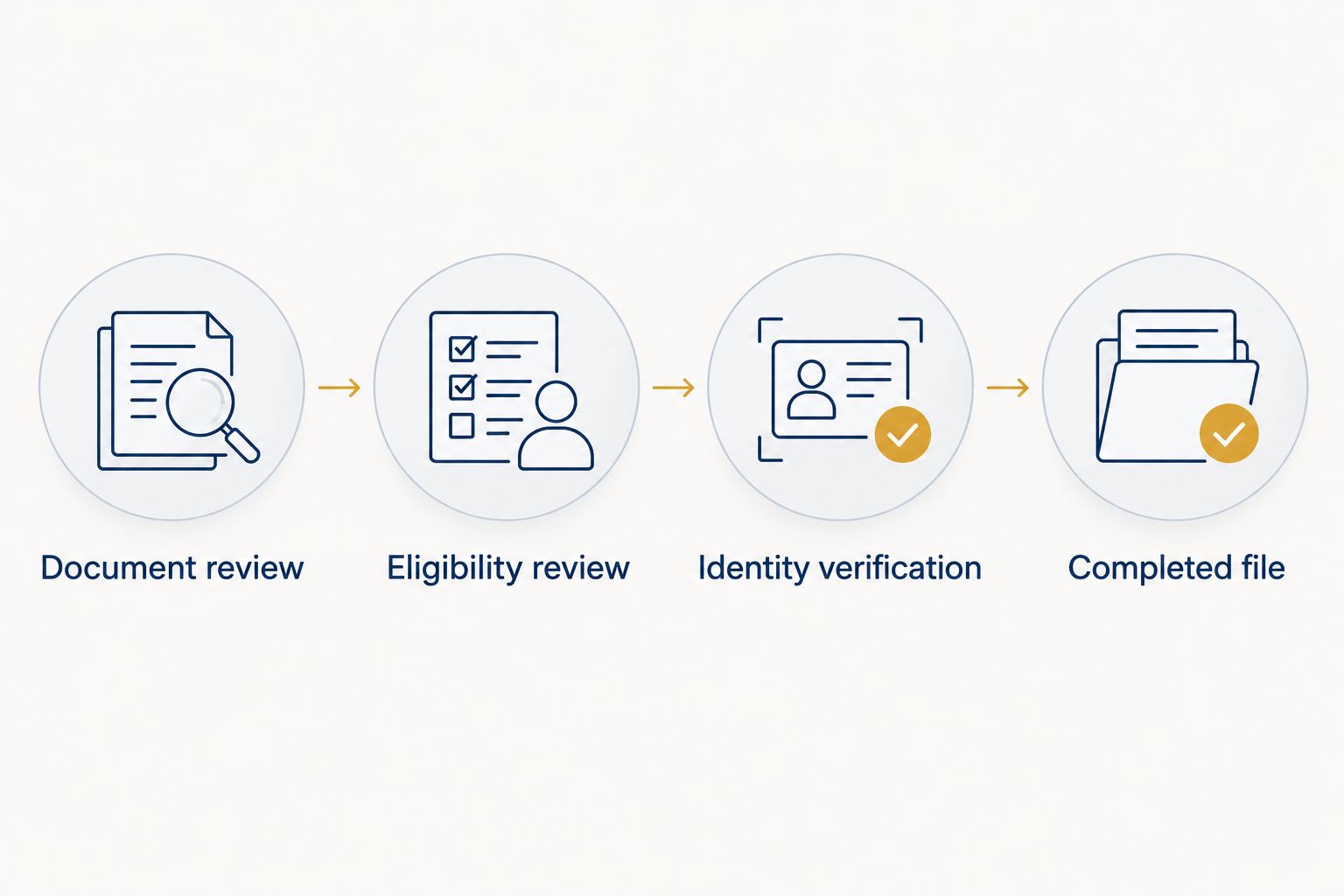
A simple handoff map
Keep these stage names in your internal checklist: Document review, Eligibility review, Identity verification, and Completed file. Each stage represents a different decision; finishing one does not automatically complete the next.
Eligibility review and appointment coordination
CraigVet Notary Services provides Maryland remote online notarization through Proof. Use the request stage to establish whether that route fits the document and signer before communicating any appointment details as final.
- Describe the request. Provide the document type, signer information, recipient requirements, and any witness instructions. Disclose the signer's physical location so Craig can assess the applicable requirements.
- Confirm the transfer method. Ask how to submit the document for review and follow those instructions. Do not place confidential documents in a broadly shared folder or send copies to unnecessary recipients.
- Resolve eligibility questions. Confirm whether the document and proposed session are eligible for Maryland remote online notarization. Raise unusual execution instructions before scheduling rather than during the live session.
- Wait for direct confirmation. Keep 2 separate task statuses: request submitted and appointment confirmed. Move to the confirmed status only after Craig contacts you with confirmation.
- Prepare the signer. Forward the actual session instructions and explain that identity verification is part of the process. Ask the signer to check camera and microphone access and identify connection problems before the appointment.
Expected result: You have a confirmed appointment only after Craig's contact, clear submission instructions, and a signer who understands the identity-verification requirement. Unresolved eligibility issues remain open rather than being hidden in a scheduling note.
For repeat business requests in 2026, keep a reusable intake checklist, but review each document separately. A previous successful appointment does not establish eligibility for the next file.
Proof session and completed-file return
The online session is where the signer follows the required identity-verification and notarial procedures. Staff coordination supports that process; it does not replace the signer's participation or the notary's judgment.
- Use the provided session instructions. Have the signer open the actual Proof invitation or access instructions supplied for the appointment. Do not reuse another person's invitation or create a substitute signing route.
- Complete identity verification. The signer must follow the identity-verification steps presented for that session. If verification fails, stop and follow the support or notary instructions rather than asking someone else to complete the check.
- Follow signing directions. The signer should wait for the instructions that apply to the required notarial act. Staff should not direct a signer to pre-sign a document merely to shorten the appointment.
- Obtain the completed file. Follow the provided delivery instructions after the session. Verify that the document received is the completed notarized file, not the unsigned copy originally exported from Clio.
- Return the file to Clio. Open the correct matter and its Documents area, then upload the completed file using your account's file-upload control. Preserve the received file unchanged; do not print and rescan it as your only retained electronic copy.
- Close the handoff. Record completion, the document's storage location, and any recipient-delivery task. Keep identity-verification materials out of routine matter notes unless your authorized retention policy specifically requires them.
Expected result: The correct Clio matter contains the completed file in its received form, and the responsible person knows whether delivery to the recipient remains outstanding.
Notarization and recipient delivery are separate tasks. Do not mark a filing, submission, or transaction complete solely because the notarized document has returned.
Repeat requests and revised documents
For a recurring 2026 business workflow, reuse the checklist and task ownership, not the previous notarization. Each new document needs its own eligibility and execution review.
When a document changes after you request an appointment, pause the handoff. Tell Craig which file changed and obtain instructions for replacing the earlier submission before the session proceeds.
If wording changes after notarization, do not edit the completed notarized file. Ask the responsible attorney or recipient what correction is required, then coordinate any new notarial work with Craig.
Choose the appropriate appointment route
| Route | Best for | Practical advantage | Limitation |
|---|---|---|---|
| Remote online notarization through Proof | Eligible documents and signers prepared for an online session | The signer participates remotely | Requires identity verification, suitable technology, and eligibility review |
| In-person mobile appointment | Requests needing assessment for an in-person route | Provides a route to discuss when remote execution does not fit | Baltimore County availability must be confirmed before booking |
CraigVet Notary Services offers mobile appointments as a secondary service. Do not assume a mobile appointment is confirmed or that every document unsuitable for remote notarization becomes eligible in person. Confirm the document requirements and Baltimore County availability first.
Troubleshooting
The wrong version reached the appointment process
Stop and identify the intended file by both filename and contents. Notify Craig of the replacement and wait for instructions before the signer proceeds; uploading another copy to Clio alone does not correct a file already submitted elsewhere.
The signer cannot complete identity verification
Have the signer follow the instructions presented in Proof and any guidance from Craig. Check whether the submitted information matches the identification and whether the device can complete the required steps; do not bypass verification or promise that another attempt will succeed.
The camera or microphone does not work
Check device permissions, browser access, and whether another application is using the camera or microphone. Have the signer follow the session's supported-device guidance, and contact Craig if the issue prevents participation rather than treating the appointment as completed.
The recipient rejects the electronic document
Ask the recipient to identify the exact unmet requirement. Return that requirement to the responsible attorney and Craig before arranging further work; printing the file or changing its certificate is not a substitute for confirming the correct procedure.
The completed file is difficult to distinguish from the draft
Check the contents and completion information before filing it as notarized. Use a consistent filename that distinguishes the received completed file, but keep the file itself unchanged and preserve the original delivery copy according to your policy.
Customize your workflow
Build your 2026 repeat-notarization process around a short internal checklist rather than a complex automation. Assign document preparation to the matter owner, appointment coordination to a named contact, and completed-file review to the person responsible for recipient delivery.
Your intake template should capture document type, signer contact details, recipient instructions, witness requirements, and the proposed signing route. Avoid collecting identification images in a general-purpose checklist; direct signers to the instructed verification process.
Automate internal reminders only after the underlying process is clear. A reminder can prompt a status check, but it should never declare document eligibility, successful identity verification, or appointment confirmation without the corresponding confirmation.
FAQ
Can I get Clio documents notarized online in Maryland?
Eligible documents stored in Clio can be prepared for Maryland remote online notarization through Proof. Confirm document eligibility, signer requirements, and recipient acceptance before arranging the session.
Does this workflow automatically connect Clio to Proof?
No. This guide uses a staff-managed document handoff from Clio to the notarization process and back, without relying on a native integration or automatic file transfer.
Should I sign my document before the online notary appointment?
Follow the instructions for the required notarial act rather than signing early by default. Craig can explain the applicable signing procedure but cannot provide legal advice about which act your document needs.
Is my appointment confirmed when I submit a request?
No. Your appointment is not confirmed until Craig contacts you with confirmation. Keep the request pending in your internal checklist until that contact occurs.
Can a business reuse the same process for recurring notarizations?
Yes, a business can reuse its intake checklist, task assignments, and file-return procedure. Each document still needs eligibility review, and each signer must follow the applicable identity-verification and execution requirements.
What if I need a mobile notary instead of an online appointment?
Ask CraigVet Notary Services about an in-person mobile appointment and confirm Baltimore County availability before booking. Document requirements still need review, and an inquiry alone does not confirm an appointment.
Can Craig tell me which notarial certificate my document needs?
Craig is not an attorney and cannot provide legal advice. Ask the responsible attorney or receiving organization to specify the required notarial act or certificate when that choice requires legal judgment.
One last thing
Preserve the completed electronic file, not just a readable copy. Printing and rescanning creates a different file and does not preserve the original electronic signature data.
For your 2026 checklist, make unchanged-file retention the final check before closing the notarization task. A neat matter folder helps, but the essential result is the correct completed document, stored intact, with recipient delivery tracked separately.


