

Yes—an eligible document can begin a Maryland remote online notarization appointment unsigned, with the signer adding the required signature during the session. The notary cannot complete a signature-based notarization while the required signature remains missing; identity verification, the notarial act, and the document recipient’s requirements still apply.
- Can a notary notarize an unsigned document remotely? Yes, if you sign the eligible document during the appointment.
- Maryland remote online notarization requires identity verification and a live audiovisual appearance, not just uploading a document.
- CraigVet Notary Services suits Maryland individuals and businesses seeking remote online notarization for eligible documents.
- An acknowledgment and a jurat have different signing requirements; confirm the required notarial act before your session.
Can a notary notarize an unsigned document remotely?
An unsigned document can enter the remote appointment, but a required signature cannot remain missing when the signature-based notarization is completed. In Maryland, remote online notarization allows the signer and notary to appear together through communication technology rather than occupying the same room.
The important distinction is between a document that is not signed yet and one that will remain unsigned. Starting without a signature is compatible with signing during the session. Asking a notary to certify a signature that does not exist is not.
For Maryland appointments in 2026, CraigVet Notary Services offers remote online notarization for eligible documents through Proof. Document eligibility and appointment details need confirmation before you proceed.
| Document status | Best for | What happens next | Benefit | Limitation |
|---|---|---|---|---|
| Unsigned before the session | Signers instructed to sign before the notary | Follow the notary’s instructions and sign during the remote session | Keeps signing connected to the required appearance | Identity verification and document eligibility still apply |
| Already signed before the session | Signers whose document requires an acknowledgment | Appear remotely and acknowledge the signature if the document and process permit it | An existing signature does not automatically prevent an acknowledgment | A previously signed document does not automatically satisfy a jurat or other witnessed-signature requirement |
Do not choose a notarial act simply because one route seems easier. Ask the receiving organization or an attorney to identify the required act when the document does not make it clear.
Why this matters
A signature, a notarial certificate, and the recipient’s acceptance are separate issues. Getting one right does not automatically resolve the others.
For example, signing early does not eliminate the need to appear before the notary. Likewise, completing notarization does not establish that your document contains the right legal language or meets every filing requirement.
Confirm what the recipient needs before arranging the appointment. That is especially useful for businesses handling repeat notarizations: a consistent intake process helps staff distinguish document preparation from the notary’s responsibilities.
How do you prepare an unsigned document for remote notarization?
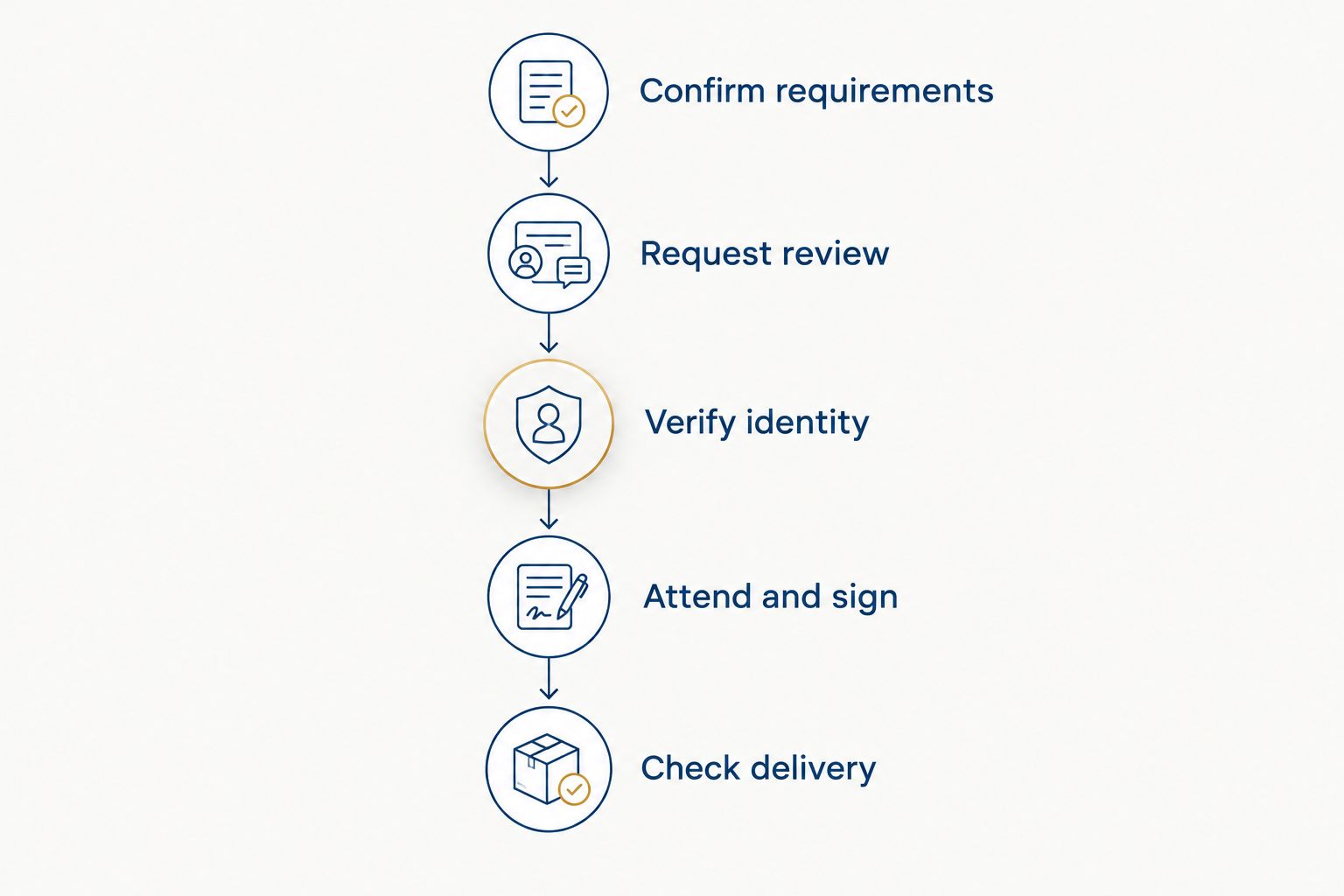
Use this 5-step appointment checklist for an eligible Maryland remote online notarization in 2026. Keep the document unsigned until you receive signing instructions if the required act calls for signing before the notary.
1. Confirm requirements
Ask the receiving organization whether it accepts a remotely notarized electronic document. Also confirm which notarial act it requires and whether it has instructions about the certificate, witnesses, or delivery format.
Do not assume that permission to submit a document electronically means remote notarization is acceptable. Those are different questions. If the recipient supplies a form, use its instructions rather than adding language yourself.
2. Request review
Tell CraigVet Notary Services what document you need notarized and whether it is unsigned or already signed. Identify the intended recipient and flag any signing instructions supplied with the document.
Ask how to provide the document for review and preparation through Proof. Submitting a request does not confirm an appointment; wait until CraigVet Notary Services contacts you. Eligibility must be addressed before the session proceeds.
3. Verify identity
Follow Proof’s identity-verification instructions and prepare the identification requested for your appointment. A document upload alone does not establish your identity or replace the required appearance.
Check that your device supports the appointment’s camera, microphone, and connection requirements. Use a setting where you can communicate clearly and review your document without interruptions. If identity verification fails, contact the notary for instructions rather than treating the upload as a completed notarization.
4. Attend and sign
Join the live audiovisual session and follow the notary’s directions. The notary must perform the required notarial act; merely exchanging messages or sending a signed attachment does not replace that process.
For an unsigned document, add your signature when instructed. If an oath or affirmation is required, respond directly during the session. Do not have another person sign for you simply because that person is helping with the technology.
5. Check delivery
Follow the instructions for obtaining the completed electronic document. Review it for the expected signature and notarial certificate before sending it to the recipient.
Keep the electronic file as instructed. If the recipient wants a paper submission, confirm its requirements before printing; a printout and an electronic original are not automatically interchangeable for every purpose.
The sequence matters: confirm the requirements before signing, and complete identity verification before expecting the notarization to proceed.
An unsigned document: sign when the notary instructs you
An unsigned document is not automatically incomplete for appointment purposes. The signature can be the part you deliberately leave until the live session.
Other blanks need separate attention. Review the document’s substantive information before the appointment, and ask the document preparer about missing terms, names, or instructions. Do not guess at language that affects your rights or obligations.
Leave the notarial certificate for the notary to complete. It records the notarial act; it is not an ordinary form field for the signer to fill out.
This distinction is useful when preparing an unsigned document in 2026: complete the information you are responsible for, but follow instructions about signatures and the notarial certificate. A notary does not draft missing legal terms or decide what your agreement should say.
An already-signed document: confirm the required act
A prior signature does not automatically rule out remote notarization. For an acknowledgment, the signer acknowledges executing the document; the signature does not necessarily have to be added during the appointment.
A jurat involves an oath or affirmation and signing in the notary’s presence. If you signed beforehand, tell the notary before the session so the signing requirements can be addressed correctly.
Do not erase, overwrite, or add another signature without instructions. The appropriate next step depends on the document and the required act, not simply on whether a signature is visible.
An acknowledgment is not a workaround for a document that requires a jurat. If the certificate or recipient’s instructions are unclear, obtain clarification from the recipient or an attorney before proceeding.
Why remote notarization eligibility varies
The answer depends on more than the document’s unsigned status. These factors determine whether the requested appointment can proceed:
- Required notarial act: An acknowledgment and a jurat impose different responsibilities on the signer and notary.
- Recipient requirements: The receiving organization determines what it will accept for its transaction or filing.
- Document restrictions: Remote notarization is not suitable for every document or circumstance.
- Identity verification: The signer must satisfy the applicable identification process; an uploaded signature is not a substitute.
- Witness instructions: A document’s witness requirements need separate attention and cannot be assumed satisfied by the notary’s presence.
- Technology readiness: The required live audiovisual interaction must work well enough to conduct the appointment properly.
For a 2026 appointment, check the current instructions for your particular document rather than relying on how a different form was handled previously. Similar-looking documents do not necessarily require the same act or submission method.
What should a business prepare for repeat notarizations?
Create a repeatable document handoff, not a blanket assumption of eligibility. Staff should know who signs, which organization receives the document, and where the recipient’s instructions are stored.
Keep these 3 pre-appointment checks in your internal process:
- Document check: Use the intended version, complete the signer’s ordinary fields, and identify the required certificate or act.
- Signer check: Confirm who must appear and whether additional signatures or witnesses need coordination.
- Recipient check: Confirm acceptance of remote notarization and the required delivery format.
CraigVet Notary Services offers Maryland remote online notarization through Proof for individuals, families, and businesses. For repeat business appointments, provide document-specific instructions each time rather than assuming a previous approval covers every future form.
Separate administrative assistance from the signer’s participation. An employee can help coordinate an appointment, but that assistance does not replace the signer’s identity verification, appearance, or required responses.
Can you notarize a document without the signer appearing?
No—remote notarization does not remove the signer’s required appearance. It changes how the appearance occurs, using live audiovisual communication rather than requiring the signer and notary to share a physical location.
Sending an unsigned file, a scanned signature, or a photograph of identification does not by itself complete a remote notarization. The notary still needs to conduct the required act with the appropriate participant.
Is a typed name enough for remote notarization?
A typed name alone does not complete remote notarization. An electronic signature and a notarial act are different parts of the transaction.
Follow the signing method provided for the appointment through Proof. Do not assume that typing your name into a PDF beforehand satisfies the document’s signature requirements or the notary’s procedure.
When should you ask about a mobile appointment instead?
A mobile appointment is a secondary option when an in-person approach fits the document or the signer’s circumstances better. It does not remove identification requirements or guarantee that a document is eligible for notarization.
For Baltimore County mobile appointments, confirm availability before booking. Explain any recipient instructions requiring physical presence, paper documents, or additional participants so the appointment can be assessed appropriately.
The practical trade-off is straightforward: remote appointments require suitable technology and remote eligibility; mobile appointments require an agreed location and confirmed availability. Choose according to the document’s requirements, not convenience alone.
FAQ
Can I upload an unsigned document before my remote notary appointment?
Yes, an unsigned document can be prepared for an eligible remote notarization appointment. Follow the document-submission instructions and wait for the notary’s directions before adding a signature that must be witnessed.
Should I sign my document before joining Proof?
Do not sign beforehand when the required act calls for signing before the notary. If you already signed, disclose that before the session so the notary can address the requirements for the intended act.
Can a notary choose an acknowledgment instead of a jurat for me?
The signer must obtain the required act from the document’s instructions, the recipient, or an attorney rather than asking the notary to make a legal choice. An acknowledgment and a jurat are not interchangeable.
Does every document qualify for Maryland remote online notarization?
No, not every document or circumstance qualifies for Maryland remote online notarization. Confirm document eligibility and the recipient’s requirements before proceeding.
Can my coworker attend the remote appointment instead of me?
No, a coworker cannot replace your required appearance when your signature is the subject of the notarial act. Administrative help does not replace your identity verification or participation.
Is my appointment confirmed after I submit a request?
No, submitting a request does not confirm an appointment. Wait for CraigVet Notary Services to contact you about eligibility and appointment details; Baltimore County mobile availability also requires confirmation.
Can Craig tell me whether my document protects my legal rights?
No, Craig is not an attorney and cannot provide legal advice. Ask an attorney about legal language, document selection, or how signing affects your rights.
One last thing
Unsigned and unfinished are not the same thing. Leaving a signature for the appointment can be correct; leaving important document terms unresolved is a separate problem.
Before your 2026 appointment, ask the recipient one specific question: does this document require an acknowledgment, a jurat, or another notarial act? A clear answer helps you arrive with the right instructions instead of expecting the notary to make a legal decision for you.


