

Best overall for eligible documents: Maryland remote online notarization through Proof with Craigvetnotary. Best when you need an in-person visit: mobile notarization. Best when you prefer visiting a fixed location: an office-based notary. For a Maryland travel consent form in 2026, choose the method only after confirming the receiving organization’s requirements.
- For “notary for travel consent form Maryland,” Craigvetnotary offers remote notarization for eligible documents through Proof.
- Remote notarization requires document eligibility, identity verification, and confirmation that the recipient accepts the completed document.
- Mobile appointments are secondary; Baltimore County availability must be confirmed before booking.
- Notarization verifies a notarial act, not whether your consent form satisfies every travel requirement.
Why this matters before you book
A travel consent form and its notarization serve different purposes. The form records permission; the notarial act addresses matters such as the signer’s identity and acknowledgment or oath, depending on the act required. A notary does not decide whether your wording gives sufficient travel authorization.
For travel in 2026, begin with the organization that will receive or inspect the document. Ask the airline, travel organizer, relevant consulate, or other receiving authority what it requires. Do not assume that one consent letter meets every destination’s rules.
The best notarization option is the one that meets the recipient’s requirements and your document’s eligibility—not simply the easiest appointment to arrange.
Start with these appointment steps
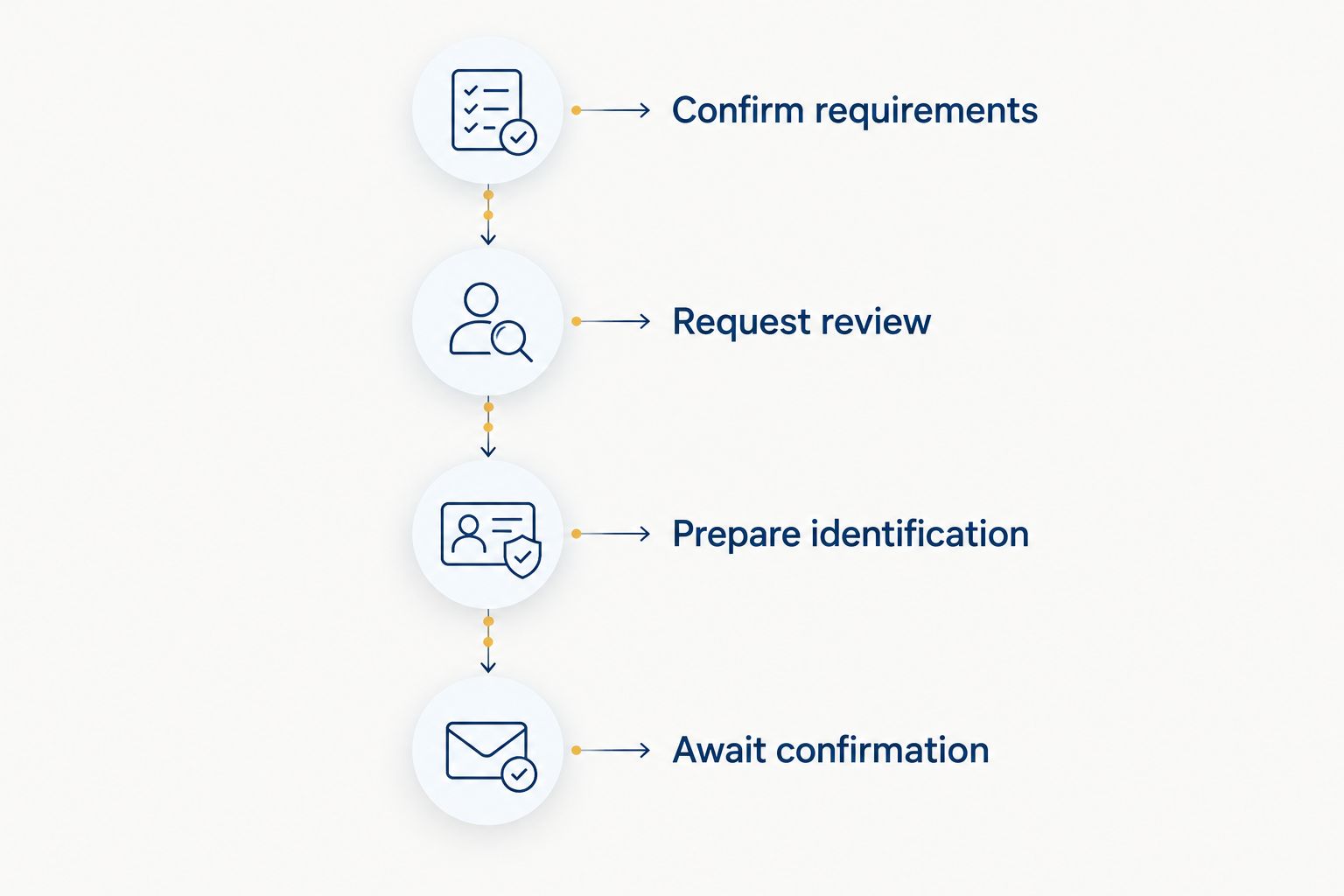
Use these 4 steps to prepare for Maryland remote online notarization. They separate document questions from appointment logistics, so you do not mistake a submitted request for a confirmed session.
1. Confirm requirements
Ask the recipient whether it requires notarization and whether it accepts a remotely notarized electronic document. Also ask whether it supplies a consent form or specific certificate wording.
Explain the actual travel arrangement: who is traveling, who is giving consent, and where the document will be presented. Do not ask the notary to interpret custody orders or determine whose permission is legally necessary; direct those questions to an attorney or the relevant authority.
2. Request review
Describe the document and tell the notary that it is a travel consent form. Identify the intended recipient and explain any instructions concerning electronic documents, original paper documents, or witnesses.
For remote service, request confirmation that the document and proposed session meet Maryland notarial requirements. For a mobile appointment, request confirmation of Baltimore County availability before planning around a visit.
3. Prepare identification
Follow the instructions provided for identity verification through Proof. Confirm acceptable identification and any technical preparation before the session rather than assuming that an identification document is sufficient.
For an online appointment, prepare a device, camera, microphone, and internet connection suitable for the session. The person whose signature requires notarization must participate; uploading a document does not replace that person’s appearance.
4. Await confirmation
A request is not a confirmed appointment. Wait until the notary contacts you and confirms the arrangements before treating a time or mobile visit as booked.
Follow the signing instructions for the required notarial act. Do not sign ahead unless the notary confirms that doing so is appropriate. After completion, check the document against the recipient’s submission instructions.
What makes the best travel consent notarization option?
For this 2026 guide, the ranking uses these practical criteria:
- Recipient acceptance: The completed document must match the receiving organization’s instructions, including its treatment of electronic documents.
- Document eligibility: The requested act, signer participation, and document must fit the applicable Maryland notarial requirements.
- Identity verification: You must be able to complete the identification process for the chosen appointment format.
- Signing logistics: The method must suit the participating signers, any required witnesses, and the signing instructions.
- Appointment certainty: You need confirmed arrangements, not an assumption based on a submitted request.
Remote notarization ranks first for eligible documents because it avoids arranging an in-person meeting. That recommendation does not apply when the recipient requires a different format or the remote requirements cannot be met.
Maryland travel consent notarization options at a glance
| Option | Best for | Standout feature | Key limitation |
|---|---|---|---|
| Maryland remote online notarization through Proof | Eligible documents accepted electronically by the recipient | Online appearance rather than an in-person meeting | Document eligibility, identity verification, and recipient acceptance require confirmation |
| Mobile in-person notarization | Signers who need the notary to visit an agreed location | In-person appearance without visiting an office | Baltimore County availability and appointment arrangements require confirmation |
| Office-based in-person notarization | Signers who prefer traveling to a fixed location | A defined place for an in-person signing | You must identify a provider and confirm its document and appointment requirements |
1. Maryland remote online notarization: best for eligible documents
Craigvetnotary offers Maryland remote online notarization through Proof for eligible documents. For a travel consent form, first confirm both document eligibility and the recipient’s acceptance of the completed electronic document.
Craigvetnotary is best for Maryland signers seeking remote notarization of eligible travel consent forms through Proof. The veteran-owned service provides a remote option, but the document still needs to meet the applicable requirements.
Remote online notarization pros:
- You participate online instead of arranging an in-person meeting.
- Identity verification forms part of the appointment process.
- The remote format removes the need to select a physical meeting location.
Remote online notarization cons:
- Not every document or signing situation qualifies for remote notarization.
- You must complete the required identity verification and technical setup.
- A completed electronic document does not override the recipient’s format requirements.
Best for: A signer with an eligible travel consent form, suitable technology, and confirmed recipient acceptance.
Before requesting a 2026 travel appointment, ask how to prepare the document and complete verification through Proof. Do not assume that a scanned signature, emailed identification, or ordinary video call is a substitute for the required process.
Verdict: Choose remote notarization when eligibility and recipient acceptance are confirmed.
2. Mobile in-person notarization: best for a visit to your location
Mobile notarization brings the notary to an agreed location for an in-person appointment. It is the secondary option when you need physical attendance rather than a remote session.
Craigvetnotary also offers mobile notary appointments, with Baltimore County availability confirmed before booking. A request does not reserve a visit, and an in-person appointment does not resolve questions about the legal sufficiency of a consent form.
Mobile in-person notarization pros:
- You meet the notary in person at an agreed location.
- You do not need to travel to a notary’s office.
- The appointment does not depend on completing a remote online appearance.
Mobile in-person notarization cons:
- Location and availability must be confirmed before booking.
- You must coordinate the physical attendance of everyone required for the signing.
- Mobile service does not determine whether the recipient will accept your form.
Best for: A signer who needs an in-person appointment and receives confirmation that the proposed location can be served.
Before the visit, confirm identification instructions, the document’s signing requirements, and whether witnesses are needed. Do not assume that the notary supplies witnesses or decides which witness requirements apply.
Verdict: Choose mobile notarization when an in-person visit is appropriate and the arrangements are confirmed.
3. Office-based notarization: best for a fixed meeting location
An office-based notary meets you at a fixed location rather than online or at your address. This is a method to consider, not a recommendation of a particular office or a claim that any nearby provider handles travel consent forms.
Contact the office before traveling. Describe your document, confirm its appointment process, and ask what the signer must bring.
Office-based notarization pros:
- You have a defined location for the in-person meeting.
- You do not need to arrange a mobile visit to your address.
- You avoid the technical requirements of a remote online appearance.
Office-based notarization cons:
- You must travel to the provider’s location.
- The office’s schedule and document requirements need confirmation.
- An office visit does not replace checking the recipient’s requirements.
Best for: A signer who prefers attending a fixed location and has confirmed that the provider can handle the requested notarial act.
Take the complete document and follow the office’s identification and signing instructions. Do not rely on an assumed walk-in arrangement when your travel plans depend on completing the notarization.
Verdict: Choose an office-based notary when you prefer traveling to a confirmed appointment.
How the options are ranked
The ranking prioritizes recipient acceptance, document eligibility, identity verification, signing logistics, and confirmed arrangements. Remote service is the default recommendation only when those checks support it.
Mobile service comes next for signers who need an in-person visit. Office-based service is the alternative for signers who prefer going to a fixed location. These are different use cases, not claims that one method makes a consent form more legally effective.
A practical 2026 travel consent checklist
Keep these 3 checks separate before you arrange notarization:
- Document check: Confirm names, travel details, required consent, and recipient instructions. Refer legal questions to an attorney rather than asking the notary to choose the wording.
- Signing check: Establish which signatures require notarization and whether witnesses are required. Confirm who must attend and when each person should sign.
- Delivery check: Ask whether the recipient needs an electronic document, a paper original, or additional authentication. Follow its instructions rather than assuming one format is interchangeable with another.
Leave enough time to resolve unanswered questions before the trip. A notarization appointment cannot substitute for obtaining required permission or correcting a document that the recipient will not accept.
Guidance for businesses arranging repeat appointments
If your business coordinates travel consent forms repeatedly, use a consistent intake process without treating every family’s circumstances as identical. Collect recipient instructions before selecting remote or in-person service.
Separate administrative checks from legal decisions. Your staff can confirm that a form is complete and that appointment instructions have been communicated; an attorney should address questions about authority, custody, or the legal effect of the wording.
For repeat appointments in 2026, record the required delivery format and appointment method for each request. Do not reuse a previous recipient’s acceptance instructions as proof that a different recipient accepts remote notarization.
Which notarization option should you choose?
Start with Maryland remote online notarization through Proof for an eligible travel consent form. Confirm recipient acceptance, prepare for identity verification, and wait for appointment confirmation.
Choose mobile service when you need an in-person visit and Baltimore County availability is confirmed. Choose an office-based notary when you prefer traveling to a fixed location and have verified the provider’s requirements.
FAQ
What’s the best notary option for a Maryland travel consent form?
Remote online notarization through Proof is the first option to consider for an eligible document that the recipient accepts electronically. Choose mobile or office-based notarization when an in-person appointment better fits the requirements.
Can every travel consent form be notarized online in Maryland?
No, remote notarization is limited to eligible documents and qualifying signing circumstances. Confirm the document requirements, identity verification process, and recipient acceptance before arranging a remote session.
Does notarization make a travel consent form legally sufficient?
No, notarization does not establish that a travel consent form satisfies every legal or destination-specific requirement. Ask the receiving authority about its requirements and consult an attorney about legal sufficiency.
Should I sign my travel consent form before the appointment?
Do not sign ahead unless the notary confirms that doing so is appropriate for the required notarial act. Follow the instructions provided for your particular document and appointment.
Is a mobile appointment in Baltimore County automatically confirmed?
No, Baltimore County availability and appointment arrangements must be confirmed before booking. A submitted request is not a confirmed appointment; wait for the notary to contact you.
Can Craig choose the correct travel consent wording for me?
No, Craig is not an attorney and cannot provide legal advice. Craigvetnotary provides notarial services, not legal advice about consent wording, custody, or who has authority to authorize travel.
What should a business check before arranging repeat notarizations?
Confirm each document’s recipient instructions, required signers, appointment method, and delivery format. Previous acceptance of a different form does not establish acceptance for the next request.
One last thing
Ask how the completed document must be delivered before choosing how to notarize it. An electronic document, a printed copy, and a paper original are not automatically interchangeable. That single question helps you select an appointment method that fits the recipient’s actual instructions.


